
70s & 80s Song Bingo Cards - Print Free or Customize
Print free 70s & 80s Song bingo cards or modify, unlimited prints! Choose from 42,200+ templates or use the bingo card generator. Add numbers, words, photos, or mix them all. Play using printable PDF, online bingo cards, and the online bingo caller, or combine all formats.
About: This bingo card is a tribute to classic rock and pop hits from the 1970s and 1980s, perfect for music lovers or anyone hosting a retro-themed party. The playlist-inspired squares capture the vibrant energy and unforgettable anthems of those decades, making it a great activity for reunions, game nights, or nostalgic get-togethers with friends.
How To: To get a printable PDF, click the Print button. You can modify the card count and other printing preferences on the Print tab. Grid items and free space content can be edited on the Basic tab. Appearance can be totally customized on the relevant tabs, or you can easily search any option on the 🔍 tab.
How to play 70s & 80s Song Bingo Cards?
- Online Players: Click on the Play button above, and then click on the 🎫 button.
- Online Caller: Click on the Play button above.
- Printed Players: Print PDF bingo cards and manually write on the cards.
- Printed Caller: Print PDF calling list & calling slips and manually select the slips.
- Combo Play: Select any combination above. For example, caller can be either Printed or Online. And players can be Printed or Online or a mix of both.
Step-By-Step:
- Start by downloading the 70s & 80s Song Bingo PDF by clicking on the "Print" button above.
- Open the PDF and print it.
- For random drawing, you can print another copy of the call list, cut, fold and then pull them randomly at play time.
- Cut the bingo cards at the cut lines if there are more than 1 bingo cards per page.
- Distribute one card per player. For marking, you can use pens. Crayons are the cheapest.
- Select one person to be the caller. If you are playing in a small group, the caller may as well play along with their own Bingo card.
- The caller opens the play by randomly picking an item from the call list and announcing it to all players.
- The players check their cards to see if they have the called word. If they do, they cross off that word.
- The first player to finish a horizontal, vertical, or a diagonal line of crossed items announces "Bingo!" and wins the game.
- The caller validates that the items marked form a proper line as per the Bingo card and call list.
- You can play for different patterns or a full card blackout for a longer game.
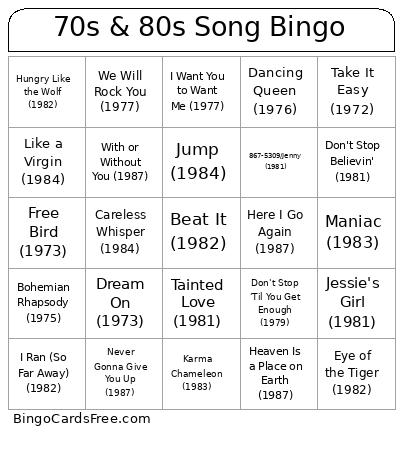 This 70s & 80s Song Bingo Cards Game contains following Words or Phrases: Stairway to Heaven (1971), Bohemian Rhapsody (1975), Hotel California (1976), Dream On (1973), Sweet Home Alabama (1974), American Pie (1971), Let It Be (1970), Superstition (1972), September (1978), Le Freak (1978), I Will Survive (1978), Stayin' Alive (1977), Go Your Own Way (1977), Rhiannon (1975), We Will Rock You (1977), We Are the Champions (1977), Sultans of Swing (1978), Another Brick in the Wall, Part II (1979), Rock and Roll All Nite (1975), Imagine (1971), Play That Funky Music (1976), Dancing Queen (1976), Take It Easy (1972), The Joker (1973), More Than a Feeling (1976), My Sharona (1979), Rich Girl (1976), I Want You to Want Me (1977), Don't Stop 'Til You Get Enough (1979), Maggie May (1971), Free Bird (1973), The Boys Are Back in Town (1976), Best of My Love (1977), You're So Vain (1972), I Love Rock 'n' Roll (1975), Billie Jean (1983), Like a Virgin (1984), Purple Rain (1984), Sweet Child o' Mine (1987), Livin' on a Prayer (1986), Don't Stop Believin' (1981), Every Breath You Take (1983), Africa (1982), Take On Me (1984), Beat It (1982), Eye of the Tiger (1982), Jump (1984), Material Girl (1984), Wake Me Up Before You Go-Go (1984), Time After Time (1983), Girls Just Want to Have Fun (1983), Karma Chameleon (1983), With or Without You (1987), In the Air Tonight (1981), Pour Some Sugar on Me (1987), Maniac (1983), Under Pressure (1981), Hungry Like the Wolf (1982), I Ran (So Far Away) (1982), Take My Breath Away (1986), Careless Whisper (1984), Sweet Dreams (Are Made of This) (1983), Faithfully (1983), Heaven Is a Place on Earth (1987), Jessie's Girl (1981), Tainted Love (1981), Shout (1985), Never Gonna Give You Up (1987), Love Shack (1989), (I Just) Died in Your Arms (1986), 867-5309/Jenny (1981), You Spin Me Round (Like a Record) (1985), Walk Like an Egyptian (1986), Here I Go Again (1987), I Want to Know What Love Is (1984).