Print free 80's Music bingo cards or alter them,
unlimited prints! Select from 42,200+ designs or use the bingo card generator.
Add numbers, phrases, pictures, or mix them all.
Play using printable PDF, online bingo cards,
and the online bingo caller, or combine all formats.
About: This bingo card is a nostalgic celebration of classic R&B, funk, and pop hits from the late 70s through the early 90s. Perfect for parties, music trivia nights, or family gatherings, it captures the energetic, feel-good vibe of iconic tracks everyone loves to sing and dance along to. Expect non-stop fun and plenty of singalongs!
How To: To download a printable PDF, click the Print button.
You can change the card count and other
printing settings on the Print tab.
Grid items and free space content can be added on the Basic tab.
Appearance can be completely customized on the
relevant tabs, or you can quickly search any option
using the 🔍 tab.
How to play 80's Music Bingo Cards?
Printed Players: Print PDF bingo cards and manually mark the cards.
Online Caller: Click on the Play button above.
Printed Caller: Print PDF calling list & calling slips and manually pick the slips.
Online Players: Click on the Play button above, and then click on the 🎫 button.
Mixed Mode: Choose any combination above.
For example, caller can be either Printed or Online.
And players can be Printed or Online or a mix of both.
Step-By-Step:
Start by downloading the 80's Music PDF by clicking on the "Print" button above.
Open the PDF and print it.
For random drawing, you can print another copy of the call list, cut, fold and then pick them randomly at play time.
Cut the bingo cards at the cut marks if there are greater than 1 bingo cards per page.
Distribute one card per player. For marking, you can use pencils. Crayons are the cheapest.
Choose one person to be the caller. If you are playing in a small group, the caller can also play along with their own Bingo card.
The caller opens the game by randomly picking an item from the call list and announcing it to all players.
The players check their cards to see if they have the called word. If they do, they mark that word.
The first player to finish a horizontal, vertical, or a diagonal line of marked items shouts "Bingo!" and wins the play.
The caller checks that the items crossed off form a correct line as per the Bingo card and call list.
You can play for different patterns or a full card blackout for a longer play.
This 80's Music Bingo Cards Game contains following Words or Phrases: A Night to Remember by Shalamar, Ain't Nobody (Live) by Rufus and Chaka Khan, Always by Atlantic Starr, Atomic Dog by George Clinton, Back to Life by Soul II Soul, Beat It by Michael Jackson, Before I Let Go by Maze (feat. Frankie Beverly), Between the Sheets by The Isley Brothers, Billie Jean by Michael Jackson, Can You Stand the Rain by New Edition, Candy by Cameo, Candy Girl by New Edition, Celebration by Kool & The Gang, Computer Love by Zapp, Cool It Now by New Edition, Every Little Step by Bobby Brown, Fire and Desire by Rick James & Teena Marie, Get Down On It by Kool & The Gang, Happy by Surface, Hello by Lionel Richie, Here and Now by Luther Vandross, How Will I Know by Whitney Houston, Human Nature by Michael Jackson, I Wanna Dance with Somebody (Who Loves Me) by Whitney Houston, I Want Her by Keith Sweat, I Want to Be Your Man by Zapp & Roger, I'm Coming Out by Diana Ross, If It Isn't Love by New Edition, It Takes Two by Rob Base & DJ EZ Rock, It's Tricky by Run-DMC, Juicy Fruit by Mtume, Just a Friend by Biz Markie, Kiss by Prince & The Revolution, Let's Groove by Earth, Wind & Fire, Love You Down by Ready for the World, Make It Last Forêver by Keith Sweat (feat. Jacci McGhee), Me Myself and I by De La Soul, Mr. Telephone Man by New Edition, My Prerogative by Bobby Brown, Never Too Much by Luther Vandross, Nite and Day by Al B. Sure!, Oh Sheila by Ready for the World, Purple Rain by Prince & The Revolution, Push It by Salt-N-Pepa, Rapper's Delight by The Sugarhill Gang, Rock Steady by The Whispers, Roni by Bobby Brown, Sexual Healing by Marvin Gaye, She's a Bad Mama Jama (She's Built, She's Stacked) by Carl Carlton, Super Freak by Rick James, Thriller by Michael Jackson, Two Occasions by The Deele, Wanna Be Startin' Somethin' by Michael Jackson, What's Love Got to Do with It by Tina Turner, When Doves Cry by Prince & The Revolution.

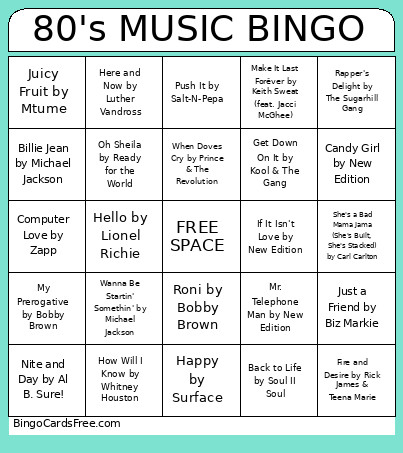 This 80's Music Bingo Cards Game contains following Words or Phrases: A Night to Remember by Shalamar, Ain't Nobody (Live) by Rufus and Chaka Khan, Always by Atlantic Starr, Atomic Dog by George Clinton, Back to Life by Soul II Soul, Beat It by Michael Jackson, Before I Let Go by Maze (feat. Frankie Beverly), Between the Sheets by The Isley Brothers, Billie Jean by Michael Jackson, Can You Stand the Rain by New Edition, Candy by Cameo, Candy Girl by New Edition, Celebration by Kool & The Gang, Computer Love by Zapp, Cool It Now by New Edition, Every Little Step by Bobby Brown, Fire and Desire by Rick James & Teena Marie, Get Down On It by Kool & The Gang, Happy by Surface, Hello by Lionel Richie, Here and Now by Luther Vandross, How Will I Know by Whitney Houston, Human Nature by Michael Jackson, I Wanna Dance with Somebody (Who Loves Me) by Whitney Houston, I Want Her by Keith Sweat, I Want to Be Your Man by Zapp & Roger, I'm Coming Out by Diana Ross, If It Isn't Love by New Edition, It Takes Two by Rob Base & DJ EZ Rock, It's Tricky by Run-DMC, Juicy Fruit by Mtume, Just a Friend by Biz Markie, Kiss by Prince & The Revolution, Let's Groove by Earth, Wind & Fire, Love You Down by Ready for the World, Make It Last Forêver by Keith Sweat (feat. Jacci McGhee), Me Myself and I by De La Soul, Mr. Telephone Man by New Edition, My Prerogative by Bobby Brown, Never Too Much by Luther Vandross, Nite and Day by Al B. Sure!, Oh Sheila by Ready for the World, Purple Rain by Prince & The Revolution, Push It by Salt-N-Pepa, Rapper's Delight by The Sugarhill Gang, Rock Steady by The Whispers, Roni by Bobby Brown, Sexual Healing by Marvin Gaye, She's a Bad Mama Jama (She's Built, She's Stacked) by Carl Carlton, Super Freak by Rick James, Thriller by Michael Jackson, Two Occasions by The Deele, Wanna Be Startin' Somethin' by Michael Jackson, What's Love Got to Do with It by Tina Turner, When Doves Cry by Prince & The Revolution.