
A.O.E. 2026 Convention Bingo Cards - Print Free or Customize
Print free A.O.E. 2026 Convention bingo cards or customize, limitless prints! Select from 41,500+ templates or use our bingo card generator. Add numbers, phrases, photos, or all of them. Play using printable PDF, online bingo cards, and our online bingo caller, or mix physical and digital.
About: This bingo card is perfect for breaking the ice and making connections at a sorority convention, especially for Alpha Omega Epsilon gatherings. The theme centers around celebrating sisterhood through shared experiences, diverse backgrounds, and fun convention moments. It's a great way to encourage networking among attendees of all classes and ages, sparking conversations and new friendships along the way.
How To: To get a printable PDF, click the Print button. You can modify the card count and other print settings on the Print tab. Grid items and free space text can be changed on the Basic tab. Appearance can be completely personalized on the corresponding tabs, or you can easily locate any option on the 🔍 tab.
How to play A.O.E. 2026 Convention Bingo Cards?
- Printed Players: Print PDF bingo cards and physically write on the cards.
- Digital Players: Click on the Play button above, and then click on the 🎫 button.
- Digital Caller: Click on the Play button above.
- Printed Caller: Print PDF calling list & calling slips and physically pick the slips.
- Mixed Play: Pick any combination above. For example, caller can be either Paper or Digital. And players can be Paper or Digital or a combination of both.
Step-By-Step:
- Start by downloading the A.O.E. 2026 Convention PDF by clicking on the "Print" button above.
- Open the PDF and print it.
- For random drawing, you can print another copy of the call list, cut, fold and then draw them randomly at play time.
- Cut the bingo cards at the cut marks if there are greater than 1 bingo cards per page.
- Distribute one card per player. For marking, you can use pens. Crayons are the cheapest.
- Pick one person to be the caller. If you are playing in a small group, the caller may also play along with their own Bingo card.
- The caller starts the play by randomly drawing an item from the call list and saying it to everyone.
- The players scan their cards to see if they have the called word. If they do, they mark that word.
- The first player to complete a horizontal, vertical, or a diagonal line of marked items shouts "Bingo!" and wins the game.
- The caller checks that the items crossed off form a correct line as per the Bingo card and call list.
- You can play for varied patterns or a full card blackout for a longer game.
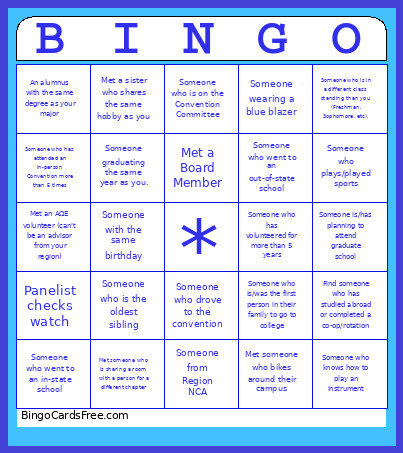 This A.O.E. 2026 Convention Bingo Cards Game contains following Words or Phrases: Someone from Region 1, Someone from Region 2, Someone from Region 3, Someone from Region 4, Someone from Region NCA, Someone who has held two different executive board positions, Someone with the same major, Alumni who have held the same Eboard position, Someone graduating the same year as you., Find an alumnus who graduated before you were born!, Someone who is in a different class standing than you (Freshman, Sophomore, etc)., Find someone who shares your same "family tree" name., Someone who is staying at the same hotel as you., Someone who has traveled more than 500 miles for a convention., Someone whose chapter is less than five years old., Met a sister who was a part of another club during college, Met someone who bikes around their campus, Met someone who is sharing a room with a person for a different chapter, Someone who went to an in-state school, Someone who went to an out-of-state school, Met a sister who shares the same hobby as you, Find someone who has studied abroad or completed a co-op/rotation, Met a sister from the same college as you (College of ...Engineering, Agriculture, Sciences, etc.), Someone who has lived in the same state as you, Someone who is the oldest sibling, Someone who has changed majors during college, Someone with the same birthday, Someone who is a Chapter Founder, Someone who speaks another language, Someone who has a pet, An alumnus with the same degree as your major, Someone who is in an internship, Someone who lives in Minnesota, Someone drinking Caffeen, Someone who is not originally from the United States, Someone who is/was the first person in their family to go to college, Someone is/has planning to attend graduate school, Met a Board Member, Met someone who's part of the AΩE Foundation, Met an AΩE volunteer (can't be an advisor from your region), Someone who drove to the convention, Speaker says Synergy/Synergize, Presentation Experiences "Technical Difficulties", Panelist checks watch, Someone asks a question that is actually a Comment, First-Time Attendee, The speaker goes over the time limit, Someone wearing a blue blazer, Someone wearing their AΩE pin, Someone who has attended an in-person Convention more than 5 times, Someone who has volunteered for more than 5 years, Someone who plays/played sports, Someone who knows how to play an instrument, Someone who is on the Convention Committee.