
AAAAA Bingo Cards - Print Free or Customize
Print free AAAAA bingo cards or customize, limitless cards! Select from 42,200+ templates or use our bingo card generator. Add numbers, phrases, images, or mix them all. Play using printed PDF, online bingo cards, and our online bingo caller, or combine all formats.
About: This bingo card celebrates unique experiences, talents, and personal milestones, perfect for workplace icebreakers, networking events, or social gatherings where getting to know one another is the goal. With a lively, upbeat tone, it encourages sharing stories about travel, achievements, quirky hobbies, and everyday victories. It’s a fun way for any group to discover just how diverse and interesting their community is.
How To: To download a printable PDF, click the Print button. You can alter the number of cards and other print preferences on the Print tab. Grid items and free space text can be added on the Basic tab. Appearance can be exactly customized on the relevant tabs, or you can easily locate any setting on the 🔍 tab.
How to play AAAAA Bingo Cards?
- Digital Players: Click on the Play button above, and then click on the 🎫 button.
- Digital Caller: Click on the Play button above.
- Paper Players: Print PDF bingo cards and manually scratch the cards.
- Paper Caller: Print PDF calling list & calling slips and manually select the slips.
- Hybrid Mode: Pick any combination above. For instance, caller can be either Printed or Digital. And players can be Printed or Digital or a mix of both.
Step-By-Step:
- Start by getting the AAAAA PDF by clicking on the "Print" button above.
- Open the PDF and print a hard copy.
- For random drawing, you can print another copy of the call list, cut, fold and then draw them randomly at play time.
- Cut the bingo cards at the cut lines if there are more than 1 bingo cards per page.
- Give one card to each player. For marking, you can use markers. Crayons cost the least.
- Pick one person to be the caller. If you are playing in a small group, the caller can also play along with their own Bingo card.
- The caller begins the play by randomly drawing an item from the call list and announcing it to everyone.
- The players look at their cards to see if they have the called word. If they do, they cross off that word.
- The first player to complete a horizontal, vertical, or a diagonal line of marked items announces "Bingo!" and wins the game.
- The caller checks that the items marked form a proper line as per the Bingo card and call list.
- You can play for multiple patterns or a full card blackout for an extended game.
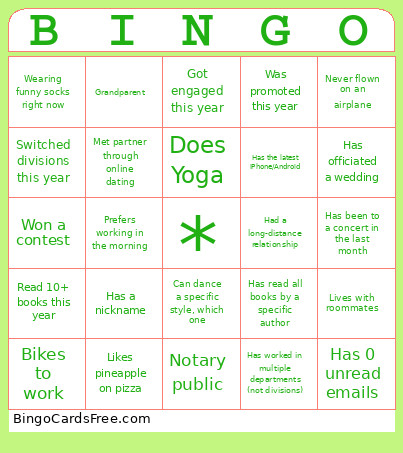 This AAAAA Bingo Cards Game contains following Words or Phrases: Has visited more than 5 countries, Speaks three plus languages, Has run a marathon, Played a musical instrument this month, which one?, Reads more than 10 books a year, Has met someone famous, who?, Volunteered in the past month, Knows how to code, Owns a business, Has worked in another country (not Juarez), Can solve a Rubik's Cube in less than 3 minutes, Practices a martial art (in the last month), Plays a team sport in the last month, Can dance a specific style, which one, Sings karaoke, in the last month, Can tell a great joke, tell it to you., Has played a board game in the last month, Knows how to juggle, Has baked cookies in the last month, Has worked in multiple departments (not divisions), Has worked at the County at least 25 years, Has won a County award, Shares a birthday month with you, Has lived in at least 3 different cities, Has been married at least 15 years, Can dance a traditional dance, Has visited a famous monument, Has dual citizenship, Has changed careers, Is part of a professional association, Has a side business, Has published something (art included), Has read all books by a specific author, Knows how to sew, Has been to Disney World, Is a vegetarian, Hates Coffee, Owns 5+ houseplants, Has a pet other than a cat or dog, Knows how to surf, Has done a DIY project for their home, Has never broken a bone, Has been on a cruise, Has sold something online before (eBay, Facebook Marketplace, etc), Doesn't watch sports, Has been to a concert in the last month, Has the latest iPhone/Android, Has gone horseback riding, Doesn't like winter/snow, Knows how to read tarot, Knows ASL, Appeared in TV, Went viral online, Owns a gaming computer, Has an unusual family tradition, Loves true crime podcasts, Likes pineapple on pizza, Loves roller coasters, Does Yoga, Can do a cartwheel, Started a club, Has been to the Olympics, Has a pen pal, Spelling bee champ, Has been on a road trip, Sends Christmas cards in the mail, Screams during scary movies, Was in a play, Good at escape rooms, Has been skydiving, Won an eating competition, Wearing funny socks right now, Won at a casino $1000+, Owns same car brand as you, Never flown on an airplane, Never learned to ride a bike, Collects something, Goes all-out on holiday decorating, Recently handmade a gift, Has performed in public, Has a BFF from high school they still talk to, Currently a student, Took a how-to class recently, Attended high school reunion, Has food allergies, Has a nickname, Birthday is on a holiday, Has a bucket list, Good cook, Taught a class, Worked at a family business, Visited 4+ continents, Had a long-distance relationship, Took dance lessons, Won a contest, Gardens, Can bake a cake from scratch, Was in a wedding party this year, Climbed a mountain, Moved in the past year, Owns a boat, Has a big backyard, Digital nomad (no social media), Notary public, Lives in a rural area, Can drive stick, Reads newspapers, Has been in a hot air balloon, Regularly writes reviews, Watches documentaries, Knows calligraphy, Brews beer, Has a snack stash in the office, Drinks 3+ cups coffee a day, Has worked in another industry, Has a work playlist, Has a favorite pen, Has 0 unread emails, Prefers working in the morning, Prefers working at night, Has had an 1hr+ commute, This is their first job, Bikes to work, Carpools, Buys coffee every morning, Buys lunch every day, Organized a work outing, Was promoted this year, Switched divisions this year, Led a project, Only child, Twin or triplet, Military family, Parent, Grandparent, Hand-made an outfit, In a sports league, Read 10+ books this year, Wears contacts, Lives with roommates, Has officiated a wedding, Has been scuba diving, Uses a paper planner, Met partner through online dating, Got engaged this year, Got married this year, Bought a house this year, Bought a car this year, Had a baby this year, From the west coast, From the east coast.