Print free Accessibility Annotation Kit Exploration bingo cards or alter them,
limitless prints! Select from 42,600+ designs or use the bingo card generator.
Add numbers, phrases, images, or any combination.
Play using PDF prints, online bingo cards,
and the online bingo caller, or combine all formats.
About: This bingo card is perfect for accessibility workshops or UX team meetings focused on annotation and user interface improvement. It encourages participants to explore digital products, spot various types of annotations, and reflect on their experiences. The tone is engaging and interactive, ideal for teams who want to deepen their understanding of accessibility features while having fun.
How To: To download a printable PDF, click the Print button.
You can change the card count and other
print options on the Print tab.
Grid items and free space text can be changed on the Basic tab.
Appearance can be totally customized on the
corresponding tabs, or you can quickly find any option
on the 🔍 tab.
How to play Accessibility Annotation Kit Exploration Bingo Cards?
Paper Players: Print PDF bingo cards and manually write on the cards.
Virtual Players: Click on the Play button above, and then click on the 🎫 button.
Virtual Caller: Click on the Play button above.
Paper Caller: Print PDF calling list & calling slips and manually pick the slips.
Combo Mode: Choose any combination above.
For example, caller can be either Offline or Virtual.
And players can be Offline or Virtual or a combination of both.
Step-By-Step:
Start by downloading the Accessibility Annotation Kit Exploration Bingo PDF by clicking on the "Print" button above.
Open the PDF and print a hard copy.
For random drawing, you can print another copy of the call list, cut, fold and then pull them randomly at play time.
Cut the bingo cards at the cut marks if there are greater than 1 bingo cards per page.
Distribute one card per player. For marking, you can use pencils. Crayons cost the least.
Choose one person to be the caller. If you are playing in a small group, the caller can as well play along with their own Bingo card.
The caller starts the play by randomly picking an item from the call list and announcing it to everyone.
The players look at their cards to see if they have the called word. If they do, they cross off that word.
The first player to complete a horizontal, vertical, or a diagonal line of marked items yells "Bingo!" and wins the game.
The caller confirms that the items crossed off form a correct line according to the Bingo card and call list.
You can play for multiple patterns or a full card blackout for a longer game.
This Accessibility Annotation Kit Exploration Bingo Cards Game contains following Words or Phrases: ⭐ Find something missing, 🔎 Find a dynamic content annotation, 🔎 Find a focus annotation, 🔎 Find a form annotation, 🔎 Find a hidden gem, 🔎 Find a keyboard annotation, 🔎 Find a keyboard interaction, 🔎 Find a modal annotation, 🔎 Find a navigation annotation, 🔎 Find a screen reader annotation, 🔎 Find a state annotation, 🔎 Find a tooltip annotation, 🔎 Find an error annotation, 🔎 Find an image annotation, 🧠 Find something confusing, 🧠 Find something new, 🧠 Find something surprising, 🧠 Find something to teach, 🧠 Find your favorite, 🧩 Annotate a component, 🧩 Apply an annotation, 🧩 Find + apply an annotation, 🧩 Use an annotation, 🧩 Use the kit on your work.

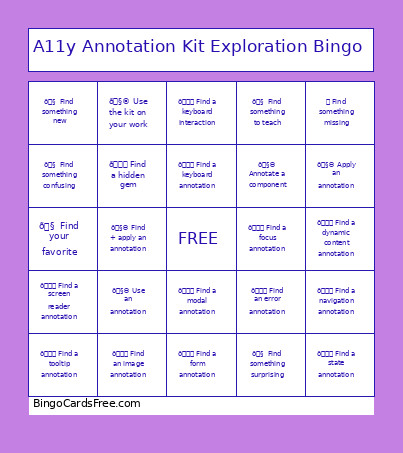 This Accessibility Annotation Kit Exploration Bingo Cards Game contains following Words or Phrases: ⭐ Find something missing, 🔎 Find a dynamic content annotation, 🔎 Find a focus annotation, 🔎 Find a form annotation, 🔎 Find a hidden gem, 🔎 Find a keyboard annotation, 🔎 Find a keyboard interaction, 🔎 Find a modal annotation, 🔎 Find a navigation annotation, 🔎 Find a screen reader annotation, 🔎 Find a state annotation, 🔎 Find a tooltip annotation, 🔎 Find an error annotation, 🔎 Find an image annotation, 🧠 Find something confusing, 🧠 Find something new, 🧠 Find something surprising, 🧠 Find something to teach, 🧠 Find your favorite, 🧩 Annotate a component, 🧩 Apply an annotation, 🧩 Find + apply an annotation, 🧩 Use an annotation, 🧩 Use the kit on your work.