
Adam and Agèle Wedding bingo Cards - Print Free or Customize
Print free Adam and Agèle Wedding bingo cards or customize, limitless prints! Choose from 41,500+ designs or use the bingo card generator. Add numbers, words, images, or any combination. Play using printed PDF, digital bingo cards, and the digital bingo caller, or mix physical and digital.
About: This bingo card captures all the quirky and memorable moments you might experience on a flight, from passenger antics to in-flight movie choices. Perfect for airline staff, frequent flyers, or travel enthusiast groups, it brings extra fun to any journey with its mix of relatable scenarios and offbeat occurrences that make air travel so unique.
How To: To download a PDF to print, click the Print button. You can adjust the card quantity and other printing settings on the Print tab. Grid items and free space text can be added on the Basic tab. Appearance can be entirely personalized on the corresponding tabs, or you can easily search any preference using the 🔍 tab.
How to play Adam and Agèle Wedding bingo Cards?
- Printed Players: Print PDF bingo cards and physically mark the cards.
- Printed Caller: Print PDF calling list & calling slips and physically pick the slips.
- Digital Caller: Click on the Play button above.
- Digital Players: Click on the Play button above, and then click on the 🎫 button.
- Mixed Mode: Select any combination above. For example, caller can be either Printed or Digital. And players can be Printed or Digital or a mix of both.
Step-By-Step:
- Start by getting the Adam and Agèle Wedding bingo PDF by clicking on the "Print" button above.
- Open the PDF and print a hard copy.
- For random drawing, you can print another copy of the call list, cut, fold and then pick them randomly at play time.
- Cut the bingo cards at the cut lines if there are greater than 1 bingo cards per page.
- Give one card to each player. For marking, you can use pencils. Crayons cost the least.
- Select one person to be the caller. If you are playing in a small group, the caller may also play along with their own Bingo card.
- The caller opens the play by randomly pulling an item from the call list and calling out it to all players.
- The players check their cards to see if they have the called word. If they do, they dab that word.
- The first player to finish a horizontal, vertical, or a diagonal line of crossed items shouts "Bingo!" and wins the game.
- The caller checks that the items crossed off form a proper line according to the Bingo card and call list.
- You can play for varied patterns or a full card blackout for a longer game.
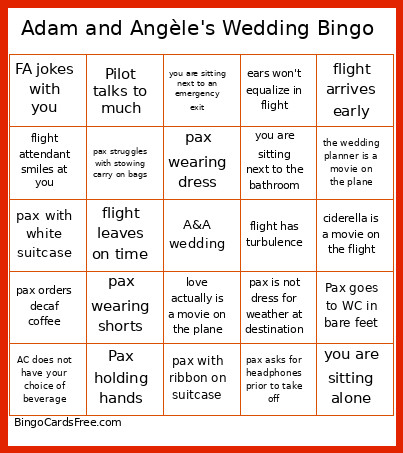 This Adam and Agèle Wedding bingo Cards Game contains following Words or Phrases: AC changes your seat number, agents looking for missing pax, flight arrives early, flight arrives on time, flight is delayed, flight leaves on time, pax ask for something that is not available in food pamphlet, pax asks for blanket, pax asks for champagne, Pax goes to WC in bare feet, pax goes to WC in sock feet, Pax holding hands, pax hugging, pax is not dress for weather at destination, pax keeps calling for FA, Pax kissing, pax orders decaf coffee, pax orders hot water, pax reading same book as you, pax snoring, pax Stans with seatbelt sign on, pax wearing a tie, pax wearing dress, pax wearing shorts, pax wearing white, pax with pink suitcase, pax with ribbon on suitcase, pax with white suitcase, plane does not go to de-icing bay, plane needs to be de-iced, you are sitting alone, you are sitting next to an emergency exit, you are sitting next to the bathroom, you are sitting with family, bridesmaid is a movie on the plane, father of the bride is a movie on the plane, wedding crashers is a movie on the plane, the wedding planner is a movie on the plane, the proposal is a movie on the plane, mama mia is a movie on the plane, pax struggles with stowing carry on bags, FA sasses you, FA jokes with you, ears won't equalize in flight, ears pop on take off, ciderella is a movie on the flight, love actually is a movie on the plane, pilots speaks French, Pilot talks to much, pax laughs out loud at a movie, pax asks for headphones prior to take off, flight attendant smiles at you, pax has 3 carry on bags, baby cries during flight, FA have to do a manual safety demonstration, you need your TV screen reset, your headphones don't work, AC does not have your choice of beverage, you get a premium seat, flight has turbulence, pax asks to go to WC when seatbelt sing is on, someone asks you to switch seats.