
Adams Family Bingo Cards - Print Free or Customize
Print free Adams Family bingo cards or personalize, unlimited cards! Pick from 42,200+ templates or use our bingo card generator. Add numbers, words, pictures, or any combination. Play using printed PDF, digital bingo cards, and our digital bingo caller, or go hybrid.
About: This bingo card is perfect for a family reunion or large gathering where you want to spark fun conversations and discover unique connections among relatives. With a focus on personal achievements, family traditions, and meaningful experiences, the tone is friendly and nostalgic. It's designed to celebrate shared history while uncovering surprising stories from your family tree.
How To: To save a PDF to print, click the Print button. You can change the number of cards and other printing options on the Print tab. Grid items and free space text can be changed on the Basic tab. Appearance can be totally customized on the corresponding tabs, or you can quickly locate any setting on the 🔍 tab.
How to play Adams Family Bingo Cards?
- Virtual Players: Click on the Play button above, and then click on the 🎫 button.
- Printed Caller: Print PDF calling list & calling slips and manually draw the slips.
- Virtual Caller: Click on the Play button above.
- Printed Players: Print PDF bingo cards and manually cross off the cards.
- Combo Play: Choose any combination above. For instance, caller can be either Offline or Virtual. And players can be Offline or Virtual or a combo of both.
Step-By-Step:
- Start by downloading the Adams Family PDF by clicking on the "Print" button above.
- Open the PDF and print it.
- For random drawing, you can print another copy of the call list, cut, fold and then pull them randomly at play time.
- Cut the bingo cards at the cut marks if there are greater than 1 bingo cards per page.
- Give one card to each player. For marking, you can use markers. Crayons cost the least.
- Choose one person to be the caller. If you are playing in a small group, the caller can as well play along with their own Bingo card.
- The caller opens the play by randomly picking an item from the call list and saying it to everyone.
- The players scan their cards to see if they have the announced word. If they do, they cross off that word.
- The first player to finish a horizontal, vertical, or a diagonal line of crossed items yells "Bingo!" and wins the play.
- The caller validates that the items marked form a proper line as per the Bingo card and call list.
- You can play for different patterns or a full card blackout for a longer play.
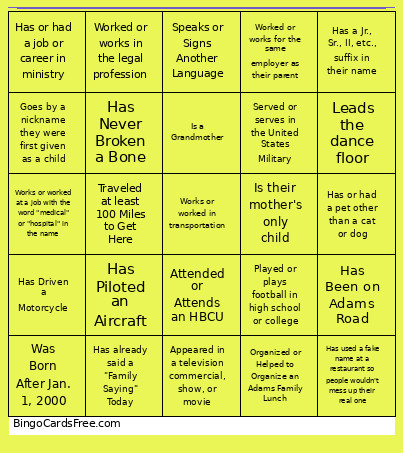 This Adams Family Bingo Cards Game contains following Words or Phrases: Appeared in a television commercial, show, or movie, Attended or attends a school in Sylacauga, Attended or attends a school with "Alabama" in the name, Attended or Attends an HBCU, Can Cook a Family Recipe, Carries on a Family Tradition They Can Tell You About, Goes by a nickname they were first given as a child, Has a Family Photo as the Background on Their Phone, Has a Graduate Degree, Has a Jr., Sr., II, etc., suffix in their name, Has a Special Talent They Can Show You Right Now, Has already said a "Family Saying" Today, Has Been on Adams Road, Has been to a continent outside of North America, Has Driven a Motorcycle, Has Never Broken a Bone, Has or had a job or career in ministry, Has or had a pet other than a cat or dog, Has Piloted an Aircraft, Has used a fake name at a restaurant so people wouldn't mess up their real one, Has visited an island, Is a Grandfather, Is a Grandmother, Is left-handed, Is or was employed by the Federal Government, Is Retired, Is their mother's oldest child, Is their mother's only child, Is their mother's youngest child, Is Wearing Crimson (NOT "Red"), Is Wearing Orange, Knows at least 5+ Family Members' Birthdays, Leads the dance floor, Organized or Helped to Organize an Adams Family Lunch, Played or plays football in high school or college, Reads the newspaper, Served or serves in the United States Military, Shares a First or Middle Name with an Ancestor, Shares Your Birth Month, Speaks or Signs Another Language, Traveled at least 100 Miles to Get Here, Was Born After Jan. 1, 2000, Was Born Before Jan. 1, 2000, Was NOT Born In Alabama Or Georgia, Worked or works at a school or library, Worked or works for the post office, Worked or works for the same employer as their parent, Worked or works in the legal profession, Works or worked at a job with the word "medical" or "hospital" in the name, Works or worked in transportation.