AdvPhilosophy Bingo Cards - Print Free or Customize
Print free AdvPhilosophy bingo cards or personalize,
unlimited prints! Select from 41,500+ designs or use the bingo card generator.
Add numbers, phrases, photos, or mix them all.
Play using PDF printouts, digital bingo cards,
and the digital bingo caller, or mix physical and digital.
About: This bingo card is perfect for adding some laughs to a Wimer-centered meeting or friendly gathering. Packed with inside jokes and quirky habits, it captures the energy and unpredictable moments that define any event involving this crew. Expect lots of playful interruptions, personal references, and the kind of fun that’s only possible with a well-acquainted group.
How To: To download a printable PDF, click the Print button.
You can alter the number of cards and other
print preferences on the Print tab.
Grid items and free space text can be edited on the Basic tab.
Appearance can be fully customized on the
relevant tabs, or you can easily find any option
on the 🔍 tab.
How to play AdvPhilosophy Bingo Cards?
Digital Caller: Click on the Play button above.
Printed Players: Print PDF bingo cards and physically scratch the cards.
Digital Players: Click on the Play button above, and then click on the 🎫 button.
Printed Caller: Print PDF calling list & calling slips and physically pick the slips.
Combo Mode: Select any combination above.
For instance, caller can be either Paper or Digital.
And players can be Paper or Digital or a combo of both.
Step-By-Step:
Start by getting the AdvPhilosophy PDF by clicking on the "Print" button above.
Open the PDF and print it.
For random calling, you can print another copy of the call list, cut, fold and then pull them randomly at play time.
Cut the bingo cards at the cut marks if there are more than 1 bingo cards per page.
Distribute one card per player. For marking, you can use pencils. Crayons cost the least.
Select one person to be the caller. If you are playing in a small group, the caller can as well play along with their own Bingo card.
The caller begins the play by randomly pulling an item from the call list and calling out it to everyone.
The players look at their cards to see if they have the called word. If they do, they dab that word.
The first player to finish a horizontal, vertical, or a diagonal line of marked items shouts "Bingo!" and wins the play.
The caller validates that the items marked form a proper line as per the Bingo card and call list.
You can play for different patterns or a full card blackout for an extended play.
This AdvPhilosophy Bingo Cards Game contains following Words or Phrases: Wimer can't find his phone, banjo reference, Wimer's wife reference, cheating reference, uncategorized Wimer noise, Wimer doing the shoulder thing, "oh my gosh" or "haaaaa", Wimer's undiagnosed dyslexia, Wimer waits for back-left table to stop talking, Wimer talks about AI, Wimer doesn't stop the timer, Wimer intervenes with Benji's workflow, bad Wimer drawing, Wimer clarifies that this isn't his opinion, Wimer jumpscare, Wimer clarifies this is his bias, "You are free to roam about the cabin", "ta-ta for now" (not abbreviated), "I'm gonna let someone else speak first", "I should really stop talking so much", mouse left somewhere besides desk, Jadon rants about math, Autumn makes a gay joke, Hitler reference, The Gable says something out of pocket, Reuben makes it about Stoicism, something freaky in reading, someone missing from table, Middle Way reference, Atalya sleeps, Benji enters late, Jadon needs pop culture explained, poorly timed break.

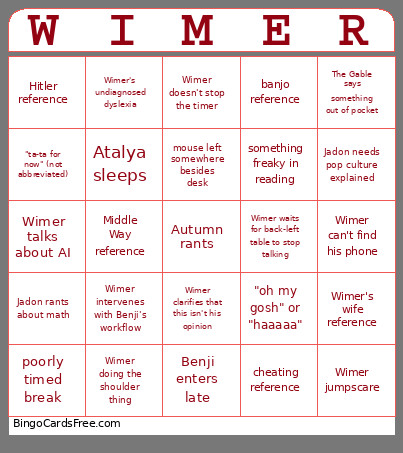 This AdvPhilosophy Bingo Cards Game contains following Words or Phrases: Wimer can't find his phone, banjo reference, Wimer's wife reference, cheating reference, uncategorized Wimer noise, Wimer doing the shoulder thing, "oh my gosh" or "haaaaa", Wimer's undiagnosed dyslexia, Wimer waits for back-left table to stop talking, Wimer talks about AI, Wimer doesn't stop the timer, Wimer intervenes with Benji's workflow, bad Wimer drawing, Wimer clarifies that this isn't his opinion, Wimer jumpscare, Wimer clarifies this is his bias, "You are free to roam about the cabin", "ta-ta for now" (not abbreviated), "I'm gonna let someone else speak first", "I should really stop talking so much", mouse left somewhere besides desk, Jadon rants about math, Autumn makes a gay joke, Hitler reference, The Gable says something out of pocket, Reuben makes it about Stoicism, something freaky in reading, someone missing from table, Middle Way reference, Atalya sleeps, Benji enters late, Jadon needs pop culture explained, poorly timed break.