Alliance Raid BINGO Cards - Print Free or Customize
Print free Alliance Raid BINGO cards or alter them,
unlimited cards! Choose from 41,500+ templates or use the bingo card generator.
Add numbers, words, images, or all of them.
Play using PDF prints, virtual bingo cards,
and the virtual bingo caller, or combine all formats.
About: This bingo card captures the chaotic and hilarious moments that make high-end Final Fantasy XIV alliance raids so unforgettable. Perfect for a group of raiders or a watch party during a new patch, it’s loaded with those “only in FFXIV” mishaps and legendary wipe stories. Expect lots of laughs and shared groans as each square gets crossed off!
How To: To download a printable PDF, click the Print button.
You can alter the card count and other
printing preferences on the Print tab.
Grid items and free space content can be edited on the Basic tab.
Appearance can be completely customized on the
relevant tabs, or you can quickly search any setting
using the 🔍 tab.
How to play Alliance Raid BINGO Cards?
Digital Caller: Click on the Play button above.
Paper Caller: Print PDF calling list & calling slips and manually choose the slips.
Digital Players: Click on the Play button above, and then click on the 🎫 button.
Paper Players: Print PDF bingo cards and manually mark the cards.
Combo Play: Choose any combination above.
For instance, caller can be either Offline or Digital.
And players can be Offline or Digital or a combination of both.
Step-By-Step:
Start by getting the Alliance Raid BINGO PDF by clicking on the "Print" button above.
Open the PDF and print a hard copy.
For random calling, you can print another copy of the call list, cut, fold and then pull them randomly at play time.
Cut the bingo cards at the cut lines if there are more than 1 bingo cards per page.
Give one card to each player. For marking, you can use crayons. Crayons cost the least.
Choose one person to be the caller. If you are playing in a small group, the caller may also play along with their own Bingo card.
The caller opens the game by randomly drawing an item from the call list and calling out it to all players.
The players look at their cards to see if they have the called word. If they do, they mark that word.
The first player to finish a horizontal, vertical, or a diagonal line of crossed items announces "Bingo!" and wins the game.
The caller checks that the items marked form a proper line according to the Bingo card and call list.
You can play for multiple patterns or a full card blackout for an extended game.
This Alliance Raid BINGO Cards Game contains following Words or Phrases: "Healers down in X", "Oh that was a wild charge", A/B/Y debuffs, Active Time Maneuver, Arena floor breaks away, Broken gear, Can't find the PF, was on the wrong DC, Death by esuna-able mechanic, DPS LB used on the adds, DPS targeted with tankbuster, Duty Action, Dynamis?, Early pull, Emote spam, Entire alliance yeeted off the platform, Failed Knockback Invuln, Forced to split up, Full Wipe, Gaze mechanic, Healer jail mechanic, Healer LB3, but it was only an LB2, Healer rescues someone into death, Homicide by shared tankbuster, Misdirection, Missed tower, NPC yells at you mid-mechanic and no one reads it, Overlapping stack markers, Paniced screaming, Prishe shows up and starts punching people, Red Mage LB3, Someone accidentally dashes off the edge, Someone didn't unlock the raid, Someone Disconnects, Someone immediately dies after accepting a raise, Tanks didn't separate the adds, Tanks separated adds when they didnt need to, The first mechanic isn't a raidwide, Typing in chat mid-AoE, Wasted LB, Wuk Lamat shows up.

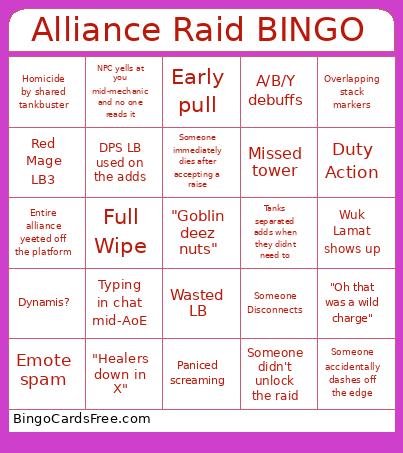 This Alliance Raid BINGO Cards Game contains following Words or Phrases: "Healers down in X", "Oh that was a wild charge", A/B/Y debuffs, Active Time Maneuver, Arena floor breaks away, Broken gear, Can't find the PF, was on the wrong DC, Death by esuna-able mechanic, DPS LB used on the adds, DPS targeted with tankbuster, Duty Action, Dynamis?, Early pull, Emote spam, Entire alliance yeeted off the platform, Failed Knockback Invuln, Forced to split up, Full Wipe, Gaze mechanic, Healer jail mechanic, Healer LB3, but it was only an LB2, Healer rescues someone into death, Homicide by shared tankbuster, Misdirection, Missed tower, NPC yells at you mid-mechanic and no one reads it, Overlapping stack markers, Paniced screaming, Prishe shows up and starts punching people, Red Mage LB3, Someone accidentally dashes off the edge, Someone didn't unlock the raid, Someone Disconnects, Someone immediately dies after accepting a raise, Tanks didn't separate the adds, Tanks separated adds when they didnt need to, The first mechanic isn't a raidwide, Typing in chat mid-AoE, Wasted LB, Wuk Lamat shows up.