
ANALISE MLA Bingo Cards - Print Free or Customize
Print free ANALISE MLA bingo cards or modify, unlimited cards! Pick from 41,500+ designs or use our bingo card generator. Add numbers, words, photos, or all of them. Play using printable PDF, digital bingo cards, and our digital bingo caller, or mix physical and digital.
How To: To save a PDF to print, click the Print button. You can modify the card quantity and other printing preferences on the Print tab. Grid items and free space content can be edited on the Basic tab. Appearance can be totally personalized on the relevant tabs, or you can quickly find any preference on the 🔍 tab.
How to play ANALISE MLA Bingo Cards?
- Printed Players: Print PDF bingo cards and physically cross off the cards.
- Digital Players: Click on the Play button above, and then click on the 🎫 button.
- Printed Caller: Print PDF calling list & calling slips and physically pick the slips.
- Digital Caller: Click on the Play button above.
- Combo Mode: Pick any combination above. For example, caller can be either Offline or Digital. And players can be Offline or Digital or a combination of both.
Step-By-Step:
- Start by getting the ANALISE MLA PDF by clicking on the "Print" button above.
- Open the PDF and print a hard copy.
- For random calling, you can print another copy of the call list, cut, fold and then pick them randomly at play time.
- Cut the bingo cards at the cut lines if there are more than 1 bingo cards per page.
- Give one card to each player. For marking, you can use crayons. Crayons cost the least.
- Pick one person to be the caller. If you are playing in a small group, the caller can also play along with their own Bingo card.
- The caller initiates the play by randomly drawing an item from the call list and calling out it to all players.
- The players scan their cards to see if they have the called word. If they do, they dab that word.
- The first player to complete a horizontal, vertical, or a diagonal line of crossed items announces "Bingo!" and wins the play.
- The caller confirms that the items marked form a correct line according to the Bingo card and call list.
- You can play for varied patterns or a full card blackout for an extended play.
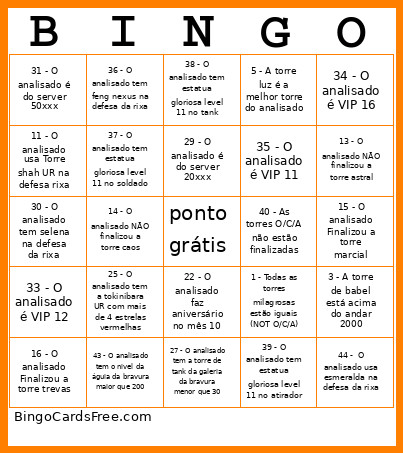 This ANALISE MLA Bingo Cards Game contains following Words or Phrases: 1 - Todas as torres milagrosas estão iguais (NOT O/C/A), 2 - As torres O/C/A estão finalizadas, 3 - A torre de babel está acima do andar 2000, 4 - A torre elemental é a melhor torre do analisado, 5 - A torre luz é a melhor torre do analisado, 6 - O analisado já deu de 4, 7 - O analisado é da guilda ascension, 8 - O analisado tem toda a galeria da bravura acima de 130 pontos, 9 - O analisado tem mais de 4500 pontos nas runas, 10 - O analisado usa Alice UR na defesa da rixa, 11 - O analisado usa Torre shah UR na defesa rixa, 12 - O analisado usa Lapu Lapu na defesa da rixa, 13 - O analisado NÃO finalizou a torre astral, 14 - O analisado NÃO finalizou a torre caos, 15 - O analisado Finalizou a torre marcial, 16 - O analisado Finalizou a torre trevas, 17 - O analisado tem a medalha da miragem da clara (despertar durante a miragem), 18 - O analisado tem a medalha da miragem da medusa (despertar durante a miragem), 19 - O analisado tem a campanha maior que 60, 20 - O analisado tem a campanha maior que 70, 21 - O analisado tem a campanha maior que 90, 22 - O analisado faz aniversário no mês 10, 23 - O analisado usa a Ais como personagem de fundo de perfil, 24 - O analisado tem mais de 10 BILHÕES de poder, 25 - O analisado tem a tokinibara UR com mais de 4 estrelas vermelhas, 26 - O analisado tem Beatrice Nexus, 27 - O analisado tem a torre de tank da galeria da bravura menor que 30, 28 - O analisado tem as 5 runas vermelhas da classe atirador, 29 - O analisado é do server 20xxx, 30 - O analisado tem selena na defesa da rixa, 31 - O analisado é do server 50xxx, 32 - O analisado é do server 60xxx, 33 - O analisado é VIP 12, 34 - O analisado é VIP 16, 35 - O analisado é VIP 11, 36 - O analisado tem feng nexus na defesa da rixa, 37 - O analisado tem estatua gloriosa level 11 no soldado, 38 - O analisado tem estatua gloriosa level 11 no tank, 39 - O analisado tem estatua gloriosa level 11 no atirador, 40 - As torres O/C/A não estão finalizadas, 41 - O analisado tem cluster na defesa da rixa, 42 - O analisado tem o nickname começando com x e terminando com x, 43 - O analisado tem o nivel da águia da bravura maior que 200, 44 - O analisado usa esmeralda na defesa da rixa, 45 - O analisado usa Ruby na defesa da rixa.