Print free Andrew bingo cards or modify,
limitless cards! Choose from 42,600+ templates or use our bingo card generator.
Add numbers, words, images, or all of them.
Play using printable PDF, virtual bingo cards,
and our virtual bingo caller, or mix physical and digital.
About: This bingo card captures all the unpredictable, hilarious, and occasionally bizarre moments that can happen on a family or friends’ group trip. Perfect for travelers or those embarking on a big adventure together, it highlights inside jokes, travel mishaps, and the kind of memories you’ll be laughing about for years. Use it to spark conversation and add extra fun to your journey!
How To: To download a PDF to print, click the Print button.
You can alter the card count and other
printing options on the Print tab.
Grid items and free space content can be changed on the Basic tab.
Appearance can be totally customized on the
relevant tabs, or you can quickly find any setting
on the 🔍 tab.
How to play Andrew Bingo Cards?
Virtual Players: Click on the Play button above, and then click on the 🎫 button.
Paper Caller: Print PDF calling list & calling slips and manually pick the slips.
Paper Players: Print PDF bingo cards and manually mark the cards.
Virtual Caller: Click on the Play button above.
Mixed Mode: Choose any combination above.
For example, caller can be either Printed or Virtual.
And players can be Printed or Virtual or a combo of both.
Step-By-Step:
Start by getting the Andrew PDF by clicking on the "Print" button above.
Open the PDF and print a hard copy.
For random calling, you can print another copy of the call list, cut, fold and then pick them randomly at play time.
Cut the bingo cards at the cut lines if there are greater than 1 bingo cards per page.
Distribute one card per player. For marking, you can use pencils. Crayons are the cheapest.
Choose one person to be the caller. If you are playing in a small group, the caller may also play along with their own Bingo card.
The caller begins the game by randomly drawing an item from the call list and calling out it to everyone.
The players scan their cards to see if they have the called word. If they do, they cross off that word.
The first player to finish a horizontal, vertical, or a diagonal line of marked items shouts "Bingo!" and wins the play.
The caller validates that the items marked form a correct line as per the Bingo card and call list.
You can play for different patterns or a full card blackout for a longer play.
This Andrew Bingo Cards Game contains following Words or Phrases: "Fairy lights", 2 of us cry (laughing tears count), Amy sends a picture of the dogs., An odd bicycle, Broken down Disney ride, Celebrity lookalike., Child falls/ trips, Clock tower, Crying baby on plane/ public transportation, Dragon says "it's wimdy", Dragon says "pink sky", Dragon/ Mum complain of being sweaty, Drama from home that we are happy to be avoiding., Everyone smells Dragon's fart, Face tattoo (non ethnic), Feeding an animal., Food too spicy, Graffiti of a political figure, Incorrect meal order, Local fruit better than NZ, Lynley "Richard Andrew Toby Stuart" name wrong, Lynley craves a chain restaurant, Lynley Tells Richard/ Andrew off, Lynley/ Toby/ Dragon clothing purchase., Marriage proposal., Mistaken for Australians, Old person falls/trips, Overhead bins struggle, Parking problems., Police officers walking, Richard Fun fact about transportation, Richard throws clothes away, Richard/ Dragon excited about price difference, Richard/ Dragon happy but looks unhappy, See someone we know that we didn't plan, Selfie takes over 1 minute to take., Shirtless stranger, Someone complaining about coffee, Someone doesn't want to share food., Someone forgot an essential item at home., Someone haggles with a shop in town, Someone is unhappy about photographing food., Someone is unwell., Someone misses their own bed, Someone mistakes the country they're in, Squirrel!, Staff member asks where we are from, Steven is an egg, Street performer, Toby says "cunt", Toby too tall, Toby: "Nick would love this", Toby/ Dragon "notice how nobody laughed", Toby/ Dragon font discussion, Toby/ Dragon says "it's giving..", Vomit, Warning sign for something harmless, We have gotten lost, We see a Celebrity, We see fire (that we didn't start), Wet socks., Wind turbine.

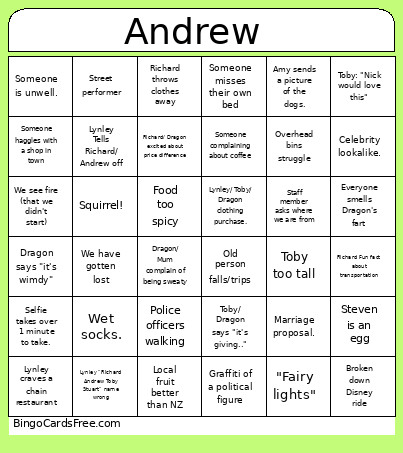 This Andrew Bingo Cards Game contains following Words or Phrases: "Fairy lights", 2 of us cry (laughing tears count), Amy sends a picture of the dogs., An odd bicycle, Broken down Disney ride, Celebrity lookalike., Child falls/ trips, Clock tower, Crying baby on plane/ public transportation, Dragon says "it's wimdy", Dragon says "pink sky", Dragon/ Mum complain of being sweaty, Drama from home that we are happy to be avoiding., Everyone smells Dragon's fart, Face tattoo (non ethnic), Feeding an animal., Food too spicy, Graffiti of a political figure, Incorrect meal order, Local fruit better than NZ, Lynley "Richard Andrew Toby Stuart" name wrong, Lynley craves a chain restaurant, Lynley Tells Richard/ Andrew off, Lynley/ Toby/ Dragon clothing purchase., Marriage proposal., Mistaken for Australians, Old person falls/trips, Overhead bins struggle, Parking problems., Police officers walking, Richard Fun fact about transportation, Richard throws clothes away, Richard/ Dragon excited about price difference, Richard/ Dragon happy but looks unhappy, See someone we know that we didn't plan, Selfie takes over 1 minute to take., Shirtless stranger, Someone complaining about coffee, Someone doesn't want to share food., Someone forgot an essential item at home., Someone haggles with a shop in town, Someone is unhappy about photographing food., Someone is unwell., Someone misses their own bed, Someone mistakes the country they're in, Squirrel!, Staff member asks where we are from, Steven is an egg, Street performer, Toby says "cunt", Toby too tall, Toby: "Nick would love this", Toby/ Dragon "notice how nobody laughed", Toby/ Dragon font discussion, Toby/ Dragon says "it's giving..", Vomit, Warning sign for something harmless, We have gotten lost, We see a Celebrity, We see fire (that we didn't start), Wet socks., Wind turbine.