Print free Apple bingo cards or personalize,
limitless prints! Select from 41,500+ templates or use our bingo card generator.
Add numbers, words, images, or mix them all.
Play using PDF printouts, online bingo cards,
and our online bingo caller, or mix physical and digital.
About: Get ready for an Apple event watch party with this bingo card centered on all the hottest WWDC predictions and wild card surprises. Packed with rumors, advanced AI integrations, quirky exec moments, and major software reveals, this card is perfect for tech fans, office pools, or any group tuned in to the big keynote. Let the keynote chaos begin!
How To: To download a printable PDF, click the Print button.
You can adjust the card quantity and other
printing settings on the Print tab.
Grid items and free space content can be edited on the Basic tab.
Appearance can be entirely personalized on the
corresponding tabs, or you can quickly find any preference
using the 🔍 tab.
How to play Apple Bingo Cards?
Paper Players: Print PDF bingo cards and manually mark the cards.
Online Players: Click on the Play button above, and then click on the 🎫 button.
Online Caller: Click on the Play button above.
Paper Caller: Print PDF calling list & calling slips and manually select the slips.
Combo Play: Select any combination above.
For instance, caller can be either Offline or Online.
And players can be Offline or Online or a combo of both.
Step-By-Step:
Start by downloading the Apple PDF by clicking on the "Print" button above.
Open the PDF and print it.
For random calling, you can print another copy of the call list, cut, fold and then pull them randomly at play time.
Cut the bingo cards at the cut marks if there are more than 1 bingo cards per page.
Distribute one card per player. For marking, you can use pencils. Crayons are the cheapest.
Select one person to be the caller. If you are playing in a small group, the caller may as well play along with their own Bingo card.
The caller begins the game by randomly picking an item from the call list and calling out it to all players.
The players scan their cards to see if they have the called word. If they do, they dab that word.
The first player to complete a horizontal, vertical, or a diagonal line of crossed items announces "Bingo!" and wins the play.
The caller confirms that the items crossed off form a correct line as per the Bingo card and call list.
You can play for varied patterns or a full card blackout for an extended play.
This Apple Bingo Cards Game contains following Words or Phrases: "Next MacOS: MacOS Tiburon",, "Keynote Length: 105 Minutes (±5)",, "A Wallpaper Creator Feature Announced",, "M5 Mac mini & Mac Studios Announced",, "Pick your AI Provider",, "Apple Debuts an AirPods App",, "Stephen Lemay Appears on Video",, "OS 27 Features Updated Genmoji Creation",, "Apple Intelligence Shortcut Integration",, "Lil' Finder Guy Makes an Appearance",, "Apple Intelligence Health Integration",, "A Memeable Federighi Moment",, '"Good Morning" Free Space',, "Customizable Camera in iOS 27",, "A Siri Chat App is Announced",, "Apple Previews homeOS + Hardware",, "Daily Brief Feature",, "A Secret Location is Accessed via Whimsical Transition",, "Liquid Glass Polish",, "Apple Debuts a Gemini-Powered Siri",, "More AI Editing Tools Come to Camera/Photos",, "John Ternus Appears During the Event",, "More Native Apple Vision Pro Apps",, "macOS/iOS 27 Emphasize Stability & Battery Life",, "Tim Cook Says Goodbye",.

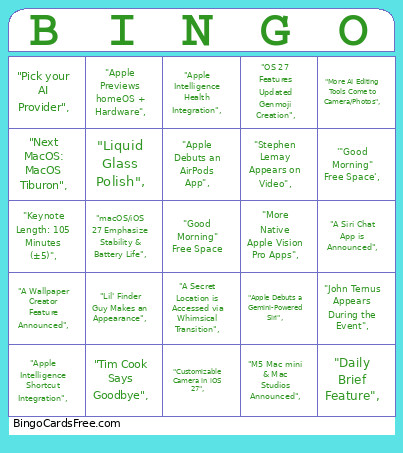 This Apple Bingo Cards Game contains following Words or Phrases: "Next MacOS: MacOS Tiburon",, "Keynote Length: 105 Minutes (±5)",, "A Wallpaper Creator Feature Announced",, "M5 Mac mini & Mac Studios Announced",, "Pick your AI Provider",, "Apple Debuts an AirPods App",, "Stephen Lemay Appears on Video",, "OS 27 Features Updated Genmoji Creation",, "Apple Intelligence Shortcut Integration",, "Lil' Finder Guy Makes an Appearance",, "Apple Intelligence Health Integration",, "A Memeable Federighi Moment",, '"Good Morning" Free Space',, "Customizable Camera in iOS 27",, "A Siri Chat App is Announced",, "Apple Previews homeOS + Hardware",, "Daily Brief Feature",, "A Secret Location is Accessed via Whimsical Transition",, "Liquid Glass Polish",, "Apple Debuts a Gemini-Powered Siri",, "More AI Editing Tools Come to Camera/Photos",, "John Ternus Appears During the Event",, "More Native Apple Vision Pro Apps",, "macOS/iOS 27 Emphasize Stability & Battery Life",, "Tim Cook Says Goodbye",.