
WYZ Community Day Bingo Cards - Print Free or Customize
Print free WYZ Community Day bingo cards or modify, unlimited prints! Pick from 41,500+ templates or use the bingo card generator. Add numbers, phrases, photos, or all of them. Play using printed PDF, digital bingo cards, and the digital bingo caller, or mix physical and digital.
About: This bingo card celebrates the world’s most famous landmarks and cultural icons, making it perfect for travel lovers, geography buffs, and classroom activities. With sites from every continent, it sparks curiosity and conversation about global wonders. Use it at international fairs, educational events, or travel-themed parties to challenge and inspire your group’s wanderlust.
How To: To save a printable PDF, click the Print button. You can adjust the card count and other printing options on the Print tab. Grid items and free space text can be added on the Basic tab. Appearance can be highly customized on the relevant tabs, or you can quickly search any preference using the 🔍 tab.
How to play WYZ Community Day Bingo Cards?
- Digital Players: Click on the Play button above, and then click on the 🎫 button.
- Printed Caller: Print PDF calling list & calling slips and physically draw the slips.
- Printed Players: Print PDF bingo cards and physically cross off the cards.
- Digital Caller: Click on the Play button above.
- Mixed Mode: Choose any combination above. For example, caller can be either Printed or Digital. And players can be Printed or Digital or a combination of both.
Step-By-Step:
- Start by getting the WYZ Community Day PDF by clicking on the "Print" button above.
- Open the PDF and print a hard copy.
- For random drawing, you can print another copy of the call list, cut, fold and then pull them randomly at play time.
- Cut the bingo cards at the cut lines if there are more than 1 bingo cards per page.
- Distribute one card per player. For marking, you can use pencils. Crayons are the cheapest.
- Choose one person to be the caller. If you are playing in a small group, the caller can also play along with their own Bingo card.
- The caller begins the game by randomly drawing an item from the call list and calling out it to everyone.
- The players check their cards to see if they have the called word. If they do, they dab that word.
- The first player to complete a horizontal, vertical, or a diagonal line of crossed items shouts "Bingo!" and wins the game.
- The caller confirms that the items marked form a correct line according to the Bingo card and call list.
- You can play for different patterns or a full card blackout for a longer game.
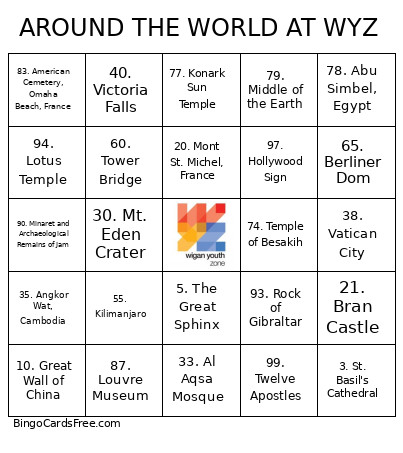 This WYZ Community Day Bingo Cards Game contains following Words or Phrases: 1. Statue of Liberty, 2. Eiffel Tower, 3. St. Basil's Cathedral, 4. Blue Domed Church, 5. The Great Sphinx, 6. Pyramids of Giza, 7. Little Mermaid, 8. Versailles, 9. Mill Network at Kinderdijk-Elshout, 10. Great Wall of China, 11. Taj Mahal, 12. Machu Picchu, 13. Big Ben, 14. Burj Al Arab Hotel, 15. The Leaning Tower of Pisa, 16. Christ the Redeemer, 17. Les Grottes De Lascaux, 18. Mecca, 19. Loch Ness, 20. Mont St. Michel, France, 21. Bran Castle, 22. Aya Sofya (Hagia Sophia), 23. Brandenburg Gate, Berlin, 24. Acropolis, 25. Sagrada Familia, 26. Uluru, 27. Neuschwanstein Castle, 28. Mount Fuji, 29. Stonehenge, 30. Mt. Eden Crater, 31. Easter Island, 32. Capitol Hill, 33. Al Aqsa Mosque, 34. Niagara Falls, 35. Angkor Wat, Cambodia, 36. Manneken Pis, Brussels, 37. Mount Everest, 38. Vatican City, 39. Mount Rushmore, 40. Victoria Falls, 41. Grand Canyon, 42. Nevado Mismi, 43. Buddha at Kamakura, 44. Petra, 45. Trevi Fountain, 46. Auschwitz Memorial / Muzeum Auschwitz, 47. Cape of Good Hope, South Africa, 48. North Cape, 49. Chichen Itza, 50. Inukshuk, 51. Table Mountain, 52. Golden Gate Bridge, 53. Sydney Opera House, 54. Parc Guell, Barcelona, 55. Kilimanjaro, 56. The Forbidden City, China, 57. Iguazu Falls, 58. Colosseum, 59. Twyfelfontein or /Ui-//Aes, 60. Tower Bridge, 61. Blue Mosque, Istanbul, 62. The Sphinx (Bucegi Mountains), 63. Millau Bridge, France, 64. Karnak Temple, Luxor, Egypt, 65. Berliner Dom, 66. Faisal Masjid, Islamabad, 67. Kremlin, 68. Empire State Building, 69. Hermitage, 70. Newgrange, 71. Waterloo, 72. Carnac, 73. Tilicho Lake, 74. Temple of Besakih, 75. Pompeii, 76. Wailing Wall, 77. Konark Sun Temple, 78. Abu Simbel, Egypt, 79. Middle of the Earth, 80. Medina, 81. Shanghai, 82. Sacre Coeur, Paris, 83. American Cemetery, Omaha Beach, France, 84. Potala Palace, Lhasa, 85. Skellig Michael, Skellig Islands, Ireland, 86. Angel Falls, 87. Louvre Museum, 88. Atomium, Brussels, 89. White Cliffs of Dover, 90. Minaret and Archaeological Remains of Jam, 91. Golden Temple, 92. Palace of Parliament, Bucharest, 93. Rock of Gibraltar, 94. Lotus Temple, 95. Yosemite National Park, 96. CN Tower, 97. Hollywood Sign, 98. Ephesus, 99. Twelve Apostles, 100. Piazza San Marco, Venice.