Print free Associate bingo 3 cards or adjust them,
limitless prints! Select from 41,500+ designs or use our bingo card generator.
Add numbers, words, photos, or mix them all.
Play using printable PDF, online bingo cards,
and our online bingo caller, or go hybrid.
About: This bingo card captures the fast-paced, unpredictable world of convenience store work. It's filled with real-life scenarios and quirky customer requests that any clerk or cashier will recognize. Perfect for team meetings, training sessions, or staff bonding events, this card brings some fun to everyday shift challenges and celebrates those classic c-store moments.
How To: To save a printable PDF, click the Print button.
You can adjust the card quantity and other
print settings on the Print tab.
Grid items and free space text can be added on the Basic tab.
Appearance can be fully personalized on the
corresponding tabs, or you can quickly locate any setting
on the 🔍 tab.
How to play Associate Bingo 3 Cards?
Printed Caller: Print PDF calling list & calling slips and physically choose the slips.
Digital Caller: Click on the Play button above.
Printed Players: Print PDF bingo cards and physically cross off the cards.
Digital Players: Click on the Play button above, and then click on the 🎫 button.
Combo Play: Choose any combination above.
For instance, caller can be either Paper or Digital.
And players can be Paper or Digital or a combo of both.
Step-By-Step:
Start by getting the Associate Bingo 3 PDF by clicking on the "Print" button above.
Open the PDF and print it.
For random drawing, you can print another copy of the call list, cut, fold and then pull them randomly at play time.
Cut the bingo cards at the cut marks if there are greater than 1 bingo cards per page.
Distribute one card per player. For marking, you can use markers. Crayons cost the least.
Choose one person to be the caller. If you are playing in a small group, the caller may as well play along with their own Bingo card.
The caller initiates the play by randomly picking an item from the call list and calling out it to all players.
The players scan their cards to see if they have the called word. If they do, they dab that word.
The first player to finish a horizontal, vertical, or a diagonal line of crossed items yells "Bingo!" and wins the play.
The caller validates that the items crossed off form a correct line according to the Bingo card and call list.
You can play for different patterns or a full card blackout for an extended play.
This Associate Bingo 3 Cards Game contains following Words or Phrases: Card Declined, Clean your section (remove all from shelving and clean them), Customer asks for Montego cigarettes, Customer buys a stamp, Customer uses a full coffee punch card for free coffee, Customer uses a full pizza punch card for a free hunk, Door Dash Sale, Help a customer pump their gas, Help someone find the ATM, Help someone looking for gum, No ID no sale, Sales totals $8 even after tax, Sell 10 boxes of wings (add sales together), Sell 10 Little Debbie (add sales together), Sell 2 four packs of Carbliss in one sale, Sell 20 double shot Fireball (add sales together), Sell a 10 oz bag of Old Trapper, Sell a 5 pack of ON Wintergreen 8mg, Sell a bag of Pick 5 chicken, Sell a Crown Royal box set, Sell a propane tank (not exchange, new), Sell a roll of Cougar, Sell a Velo Plus, Sell two deli sandwiches for $3.50, Someone asks you if we sell cross bars, Someone buys a grab bag of chips for $1 with their fountain soda, Someone buys a loaf of bread and some peanut butter, You get asked "Do I have to prepay?".

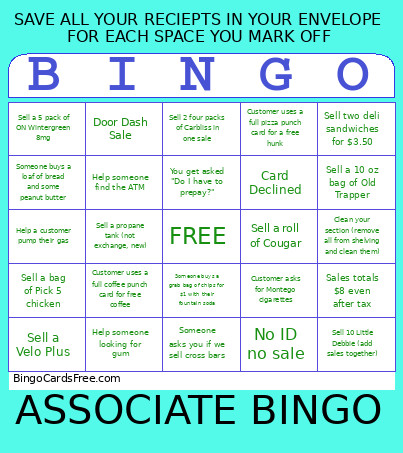 This Associate Bingo 3 Cards Game contains following Words or Phrases: Card Declined, Clean your section (remove all from shelving and clean them), Customer asks for Montego cigarettes, Customer buys a stamp, Customer uses a full coffee punch card for free coffee, Customer uses a full pizza punch card for a free hunk, Door Dash Sale, Help a customer pump their gas, Help someone find the ATM, Help someone looking for gum, No ID no sale, Sales totals $8 even after tax, Sell 10 boxes of wings (add sales together), Sell 10 Little Debbie (add sales together), Sell 2 four packs of Carbliss in one sale, Sell 20 double shot Fireball (add sales together), Sell a 10 oz bag of Old Trapper, Sell a 5 pack of ON Wintergreen 8mg, Sell a bag of Pick 5 chicken, Sell a Crown Royal box set, Sell a propane tank (not exchange, new), Sell a roll of Cougar, Sell a Velo Plus, Sell two deli sandwiches for $3.50, Someone asks you if we sell cross bars, Someone buys a grab bag of chips for $1 with their fountain soda, Someone buys a loaf of bread and some peanut butter, You get asked "Do I have to prepay?".