AXiA Fall Bingo 2026 Cards - Print Free or Customize
Print free AXiA Fall bingo 2026 cards or customize,
unlimited prints! Choose from 42,200+ designs or use our bingo card generator.
Add numbers, words, images, or mix them all.
Play using printed PDF, online bingo cards,
and our online bingo caller, or go hybrid.
About: This bingo card captures the lively spirit of a fun and relatable fall day in a busy office. Perfect for team meetings or casual Fridays, it highlights everything from autumn quirks to classic workplace moments. It’s sure to get everyone laughing and engaged as they recognize colleagues’ habits and seasonal banter around the workplace.
How To: To download a PDF to print, click the Print button.
You can change the card quantity and other
printing preferences on the Print tab.
Grid items and free space content can be edited on the Basic tab.
Appearance can be totally customized on the
relevant tabs, or you can easily search any setting
on the 🔍 tab.
How to play AXiA Fall Bingo 2026 Cards?
Virtual Players: Click on the Play button above, and then click on the 🎫 button.
Paper Caller: Print PDF calling list & calling slips and physically draw the slips.
Virtual Caller: Click on the Play button above.
Paper Players: Print PDF bingo cards and physically cross off the cards.
Hybrid Play: Choose any combination above.
For instance, caller can be either Paper or Virtual.
And players can be Paper or Virtual or a mix of both.
Step-By-Step:
Start by saving the AXiA Fall Bingo 2026 PDF by clicking on the "Print" button above.
Open the PDF and print it.
For random drawing, you can print another copy of the call list, cut, fold and then pick them randomly at play time.
Cut the bingo cards at the cut lines if there are more than 1 bingo cards per page.
Give one card to each player. For marking, you can use markers. Crayons are the cheapest.
Choose one person to be the caller. If you are playing in a small group, the caller can also play along with their own Bingo card.
The caller starts the play by randomly pulling an item from the call list and calling out it to all players.
The players look at their cards to see if they have the announced word. If they do, they mark that word.
The first player to finish a horizontal, vertical, or a diagonal line of marked items shouts "Bingo!" and wins the game.
The caller checks that the items marked form a proper line as per the Bingo card and call list.
You can play for varied patterns or a full card blackout for an extended game.
This AXiA Fall Bingo 2026 Cards Game contains following Words or Phrases: Someone mentions pumpkin spice, Someone wears orange, Someone talks about Halloween plans, Someone has a fall screensaver, Someone says TGIF, Someone asks if it's Friday yet, Someone brings in a snack to share, Someone mentions apple cider, Someone wears a sweater, Someone talks about the weather, Someone says they're cold, Someone says summer ended too fast, Someone talks about leaves changing, Someone drags a leaf into the office, Someone asks Mimi to turn up the thermostat, Someone complains it's getting dark out early, Someone wears boots, Someone wears a blanket at their desk, Someone mentions apple picking, Someone talks about their Halloween costume, 2 or more people argue about the thermostat temperature, Someone mentions "fall allergies", Someone says their food is missing in the fridge, Abby Rae talks about the baby doing something new, Michael mentions Aidil not being at her desk, Pam wears pants, Melisha's laugh is heard in the back office, Lynne gets flowers delivered from Geoff, Someone mentions no parking spots, Dan talks about his granddaughter, The alarm at Cortica goes off, Someone forgets they're muted on Zoom, Someone says "I'm starving", Someone mentions policy renewal to a client, Someone suggests adding an umbrella, Someone suggests a customer increase their limits, Someone uses their fan and heater in the same day, Someone suggests adding inland marine, Someone calls Northeast IT, Trish talks about her puppy, Someone loses their pen, Someone gets food delivered, Someone orders cookies, Anna gets a package delivered, Someone calls out 2 days in a row, Someone yells "representative" on the phone.

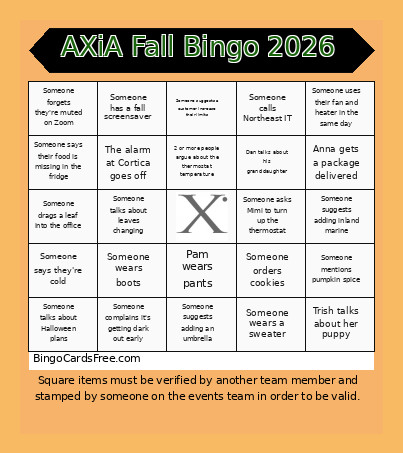 This AXiA Fall Bingo 2026 Cards Game contains following Words or Phrases: Someone mentions pumpkin spice, Someone wears orange, Someone talks about Halloween plans, Someone has a fall screensaver, Someone says TGIF, Someone asks if it's Friday yet, Someone brings in a snack to share, Someone mentions apple cider, Someone wears a sweater, Someone talks about the weather, Someone says they're cold, Someone says summer ended too fast, Someone talks about leaves changing, Someone drags a leaf into the office, Someone asks Mimi to turn up the thermostat, Someone complains it's getting dark out early, Someone wears boots, Someone wears a blanket at their desk, Someone mentions apple picking, Someone talks about their Halloween costume, 2 or more people argue about the thermostat temperature, Someone mentions "fall allergies", Someone says their food is missing in the fridge, Abby Rae talks about the baby doing something new, Michael mentions Aidil not being at her desk, Pam wears pants, Melisha's laugh is heard in the back office, Lynne gets flowers delivered from Geoff, Someone mentions no parking spots, Dan talks about his granddaughter, The alarm at Cortica goes off, Someone forgets they're muted on Zoom, Someone says "I'm starving", Someone mentions policy renewal to a client, Someone suggests adding an umbrella, Someone suggests a customer increase their limits, Someone uses their fan and heater in the same day, Someone suggests adding inland marine, Someone calls Northeast IT, Trish talks about her puppy, Someone loses their pen, Someone gets food delivered, Someone orders cookies, Anna gets a package delivered, Someone calls out 2 days in a row, Someone yells "representative" on the phone.