back to sweat edu Bingo Cards - Print Free or Customize
Print free back to sweat edu bingo cards or adjust them,
unlimited prints! Pick from 42,200+ designs or use the bingo card generator.
Add numbers, phrases, images, or mix them all.
Play using printed PDF, digital bingo cards,
and the digital bingo caller, or combine all formats.
About: This bingo card is the perfect fit for fitness enthusiasts who love trying new classes, connecting with local instructors, and sharing their experiences. With a fun mix of workouts, social challenges, and creative selfies, it’s ideal for group challenges or fitness communities looking to add a little friendly competition and variety to their wellness routines.
How To: To download a printable PDF, click the Print button.
You can adjust the card count and other
printing settings on the Print tab.
Grid items and free space content can be changed on the Basic tab.
Appearance can be totally personalized on the
corresponding tabs, or you can easily locate any option
using the 🔍 tab.
How to play back to sweat edu Bingo Cards?
Paper Players: Print PDF bingo cards and manually scratch the cards.
Online Players: Click on the Play button above, and then click on the 🎫 button.
Online Caller: Click on the Play button above.
Paper Caller: Print PDF calling list & calling slips and manually pick the slips.
Mixed Mode: Select any combination above.
For example, caller can be either Printed or Online.
And players can be Printed or Online or a combination of both.
Step-By-Step:
Start by getting the back to sweat edu PDF by clicking on the "Print" button above.
Open the PDF and print it.
For random calling, you can print another copy of the call list, cut, fold and then draw them randomly at play time.
Cut the bingo cards at the cut marks if there are greater than 1 bingo cards per page.
Give one card to each player. For marking, you can use crayons. Crayons cost the least.
Select one person to be the caller. If you are playing in a small group, the caller may also play along with their own Bingo card.
The caller starts the game by randomly drawing an item from the call list and saying it to all players.
The players check their cards to see if they have the announced word. If they do, they mark that word.
The first player to finish a horizontal, vertical, or a diagonal line of marked items announces "Bingo!" and wins the play.
The caller confirms that the items marked form a proper line as per the Bingo card and call list.
You can play for multiple patterns or a full card blackout for an extended play.
This back to sweat edu Bingo Cards Game contains following Words or Phrases: drain your sweaty pursuits card*, attend iron hand brewing run club*, take a selfie with the instructor after class*, attend a class at crew fitness*, take a group photo at the end of the class*, go to a reformer class at peak pilates*, take a class taught by Carrie Cox*, take a class with me (mariah), take a class at numa wellness and do the cold plunge/sauna*, visit 2 different studios in 2 weeks and tell me about each studio, take a class at JH Crossfit*, schedule a class using the MindBody app, attend an in-store sweat class, take a class at SoulShine*, take a selfie with Kit after the braided river run club*, go on a work bestie run/walk*, take a selfie with Erin A after her class*, take a selfie with Katie after her class*, make an OOTD tiktok/video before a studio class*, go to a class at mission fitness, go to kindred immersion on wednesday*, take a monday morning studio class*, attend a class where there is a dog in attendance*, take an outside group fitness class*.

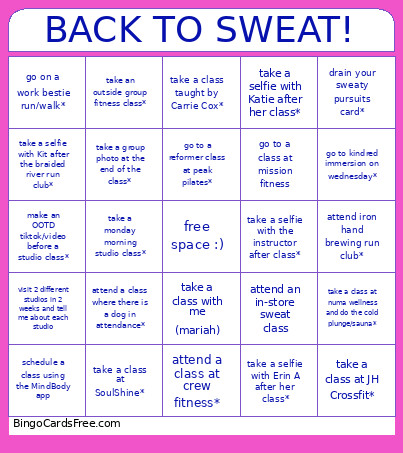 This back to sweat edu Bingo Cards Game contains following Words or Phrases: drain your sweaty pursuits card*, attend iron hand brewing run club*, take a selfie with the instructor after class*, attend a class at crew fitness*, take a group photo at the end of the class*, go to a reformer class at peak pilates*, take a class taught by Carrie Cox*, take a class with me (mariah), take a class at numa wellness and do the cold plunge/sauna*, visit 2 different studios in 2 weeks and tell me about each studio, take a class at JH Crossfit*, schedule a class using the MindBody app, attend an in-store sweat class, take a class at SoulShine*, take a selfie with Kit after the braided river run club*, go on a work bestie run/walk*, take a selfie with Erin A after her class*, take a selfie with Katie after her class*, make an OOTD tiktok/video before a studio class*, go to a class at mission fitness, go to kindred immersion on wednesday*, take a monday morning studio class*, attend a class where there is a dog in attendance*, take an outside group fitness class*.