Print free Baja Trivia bingo cards or customize,
limitless cards! Select from 41,500+ designs or use the bingo card generator.
Add numbers, words, images, or mix them all.
Play using PDF printouts, digital bingo cards,
and the digital bingo caller, or go hybrid.
About: This bingo card perfectly captures the playful chaos of a group trivia night with friends or coworkers. Designed for an audience who loves inside jokes and friendly banter, it highlights familiar quirks, classic excuses, and competitive moments that make team trivia so much fun. It's ideal for adding some extra laughs to your next regular quiz session.
How To: To save a printable PDF, click the Print button.
You can change the number of cards and other
printing options on the Print tab.
Grid items and free space text can be edited on the Basic tab.
Appearance can be highly customized on the
corresponding tabs, or you can quickly search any setting
on the 🔍 tab.
How to play Baja Trivia Bingo Cards?
Online Caller: Click on the Play button above.
Online Players: Click on the Play button above, and then click on the 🎫 button.
Paper Caller: Print PDF calling list & calling slips and physically draw the slips.
Paper Players: Print PDF bingo cards and physically write on the cards.
Hybrid Play: Choose any combination above.
For example, caller can be either Paper or Online.
And players can be Paper or Online or a mix of both.
Step-By-Step:
Start by downloading the Baja Trivia PDF by clicking on the "Print" button above.
Open the PDF and print a hard copy.
For random calling, you can print another copy of the call list, cut, fold and then pull them randomly at play time.
Cut the bingo cards at the cut lines if there are more than 1 bingo cards per page.
Give one card to each player. For marking, you can use markers. Crayons are the cheapest.
Choose one person to be the caller. If you are playing in a small group, the caller can also play along with their own Bingo card.
The caller starts the game by randomly drawing an item from the call list and announcing it to all players.
The players check their cards to see if they have the announced word. If they do, they mark that word.
The first player to finish a horizontal, vertical, or a diagonal line of crossed items announces "Bingo!" and wins the game.
The caller verifies that the items marked form a correct line according to the Bingo card and call list.
You can play for multiple patterns or a full card blackout for a longer game.
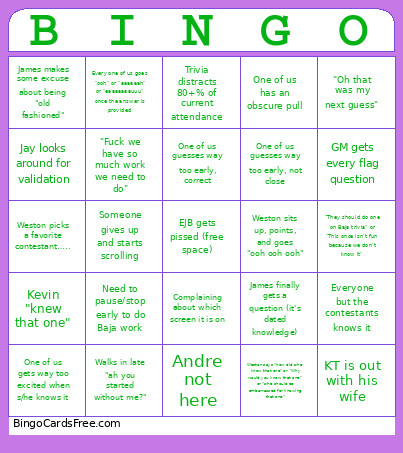
This Baja Trivia Bingo Cards Game contains following Words or Phrases: Jay looks around for validation, Weston picks a favorite contestant….., Kevin "knew that one", Weston says "how did s/he know that one" or "Why would you know that one" or "s/he should be embarrassed for knowing that one", James makes some excuse about being "old fashioned", One of us guesses way too early, correct, One of us guesses way too early, not close, One of us has an obscure pull, One of us gets way too excited when s/he knows it, Need to pause/stop early to do Baja work, Trivia distracts 80+% of current attendance, James "ooh! ooh! ooh!" then doesn't get it, GM gets every flag question, Andre not here, "They should do one on Baja trivia" or "This once isn't fun because we don't know it", Every one of us goes "ooh" or "aaaaaah" or "eaaaaaaauuu" once the answer is provided, KT is out with his wife, Complaining about which screen it is on, "Fuck we have so much work we need to do", James finally gets a question (it's dated knowledge), "Oh that was my next guess", Everyone but the contestants knows it, Weston sits up, points, and goes "ooh ooh ooh", Someone gives up and starts scrolling, Walks in late "ah you started without me?".

 This Baja Trivia Bingo Cards Game contains following Words or Phrases: Jay looks around for validation, Weston picks a favorite contestant….., Kevin "knew that one", Weston says "how did s/he know that one" or "Why would you know that one" or "s/he should be embarrassed for knowing that one", James makes some excuse about being "old fashioned", One of us guesses way too early, correct, One of us guesses way too early, not close, One of us has an obscure pull, One of us gets way too excited when s/he knows it, Need to pause/stop early to do Baja work, Trivia distracts 80+% of current attendance, James "ooh! ooh! ooh!" then doesn't get it, GM gets every flag question, Andre not here, "They should do one on Baja trivia" or "This once isn't fun because we don't know it", Every one of us goes "ooh" or "aaaaaah" or "eaaaaaaauuu" once the answer is provided, KT is out with his wife, Complaining about which screen it is on, "Fuck we have so much work we need to do", James finally gets a question (it's dated knowledge), "Oh that was my next guess", Everyone but the contestants knows it, Weston sits up, points, and goes "ooh ooh ooh", Someone gives up and starts scrolling, Walks in late "ah you started without me?".