
BANBAN 8 Bingo Cards - Print Free or Customize
Print free BANBAN 8 bingo cards or alter them, unlimited cards! Pick from 41,100+ templates or use the bingo card generator. Add numbers, words, images, or mix them all. Play using PDF prints, digital bingo cards, and the digital bingo caller, or combine all formats.
About: This bingo card is perfect for fans eagerly awaiting the next chapter in the Garten of Banban game series. Packed with returning characters, wild theories, possible cameos, and major plot twists, it’s designed for viewers or streamers following new releases, updating live as surprises unfold. The tone balances excitement and curiosity, capturing all the unpredictable thrills this beloved horror franchise is known for.
How To: To save a PDF to print, click the Print button. You can modify the number of cards and other print options on the Print tab. Grid items and free space text can be changed on the Basic tab. Appearance can be completely personalized on the corresponding tabs, or you can easily find any setting on the 🔍 tab.
How to play BANBAN 8 Bingo Cards?
- Paper Players: Print PDF bingo cards and manually cross off the cards.
- Paper Caller: Print PDF calling list & calling slips and manually select the slips.
- Online Players: Click on the Play button above, and then click on the 🎫 button.
- Online Caller: Click on the Play button above.
- Mixed Play: Choose any combination above. For example, caller can be either Paper or Online. And players can be Paper or Online or a mix of both.
Step-By-Step:
- Start by downloading the BANBAN 8 PDF by clicking on the "Print" button above.
- Open the PDF and print a hard copy.
- For random drawing, you can print another copy of the call list, cut, fold and then draw them randomly at play time.
- Cut the bingo cards at the cut marks if there are more than 1 bingo cards per page.
- Distribute one card per player. For marking, you can use pencils. Crayons are the cheapest.
- Choose one person to be the caller. If you are playing in a small group, the caller may as well play along with their own Bingo card.
- The caller begins the play by randomly drawing an item from the call list and announcing it to all players.
- The players check their cards to see if they have the called word. If they do, they cross off that word.
- The first player to finish a horizontal, vertical, or a diagonal line of marked items shouts "Bingo!" and wins the play.
- The caller confirms that the items crossed off form a proper line as per the Bingo card and call list.
- You can play for different patterns or a full card blackout for an extended play.
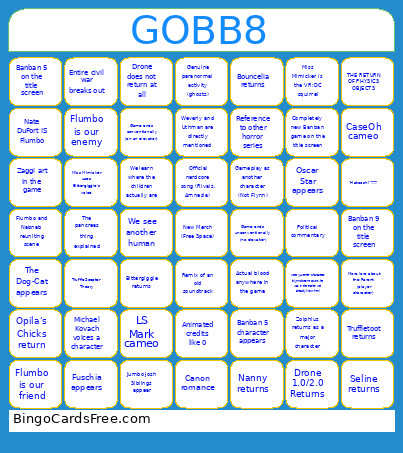 This BANBAN 8 Bingo Cards Game contains following Words or Phrases: Zolphius returns as a major character, Seline returns, Bouncelia returns, Nanny returns, Truffletoot returns, Bittergiggle returns, Ramamba returns, Opila's Chicks return, Brushista appears, Major character dies, Miss Mimicker is the VR:DC squirrel, Brand new mascots (NOT GV, NOT RC TEAM), The Dog-Cat appears, Oscar Star appears, Fuschia appears, Humble Bee appears, Croopa appears, Jumbo Josh Siblings appear, We learn where the children actually are, Nate DuFort IS Flumbo, Nate DuFort IS NOT Flumbo, Official nerdcore song (Rivals, Amnesia), Animated credits like 0, LS Mark cameo, CaseOh cameo, Michael Kovach voices a character, TruffleScepter Theory, Flumbo and Nabnab reuniting scene, Banban betrays us, Reference to other horror series, Modern brainrot slang reference, Revisit Banban 0 location, Drone 1.0/2.0 Returns, Drone does not return at all, Banban 9 on the title screen, Banban 5 on the title screen, Completely new Banban game on the title screen, Music from Partners Program game is used (similar to Punchrush OST in Banban 7), Remix of an old soundtrack, Game ends unconventionally (no elevator), Game ends conventionally (on an elevator), Hellish Toadster, Angelic or Hellish Flumbo, More Flynn gameplay, Gameplay as another character (Not Flynn), Entire civil war breaks out, Flumbo is our friend, Flumbo is our enemy, Game actually makes you emotional, Zaggi art in the game, Political commentary, Banban 5 character appears, Weverly and Uthman are directly mentioned, The pancreas thing explained, Genuine paranormal activity (ghosts), We see another human, Actual blood anywhere in the game, Genuinely scary section, More "Juvenile" characters (Flynn doesn't count, he was in the trailer, we already know him), More lore about the Parent (player character), The void gets explained, Banban 0 red pit eyes get explained, Canon LGBTQ, Canon romance, Miss Mimicker uses Bittergiggle's voice, THE RETURN OF PHYSICS OBJECTS, "Hatooshi"???.