
Bar bingo Cards - Print Free or Customize
Print free Bar bingo cards or modify, unlimited cards! Choose from 42,200+ designs or use the bingo card generator. Add numbers, phrases, pictures, or all of them. Play using PDF prints, virtual bingo cards, and the virtual bingo caller, or combine all formats.
About: This bingo card is perfect for a night out with friends, especially during a lively bar crawl or celebration downtown. It’s packed with playful social challenges and quirky photo ops designed to get everyone mingling, laughing, and making memories. Ideal for a fun, outgoing group ready to embrace spontaneity and good vibes.
How To: To save a printable PDF, click the Print button. You can adjust the card quantity and other print preferences on the Print tab. Grid items and free space content can be changed on the Basic tab. Appearance can be exactly customized on the relevant tabs, or you can easily locate any setting on the 🔍 tab.
How to play Bar bingo Cards?
- Digital Players: Click on the Play button above, and then click on the 🎫 button.
- Digital Caller: Click on the Play button above.
- Paper Players: Print PDF bingo cards and physically scratch the cards.
- Paper Caller: Print PDF calling list & calling slips and physically draw the slips.
- Hybrid Play: Select any combination above. For example, caller can be either Paper or Digital. And players can be Paper or Digital or a mix of both.
Step-By-Step:
- Start by getting the Bar bingo PDF by clicking on the "Print" button above.
- Open the PDF and print a hard copy.
- For random drawing, you can print another copy of the call list, cut, fold and then pull them randomly at play time.
- Cut the bingo cards at the cut marks if there are greater than 1 bingo cards per page.
- Give one card to each player. For marking, you can use markers. Crayons are the cheapest.
- Select one person to be the caller. If you are playing in a small group, the caller may as well play along with their own Bingo card.
- The caller starts the play by randomly pulling an item from the call list and calling out it to everyone.
- The players look at their cards to see if they have the announced word. If they do, they mark that word.
- The first player to finish a horizontal, vertical, or a diagonal line of marked items shouts "Bingo!" and wins the play.
- The caller confirms that the items crossed off form a correct line as per the Bingo card and call list.
- You can play for different patterns or a full card blackout for a longer play.
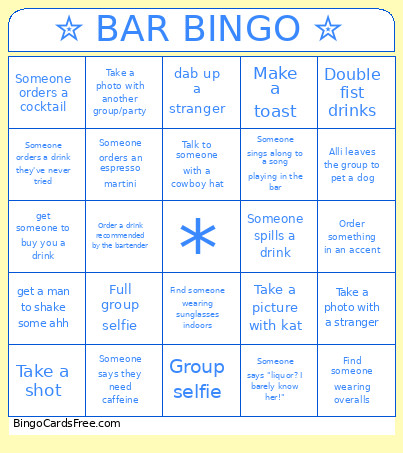 This Bar bingo Cards Game contains following Words or Phrases: "Accidentally" photobomb a picture, A stranger compliments you, Alli leaves the group to pet a dog, alli says she has to pee, Alli takes a shot, asks someone for a dollar, Buy a drink for someone in the group, Cheers with a stranger, Chug your drink, Compliment a stranger, dab up a stranger, Double fist drinks, elyssa spills drink, Entire group cheers, Find a coaster, Find a grown man in flip flops, Find someone celebrating a birthday, Find someone wearing a Hawaiian shirt, Find someone wearing overalls, Find someone wearing sunglasses indoors, Find someone who has been out of state, Find someone with a sunburn, Find someone with the same first name as a group member, Full group selfie, Get a high five from a stranger, get a man to shake some ahh, get a number, Get a sticker or coaster from a bar, Get a stranger to give advice of some kind, Get a stranger to take your picture, get someone to buy you a drink, give someone your number, Go to a bar with live music, Group photo taken by a stranger, Group selfie, Make a toast, Order a drink recommended by the bartender, Order a tequila shot, Order something in an accent, Order tequila, Post an instagram story, Request a song at the bar, Say "come here often?" to a stranger, send an anonymous shot to a stranger, Someone orders a beer, Someone orders a cocktail, Someone orders a drink they've never tried, Someone orders a margarita, Someone orders a vodac cran, Someone orders an espresso martini, Someone says "liquor? I barely know her!", Someone says they need caffeine, Someone sings along to a song playing in the bar, Someone spills a drink, Someones runs away (gone 5+ mins), Spot a dog, Start a conga line, Take a group shot!, Take a photo of you or someone else dabbing, Take a photo with a bartender, Take a photo with a stranger, Take a photo with another group/party, Take a picture of a drink, Take a picture with inez, Take a picture with kat, Take a shot, Talk to someone with a cowboy hat, use accent in a convo w a stranger.