binggggggggg Bingo Cards - Print Free or Customize
Print free binggggggggg bingo cards or adjust them,
limitless cards! Pick from 41,500+ designs or use the bingo card generator.
Add numbers, phrases, images, or all of them.
Play using printable PDF, online bingo cards,
and the online bingo caller, or mix physical and digital.
About: This bingo card is perfect for staff or team members working in an interactive family entertainment venue, especially during busy days. The card captures the unexpected chaos and funny mishaps that can pop up, from kids’ wild antics to technical slip-ups. It's a lighthearted way to keep everyone engaged and maybe even find humor in those unpredictable moments.
How To: To save a printable PDF, click the Print button.
You can change the card quantity and other
print preferences on the Print tab.
Grid items and free space content can be changed on the Basic tab.
Appearance can be entirely customized on the
corresponding tabs, or you can easily find any setting
using the 🔍 tab.
How to play binggggggggg Bingo Cards?
Paper Players: Print PDF bingo cards and physically cross off the cards.
Digital Caller: Click on the Play button above.
Digital Players: Click on the Play button above, and then click on the 🎫 button.
Paper Caller: Print PDF calling list & calling slips and physically select the slips.
Hybrid Mode: Select any combination above.
For example, caller can be either Printed or Digital.
And players can be Printed or Digital or a combination of both.
Step-By-Step:
Start by getting the binggggggggg PDF by clicking on the "Print" button above.
Open the PDF and print a hard copy.
For random calling, you can print another copy of the call list, cut, fold and then draw them randomly at play time.
Cut the bingo cards at the cut marks if there are greater than 1 bingo cards per page.
Distribute one card per player. For marking, you can use pens. Crayons are the cheapest.
Select one person to be the caller. If you are playing in a small group, the caller can as well play along with their own Bingo card.
The caller initiates the game by randomly picking an item from the call list and announcing it to all players.
The players check their cards to see if they have the announced word. If they do, they dab that word.
The first player to complete a horizontal, vertical, or a diagonal line of marked items shouts "Bingo!" and wins the play.
The caller checks that the items marked form a proper line as per the Bingo card and call list.
You can play for different patterns or a full card blackout for a longer play.
This binggggggggg Bingo Cards Game contains following Words or Phrases: Kid gets hurt by photobooth, Kid eats a ball and swallows it, Kid with light up shoes, Team member evil twin, Guests escapes out of 006, Kid climbs on gametable, Kid falls of stage in bar, Kid runs into a wall, Parents from different families get into a fight, Kid pees on the floor, Staff member walks through T6 while guests are there, Navigator collapses, Child throws a tamper tantrum on the ground, FOH member quits, 4a ball in 6, Kid climbs on pixel in 4b, Guest presses laser button in 4b, Guest tries entering rack room, Lockers collapse, Black photo frame in 008 falls, Kid tries to eat smoke in tunnel, Kid shorter than low fog in tunnel, Kid on the floor in tunnel, FnB sells food, Team pick time above 2 min, Group of 25, Host has wrong number of guests, 4a balls before 4a, Volume of music not good, "Control can you open the door" without context, Guest leaves show during 4A, Romeo messes up the changeover, Tech starts 006 instead of clearing it, Guest leaves item behind, Ali steals coffee from us at least 3 times in a day, FOH ask us for non tech related things, More than 1 empty slot before last slot of the day, Printers broken, Adult guest in cosplay, Child guest in costume, Ops called for something stupid, Code whisky to change answer.

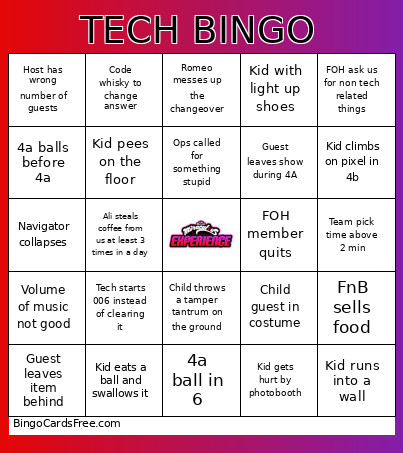 This binggggggggg Bingo Cards Game contains following Words or Phrases: Kid gets hurt by photobooth, Kid eats a ball and swallows it, Kid with light up shoes, Team member evil twin, Guests escapes out of 006, Kid climbs on gametable, Kid falls of stage in bar, Kid runs into a wall, Parents from different families get into a fight, Kid pees on the floor, Staff member walks through T6 while guests are there, Navigator collapses, Child throws a tamper tantrum on the ground, FOH member quits, 4a ball in 6, Kid climbs on pixel in 4b, Guest presses laser button in 4b, Guest tries entering rack room, Lockers collapse, Black photo frame in 008 falls, Kid tries to eat smoke in tunnel, Kid shorter than low fog in tunnel, Kid on the floor in tunnel, FnB sells food, Team pick time above 2 min, Group of 25, Host has wrong number of guests, 4a balls before 4a, Volume of music not good, "Control can you open the door" without context, Guest leaves show during 4A, Romeo messes up the changeover, Tech starts 006 instead of clearing it, Guest leaves item behind, Ali steals coffee from us at least 3 times in a day, FOH ask us for non tech related things, More than 1 empty slot before last slot of the day, Printers broken, Adult guest in cosplay, Child guest in costume, Ops called for something stupid, Code whisky to change answer.