Print free BINGO 2026 cards or alter them,
unlimited cards! Pick from 41,500+ templates or use the bingo card generator.
Add numbers, phrases, photos, or mix them all.
Play using printed PDF, digital bingo cards,
and the digital bingo caller, or mix physical and digital.
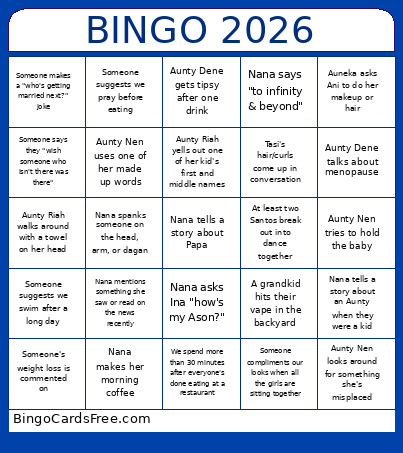
About: This bingo card perfectly captures the quirks and heartwarming moments of a lively family gathering, especially one with several generations and strong personalities. It’s full of inside jokes, classic auntie antics, and loving banter. Ideal for family reunions or holiday get-togethers, this card encourages everyone to laugh at the everyday chaos that makes family time so memorable.
How To: To download a PDF to print, click the Print button.
You can change the number of cards and other
print preferences on the Print tab.
Grid items and free space text can be changed on the Basic tab.
Appearance can be totally personalized on the
corresponding tabs, or you can quickly locate any preference
using the 🔍 tab.
How to play BINGO 2026 Cards?
Paper Caller: Print PDF calling list & calling slips and manually select the slips.
Paper Players: Print PDF bingo cards and manually scratch the cards.
Virtual Caller: Click on the Play button above.
Virtual Players: Click on the Play button above, and then click on the 🎫 button.
Hybrid Mode: Pick any combination above.
For example, caller can be either Paper or Virtual.
And players can be Paper or Virtual or a combination of both.
Step-By-Step:
Start by saving the BINGO 2026 PDF by clicking on the "Print" button above.
Open the PDF and print it.
For random drawing, you can print another copy of the call list, cut, fold and then draw them randomly at play time.
Cut the bingo cards at the cut lines if there are greater than 1 bingo cards per page.
Distribute one card per player. For marking, you can use markers. Crayons are the cheapest.
Pick one person to be the caller. If you are playing in a small group, the caller can as well play along with their own Bingo card.
The caller initiates the game by randomly pulling an item from the call list and calling out it to all players.
The players check their cards to see if they have the called word. If they do, they dab that word.
The first player to finish a horizontal, vertical, or a diagonal line of marked items announces "Bingo!" and wins the play.
The caller validates that the items crossed off form a proper line as per the Bingo card and call list.
You can play for multiple patterns or a full card blackout for a longer play.
This BINGO 2026 Cards Game contains following Words or Phrases: Nana tells a story about Papa, Nana says "to infinity & beyond", Nana asks Ina "how's my Ason?", Nana makes her morning coffee, Nana talks about vitamin supplements, Nana tells a story about an Aunty when they were a kid, Nana mentions something she saw or read on the news recently, Nana spanks someone on the head, arm, or dagan, Aunty Dene talks about menopause, Aunty Dene gets tipsy after one drink, Aunty Nen tries to hold the baby, Aunty Nen looks around for something she's misplaced, Aunty Nen asks her girls if they've drank water, Aunty Nen uses one of her made up words, Aunty Nen gives one of her daughters a stern and silent look, Aunty Riah walks around with a towel on her head, Aunty Riah with a bottle of alcohol, Aunty Riah yells out one of her kid's first and middle names, Auneka starts singing, Auneka asks Ani to do her makeup or hair, At least two Santos break out into dance together, Tasi's hair/curls come up in conversation, Ina's tiktok's come up in conversation, Someone suggests we swim after a long day, Someone makes a "who's getting married next?" joke, Someone says they "wish someone who isn't there was there", Someone compliments our looks when all the girls are sitting together, Someone suggests we pray before eating, Someone facetimes their family member/significant other who isn't present, Someone's weight loss is commented on, A grandkid hits their vape in the backyard, We spend more than 30 minutes after everyone's done eating at a restaurant.

 This BINGO 2026 Cards Game contains following Words or Phrases: Nana tells a story about Papa, Nana says "to infinity & beyond", Nana asks Ina "how's my Ason?", Nana makes her morning coffee, Nana talks about vitamin supplements, Nana tells a story about an Aunty when they were a kid, Nana mentions something she saw or read on the news recently, Nana spanks someone on the head, arm, or dagan, Aunty Dene talks about menopause, Aunty Dene gets tipsy after one drink, Aunty Nen tries to hold the baby, Aunty Nen looks around for something she's misplaced, Aunty Nen asks her girls if they've drank water, Aunty Nen uses one of her made up words, Aunty Nen gives one of her daughters a stern and silent look, Aunty Riah walks around with a towel on her head, Aunty Riah with a bottle of alcohol, Aunty Riah yells out one of her kid's first and middle names, Auneka starts singing, Auneka asks Ani to do her makeup or hair, At least two Santos break out into dance together, Tasi's hair/curls come up in conversation, Ina's tiktok's come up in conversation, Someone suggests we swim after a long day, Someone makes a "who's getting married next?" joke, Someone says they "wish someone who isn't there was there", Someone compliments our looks when all the girls are sitting together, Someone suggests we pray before eating, Someone facetimes their family member/significant other who isn't present, Someone's weight loss is commented on, A grandkid hits their vape in the backyard, We spend more than 30 minutes after everyone's done eating at a restaurant.