Print free bingo cards or personalize,
unlimited prints! Select from 41,500+ designs or use our bingo card generator.
Add numbers, phrases, photos, or any combination.
Play using printable PDF, online bingo cards,
and our online bingo caller, or mix physical and digital.
About: This bingo card is perfect for an R&B lover’s night, packed with soulful song titles that span classic and modern hits. It’s ideal for music-themed parties, bridal showers, or girls’ nights where nostalgia and powerful vocals set the mood. Expect lots of singing along, laughter, and friendly competition as everyone searches for their favorites.
How To: To download a printable PDF, click the Print button.
You can change the card quantity and other
print settings on the Print tab.
Grid items and free space content can be added on the Basic tab.
Appearance can be entirely personalized on the
corresponding tabs, or you can easily locate any option
on the 🔍 tab.
How to play Bingo Cards?
Virtual Caller: Click on the Play button above.
Printed Caller: Print PDF calling list & calling slips and physically draw the slips.
Printed Players: Print PDF bingo cards and physically write on the cards.
Virtual Players: Click on the Play button above, and then click on the 🎫 button.
Combo Mode: Select any combination above.
For instance, caller can be either Paper or Virtual.
And players can be Paper or Virtual or a combo of both.
Step-By-Step:
Start by getting the Bingo PDF by clicking on the "Print" button above.
Open the PDF and print a hard copy.
For random drawing, you can print another copy of the call list, cut, fold and then pull them randomly at play time.
Cut the bingo cards at the cut lines if there are greater than 1 bingo cards per page.
Distribute one card per player. For marking, you can use markers. Crayons cost the least.
Select one person to be the caller. If you are playing in a small group, the caller may as well play along with their own Bingo card.
The caller initiates the game by randomly pulling an item from the call list and saying it to everyone.
The players scan their cards to see if they have the called word. If they do, they mark that word.
The first player to finish a horizontal, vertical, or a diagonal line of crossed items yells "Bingo!" and wins the play.
The caller checks that the items crossed off form a correct line according to the Bingo card and call list.
You can play for different patterns or a full card blackout for a longer play.
This Bingo Cards Game contains following Words or Phrases: We Can't Be Friends, Cry, If, Bootylicious, Dangerously In Love, Jumpin Jumpin, Nobody, Breathe Again, I Love Me Some Him, Free Yourself, Bump What Your Friends Say, Ain't Gone Beg, You Got Me Waiting, Without Me, Lose To Win, When I See You, Soon As I Get Home, I Remember, Never Let You Go, Never Make A Promise, Beauty, The Love We Had, These Are The Times, Where I wanna Be, Knocks Me Off My Feet, U Know What's Up, If Only You Knew, Nothing In This World, You're The One, Differences, All The Way Home, My Man, I Bet, Never Ever, How Do I Breathe, Crying Out For Me, Let Me Love You, I Gotta Be, He Can't Love You, Walked Outta Heaven, Get It Together, Sexy Love-Neyo, Mad, Let Me Know, Age Ain't Nothing But A Number, If Your Girl Only Knew, Players Prayer, She Don't, As We Lay, It's Gonna Rain, Make It Last Forever, Slow Dance, Nobody, Right and Wrong Way, Neighbors Know My Name, You & I, Separated, Red Light Special, What About Your Friends, Creep, Signs Of Love Making, What Am I Gonna Do, Sweet Lady, 25 Reasons, Complicated, I'll Give All My Love To You, Funky Dope Love, There You Go Telling Me No, Knock You Down, No Pain, After The Pain, Lifetime, Loving Each Other For Life, The Other Woman, Emotions, Cry For You, A Thin Line Between Love and Hate, Mr. Too Damn Good, Thinking Bout It, Baby I'm Ready, This Little Game We Play, Incomplete, Still In Love, Let's Stay Together, Just Another Love Song, Is There Anybody Lonely, For Better Or Worse, In My Mind, Pretty Lady, Still With Her, Never Lie Immature, Come With Me, Night Time, Can't Stay Too Long, I Belong To You.

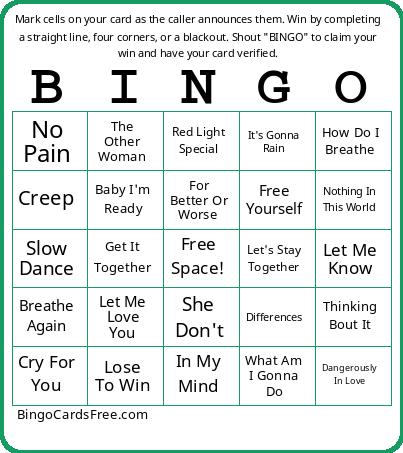 This Bingo Cards Game contains following Words or Phrases: We Can't Be Friends, Cry, If, Bootylicious, Dangerously In Love, Jumpin Jumpin, Nobody, Breathe Again, I Love Me Some Him, Free Yourself, Bump What Your Friends Say, Ain't Gone Beg, You Got Me Waiting, Without Me, Lose To Win, When I See You, Soon As I Get Home, I Remember, Never Let You Go, Never Make A Promise, Beauty, The Love We Had, These Are The Times, Where I wanna Be, Knocks Me Off My Feet, U Know What's Up, If Only You Knew, Nothing In This World, You're The One, Differences, All The Way Home, My Man, I Bet, Never Ever, How Do I Breathe, Crying Out For Me, Let Me Love You, I Gotta Be, He Can't Love You, Walked Outta Heaven, Get It Together, Sexy Love-Neyo, Mad, Let Me Know, Age Ain't Nothing But A Number, If Your Girl Only Knew, Players Prayer, She Don't, As We Lay, It's Gonna Rain, Make It Last Forever, Slow Dance, Nobody, Right and Wrong Way, Neighbors Know My Name, You & I, Separated, Red Light Special, What About Your Friends, Creep, Signs Of Love Making, What Am I Gonna Do, Sweet Lady, 25 Reasons, Complicated, I'll Give All My Love To You, Funky Dope Love, There You Go Telling Me No, Knock You Down, No Pain, After The Pain, Lifetime, Loving Each Other For Life, The Other Woman, Emotions, Cry For You, A Thin Line Between Love and Hate, Mr. Too Damn Good, Thinking Bout It, Baby I'm Ready, This Little Game We Play, Incomplete, Still In Love, Let's Stay Together, Just Another Love Song, Is There Anybody Lonely, For Better Or Worse, In My Mind, Pretty Lady, Still With Her, Never Lie Immature, Come With Me, Night Time, Can't Stay Too Long, I Belong To You.