Find Setting
Template Name This is shown at the top of the template and game pages.
Your Name Optional. If this template makes to the front page, you will be credited for creating it.
Card Title Shown at the top of each bingo card.
...
Quiz Separator If words on a line are separated by this text, then:
Bingo card will only show the text on the right side of the separator.
The PDF call list will show the full text.
To disable this feature, clear this field.
Quiz Mode ON
Quiz Board Demo Select which side of the quiz separator to show on the card preview on this page.
When printing or playing, calling cards always show the right side only.
Right Side Left Side Full Audio Separator If words on a line are separated by this text, then:
The text on the right side of the separator will be spoken by the online game play.
Bingo card will only show the text on the left side of the separator.
The PDF call list will show the full text.
To disable this feature, clear this field.
Audio Mode ON
Items Per Column Use separate item lists for each column. This is useful for american traditional 75 ball number bingo or cards where each column should draw from a different set of items.
Grid Items AI Helper Enter numbers, words or phrases, each one on a new line. Up to 255 items are supported.Items Per Column:
Grid Images Supports:
Up to 99 images.
Single or multiple image uploads.
Up to 5 MB file size per image.
You can use both Grid Items and Grid Images.
Click an image or label to edit the label or delete the image.
If an image background changes to white, remove transparency or reduce the image size to < 10KB. Show Image Labels Choose whether image labels appear on bingo cards. Image labels are always shown on the calling card.
No 10% 15% 20% 25% 30% 35% 40% 45% 50% Grid Size (Cols x Rows) Grid size in Columns x Rows format.
3 x 3 4 x 4 5 x 5 6 x 6 7 x 7 Tambola Custom Free Space Cell Free space is usually the center square of the card. It is like a joker or a wild square, and counts towards the winning pattern.
None Center Random Free Space Content Shows text or an image in the Free Space cell.
Make sure Free Space Cell is not set to "None".
To show text, enter text.
To show an image, click the button on the right and select an image.
If the image background changes to white, remove transparency or reduce the image size to < 10KB. ...
Randomize? Select Yes to generate unique random cards.
Max. Font Size Text is automatically resized to fit inside each cell. Shorter text may appear very large.
Choose a smaller maximum font size to limit how large the text can get.
1% 2% 3% 4% 5% 6% 7% 8% 9% 10% 11% 12% 13% 14% 15% 16% 17% 18% 19% 20% Title Text Color Title text color.
Title Back Shape Title background shape.
None Arrow Left Arrow Right Bowl Diamond Hexagon Hill Oval Pillar Rectangle Rounded Bottom Rounded Top Rounded Title Back Opacity Title background opacity.
0% 10% 20% 30% 40% 50% 60% 70% 80% 90% 100% Title Back Color Title background shape color.
🎨 Title Border Color Title background border color.
🎨 Cell Back Shape Background shape for cells.
Select a stock image or upload your own custom image.
You can use Cell Transparency setting to change how prominently the background shape shows.
If you select a shape other than Grid, you may have to increase Cell Padding if you want to fit the text inside the shape.
Don't see the selected image? Grid Callout 1 Circle Cup 60 Cup 80 Diamond Egg Grad Hat Heart Hexagon 1 Hexagon 2 Hill 60 Hill 80 Lego Octagon Pentagon 1 Pentagon 2 Rounded Square Star 4s60 Star 4s80 Star 4s80a Star 6s60a ...
Cell Padding Empty space inside each cell between border and text.
2% 4% 6% 8% 10% 12% 14% 16% 18% 20% 25% 30% 35% 40% Cell Spacing Space between any 2 cells.
0% 1% 2% 3% 4% 5% 6% 8% 10% 12% 14% 16% 18% 20% 25% 30% 35% 40% Cell Transparency 0% makes grid background opaque. Higher setting makes grid background transparent allowing card background image or card background color to show.
0% 10% 20% 30% 40% 50% 60% 70% 80% 90% 100% 0% 0.5% 1% 2% 3% 4% 5% 6% 7% 8% 9% 10% Card Border Color Card outside border color.
🎨 Card Border Style Yes makes the card corners rounded.
Square Rounded Card Padding Empty space between card border and card contents.
0% 1% 2% 3% 4% 5% 6% 7% 8% 9% 10% 🎨 Card Back Image Background image for the whole card.
Select a stock image or upload your own custom image.
Use Card Transparency and Cell Transparency to control how much of the image shows through.
Don't see the selected image?
Set Card Transparency >50.
Set Card Border Width >0 or Card Padding >0.
Set Cell Transparency >50.
None American Flag Baby Boy Baby Girl Balloons Balloons 2 Birds Birthday Bridal CPU Day Cake Candles Cat Cat 2 Cat 3 Cat 4 Cinco De Mayo Cupcakes Cupcakes 2 Cupcakes 3 Cupcakes 4 Davids Star Davids Star 2 Dollar Sign Earth Day Earth Day 2 Eggs Eggs 2 Eid Mubarak Eid Mubarak 2 Eid Mubarak 3 Emojis Laughing Emojis Laughing 2 Fathers Day Fireworks Fireworks 2 Floral Floral 2 Flowers Roses Flowers Spring Gift Box Gift Box 2 Gift Box 3 Gift Box 4 Gift Boxes Gift Boxes 2 Gift Boxes 3 Glass Cocktail Glass Cocktail 2 Glass Cocktail 3 Glass Cocktail 4 Glass Cocktail 5 Glasses Cocktail Glasses Cocktail 2 Graduation Cap Happy Birthday Heart Heart 2 Hearts Hearts 2 Hearts 3 House Memorial Day Mothers Day Notebook College Notebook Math Notebook Narrow Notebook Wide Party Hat Party Hat 2 Party Hat 3 Party Hat 4 Party Hats Rabbits Rose Rose 2 Rose 3 Rose 4 Solar Eclipse Solar Eclipse 2 Solar Eclipse 3 Solar Eclipse 4 Tea Party Tree Tree 2 Tree 3 Tree 4 Tree 5 Trees ...
Card Image Fill Select how the background image covers the whole card. You can also choose to repeat the image.
Fit Shorter Edge Fit Longer Edge Repeat 2x Repeat 4x Repeat 5x Repeat 10x Repeat 20x Card Transparency Controls the transparency of the card background color.
Higher values make the card background more transparent, allowing the card background image or outer background to show through.
0% 10% 20% 30% 40% 50% 60% 70% 80% 90% 100% Boogie Mode This mode uses rapid animations. It may cause dizziness, nausea, or trigger sensitive individuals. Please use responsibly.
Warning!
Boring Nice Fun Wild Crazy Insane Visibility Public: Anyone can see your card template, including search engines
Private: Only you can see and edit the card template. You will need to be signed in.
Click to Sign-Up « Free!!!
Click to Sign-In Public Private Number of Cards Number of cards to generate and include in the Full PDF. The Preview button will always generate only 1 card.
Print Call List Choose whether to include a call list in the Full PDF.
Grid prints the call list as a grid; List prints it as a text list.
No Grid List Letter Legal A4 8.5 x 12 Paper Orientation Paper orientation for printing. Some card layouts may look better in portrait or landscape.
Portrait Landscape Cards Per Page (Cols x Rows) Arrangement of cards on each page of paper.
1 x 1 1 x 2 1 x 3 1 x 4 2 x 1 2 x 2 2 x 3 2 x 4 2 x 5 2 x 6 3 x 1 3 x 2 3 x 3 3 x 4 4 x 1 4 x 2 4 x 3 4 x 4 Card Hor. Margin Horizontal margin on left and right sides of each card.
0.1 inch 0.2 inch 0.25 inch 0.3 inch 0.4 inch 0.5 inch 0.6 inch 0.7 inch 0.75 inch 0.8 inch 0.9 inch 1 inch 1.25 inch 1.5 inch 1.75 inch 2 inch Card Ver. Margin Vertical margin on top and bottom sides of each card.
0.1 inch 0.2 inch 0.25 inch 0.3 inch 0.4 inch 0.5 inch 0.6 inch 0.7 inch 0.75 inch 0.8 inch 0.9 inch 1 inch 1.25 inch 1.5 inch 1.75 inch 2 inch Ink Saver Colors: Removes background to save ink for printing.B&W: Removes background & changes colors to black & white to save ink for printing.
No Colored B&W Empty Space Select amount of empty space to keep in each cell for participants to write something.
No 10% 20% 30% 40% 50% Starting Card Number Starting card number. Change if you need to reprint a set of cards starting with a specific card number.
Card Header Height Header height. Header is shown only when there is 1 or more characters.
5% 10% 12% 14% 16% 18% 20% 25% Card Header Text Instructions or any other message(s) at the top of each card.
Card Footer Height Footer height. Footer is shown only when there is 1 or more characters.
5% 10% 12% 14% 16% 18% 20% 25% Card Footer Text Instructions or any other message(s) at the bottom of each card.
Font All fonts support English.
Default Arabella Courier CourierPrime DejaVuSans DejaVuSerif FreeSans FreeSans_Bold FreeSerif FreeSerif_Bold Helvetica LCD14 MinecartLCD Montez Mukta Mukta_Bold NotoSans Pacifico Parisienne Roboto Roboto_Bold Satisfy

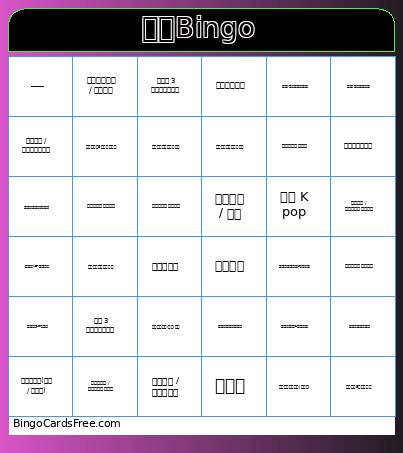 This 破冰bingo Cards Game contains following Words or Phrases: 喜欢 K pop, 会说三种及以上语言, 养过宠物, 去过 3 个以上省份旅游, 会做饭, 手机里有超过100张表情包, 滑雪上过中、高级道, 会演奏乐器, 不是独生子女, 有凌晨 3 点后才睡的经历, 喜欢拍照 / 摄影, 微信置顶了5个以上的群聊, 交换星座属相并记录, 有隐藏才艺(魔术 / 模仿等), 看过选秀节目并且有真情实感追过, 喜欢爬山 / 攀岩等户外活动, 今年看过5部以上电影, 任意排位游戏达到最高段位or可吹嘘的战绩, 喜欢打篮球 / 羽毛球等球类运动, 交换最喜欢的饮品并记录, 曾经一个人旅行过, 有写日记 / 手账的习惯, 喜欢玩剧本杀 / 密室逃脱, 在科目二/科目三挂过一次及以上, 有小红书 / 抖音账号并持续更新, 有明确讨厌的食材(香菜等), 参加过十佳歌手等赛事, 微信头像超过半年没换过, 和对方交换MBTI并记录在此格, 电脑桌面/手机屏保是纯色或系统自带, 今天之前就已经认识5个以上在场的人, 今天来参加这个活动已经用尽了全部社交额度, 带了充电宝而且愿意借给别人, 发消息喜欢用括号加注释(比如这样), 在宿舍养过植物, 曾经买过手办/周边/谷子.