
Bingo cards Networking event - Print Free or Customize
Print free bingo cards Networking event or modify, limitless cards! Select from 42,200+ designs or use our bingo card generator. Add numbers, words, pictures, or mix them all. Play using printable PDF, virtual bingo cards, and our virtual bingo caller, or combine all formats.
About: This bingo card is perfect for networking events, especially at conferences focused on urbanism, placemaking, or community design. The prompts encourage meaningful conversations about global experiences, city life, and personal journeys of belonging. It’s a fun and informal way to break the ice while highlighting diversity, travel, and inclusive city living among participants.
How To: To save a PDF to print, click the Print button. You can alter the card count and other print preferences on the Print tab. Grid items and free space content can be edited on the Basic tab. Appearance can be totally customized on the relevant tabs, or you can easily search any option using the 🔍 tab.
How to play Bingo cards Networking event?
- Paper Players: Print PDF bingo cards and manually write on the cards.
- Paper Caller: Print PDF calling list & calling slips and manually select the slips.
- Online Players: Click on the Play button above, and then click on the 🎫 button.
- Online Caller: Click on the Play button above.
- Hybrid Mode: Select any combination above. For instance, caller can be either Offline or Online. And players can be Offline or Online or a mix of both.
Step-By-Step:
- Start by saving the Bingo cards Networking event PDF by clicking on the "Print" button above.
- Open the PDF and print a hard copy.
- For random calling, you can print another copy of the call list, cut, fold and then draw them randomly at play time.
- Cut the bingo cards at the cut lines if there are more than 1 bingo cards per page.
- Give one card to each player. For marking, you can use pens. Crayons are the cheapest.
- Select one person to be the caller. If you are playing in a small group, the caller can as well play along with their own Bingo card.
- The caller starts the game by randomly picking an item from the call list and announcing it to all players.
- The players scan their cards to see if they have the called word. If they do, they dab that word.
- The first player to finish a horizontal, vertical, or a diagonal line of marked items shouts "Bingo!" and wins the game.
- The caller confirms that the items marked form a proper line as per the Bingo card and call list.
- You can play for different patterns or a full card blackout for a longer game.
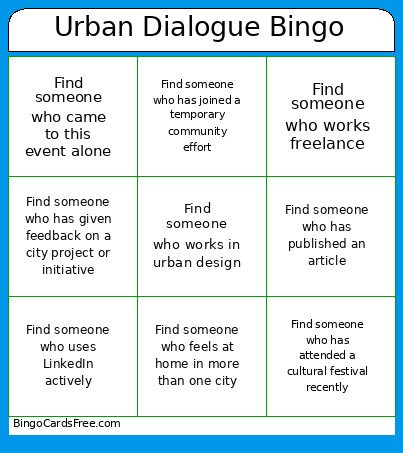 This Bingo cards Networking event Game contains following Words or Phrases: Find someone who has worked in a startup, Find someone who has presented at a conference, Find someone who works in a different industry than you, Find someone who has worked internationally, Find someone who has attended Placemaking Week Europe before, Find someone who has organized a community event, Find someone who has published an article, Find someone who has visited more than 10 countries, Find someone who speaks a different language than you, Find someone who works in urban design, Find someone who has lived in more than 3 cities, Find someone who speaks 3 or more languages, Find someone who has visited Poland, Find someone who took the train to this event, Find someone who biked to this event, Find someone who uses LinkedIn actively, Find someone who came to this event alone, Find someone who has experience with social media content creation, Find someone who has never attended a networking event before, Find someone who has volunteered before, Find someone who has worked remotely before, Find someone who designed/helped redesign a public space, Find someone who feels at home in more than one city, Find someone who feels at home in public spaces, Find someone who has experienced culture shock, Find someone who believes cities should feel welcoming to everyone, Find someone who has worked on accessibility or inclusion projects, Find someone who has seen a city change over time, Find someone who has felt welcomed by a city they visited, Find someone who has experienced loneliness in a city, Find someone who believes cities influence wellbeing, Find someone who has traveled solo before, Find someone who has friends in multiple countries, Find someone who has explored a city mainly by walking, Find someone who has participated in a co-design process, Find someone who has worked on projects involving local culture, Find someone who has attended a cultural festival recently, Find someone who has discovered a sense of belonging while traveling, Find someone who has visited a city alone, Find someone who works freelance, Find someone who has visited a city without speaking the local language, Find someone who has participated in a local tradition abroad, Find someone who has adopted a city habit from locals, Find someone who has helped someone else feel included in a city, Find someone who associates belonging with walkability, Find someone who has a habitual route they take without thinking, Find someone who has given feedback on a city project or initiative, Find someone who has joined a temporary community effort, Find someone who has felt like a local in a foreign city, Find someone who feels belonging only in specific times of day or seasons.