Print free bingo Colors cards or personalize,
limitless cards! Select from 41,500+ templates or use our bingo card generator.
Add numbers, phrases, pictures, or mix them all.
Play using PDF prints, virtual bingo cards,
and our virtual bingo caller, or combine all formats.
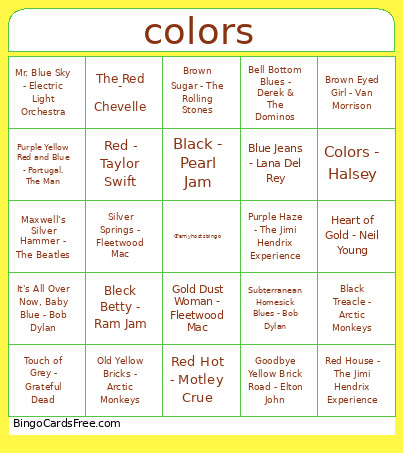
About: This bingo card is a colorful celebration of iconic songs, each with a distinct shade or color in its title. Perfect for music trivia nights, themed parties, or any event with a crowd of classic rock and pop fans, this game is sure to spark nostalgia and conversation about favorite tunes and legendary artists.
How To: To download a printable PDF, click the Print button.
You can change the card count and other
printing settings on the Print tab.
Grid items and free space text can be changed on the Basic tab.
Appearance can be fully personalized on the
relevant tabs, or you can easily locate any setting
on the 🔍 tab.
How to play Bingo Colors Cards?
Paper Caller: Print PDF calling list & calling slips and physically draw the slips.
Digital Caller: Click on the Play button above.
Paper Players: Print PDF bingo cards and physically write on the cards.
Digital Players: Click on the Play button above, and then click on the 🎫 button.
Hybrid Play: Pick any combination above.
For example, caller can be either Offline or Digital.
And players can be Offline or Digital or a combination of both.
Step-By-Step:
Start by getting the Bingo Colors PDF by clicking on the "Print" button above.
Open the PDF and print a hard copy.
For random drawing, you can print another copy of the call list, cut, fold and then pick them randomly at play time.
Cut the bingo cards at the cut marks if there are more than 1 bingo cards per page.
Distribute one card per player. For marking, you can use markers. Crayons are the cheapest.
Pick one person to be the caller. If you are playing in a small group, the caller may also play along with their own Bingo card.
The caller initiates the play by randomly pulling an item from the call list and calling out it to everyone.
The players look at their cards to see if they have the announced word. If they do, they cross off that word.
The first player to complete a horizontal, vertical, or a diagonal line of crossed items announces "Bingo!" and wins the game.
The caller checks that the items crossed off form a proper line as per the Bingo card and call list.
You can play for varied patterns or a full card blackout for a longer game.
This Bingo Colors Cards Game contains following Words or Phrases: Old Yellow Bricks - Arctic Monkeys, Black Treacle - Arctic Monkeys, Bell Bottom Blues - Derek & The Dominos, Tangled Up In Blue - Bob Dylan, gold rush - Taylor Swift, Red Wine Supernova - Chappel Roan, Pink Pony Club - Chappel Roan, Orange Blossoms - GoldFord, Red - Taylor Swift, Maroon - Taylor Swift, Colors - Halsey, It's All Over Now, Baby Blue - Bob Dylan, Brown Sugar - The Rolling Stones, Touch of Grey - Grateful Dead, Maxwell's Silver Hammer - The Beatles, Little Black Dress - One Direction, Rose Colored Lenses - Miley Cyrus, Silver Springs - Fleetwood Mac, Purple Rain - Prince, Green Light - Lorde, RED FLAG. - Kesha, Yellow - Coldplay, Mr. Blue Sky - Electric Light Orchestra, Yellow Ledbetter - Pearl Jam, Blue Jeans - Lana Del Rey, The Red - Chevelle, Brown Eyed Girl - Van Morrison, Red Hot - Motley Crue, Back in Black - AC/DC, Purple Yellow Red and Blue - Portugal. The Man, Red House - The Jimi Hendrix Experience, Goodbye Yellow Brick Road - Elton John, Subterranean Homesick Blues - Bob Dylan, Black - Pearl Jam, Black Velvet - Alannah Myles, Purple Haze - The Jimi Hendrix Experience, Lavender Haze - Taylor Swift, Bleck Betty - Ram Jam, Gold Dust Woman - Fleetwood Mac, Heart of Gold - Neil Young.

 This Bingo Colors Cards Game contains following Words or Phrases: Old Yellow Bricks - Arctic Monkeys, Black Treacle - Arctic Monkeys, Bell Bottom Blues - Derek & The Dominos, Tangled Up In Blue - Bob Dylan, gold rush - Taylor Swift, Red Wine Supernova - Chappel Roan, Pink Pony Club - Chappel Roan, Orange Blossoms - GoldFord, Red - Taylor Swift, Maroon - Taylor Swift, Colors - Halsey, It's All Over Now, Baby Blue - Bob Dylan, Brown Sugar - The Rolling Stones, Touch of Grey - Grateful Dead, Maxwell's Silver Hammer - The Beatles, Little Black Dress - One Direction, Rose Colored Lenses - Miley Cyrus, Silver Springs - Fleetwood Mac, Purple Rain - Prince, Green Light - Lorde, RED FLAG. - Kesha, Yellow - Coldplay, Mr. Blue Sky - Electric Light Orchestra, Yellow Ledbetter - Pearl Jam, Blue Jeans - Lana Del Rey, The Red - Chevelle, Brown Eyed Girl - Van Morrison, Red Hot - Motley Crue, Back in Black - AC/DC, Purple Yellow Red and Blue - Portugal. The Man, Red House - The Jimi Hendrix Experience, Goodbye Yellow Brick Road - Elton John, Subterranean Homesick Blues - Bob Dylan, Black - Pearl Jam, Black Velvet - Alannah Myles, Purple Haze - The Jimi Hendrix Experience, Lavender Haze - Taylor Swift, Bleck Betty - Ram Jam, Gold Dust Woman - Fleetwood Mac, Heart of Gold - Neil Young.