
🔍
Advertisement

claudio bingo Cards - Print Free or Customize

Print free claudio bingo cards or alter them, limitless cards! Pick from 42,600+ designs or use our bingo card generator. Add numbers, phrases, images, or mix them all. Play using printable PDF, virtual bingo cards, and our virtual bingo caller, or mix physical and digital.

Bingo de Páscoa HNK
01. Veículo chegou para carregar e não tinha produto02. Esqueci de incluir um SKU na carga03. Mandei e-mail e esqueci de anexar o arquivo04. Esqueci de comunicar o cancelamento da carga05. Atualizei a planilha errada
06. Mandei a mensagem no grupo errado07. Dei "bom dia" às 16h08. Disse que ia chegar e não chegou09. Apareci na câmera de pijama10. Esqueci que era minha vez de apresentar o DCS
11. Não mandei a ata da reunião12. Escrevi "peido" ao invés de pedido13. Confundi outras Danis com a Dani Sampaio14. Mandei carga sem agenda15. Pedi pra DRP liberar saldo
16. Comemorei ATP positivo e negativou no mesmo dia17. Comemorei Backlog baixo e chorei depois18. Neguei saldo pro GPA19. Encomenda chegou na hora da apresentação20. Ignorei uma msg de T&O cobrando uma descarga
21. Me arrumei pra visitar o cliente e ele desmarcou22. Respondi a todos no email quando não devia23. Falei no mudo24. Programei a dt fora da matriz25. Trabalhei da praia
This is shown at the top of the template and game pages.
Optional. If this template makes to the front page, you will be credited for creating it.
Shown at the top of each bingo card.

This can be text or an image. Images larger than 50 KB may be compressed and may lose transparency.
If words on a line are separated by this text, then:
  • Bingo card will only show the text on the right side of the separator.
  • The PDF call list will show the full text.
  • To disable this feature, clear this field.
Quiz Mode ON
Select which side of the quiz separator to show on the card preview on this page. When printing or playing, calling cards always show the right side only.
If words on a line are separated by this text, then:
  • The text on the right side of the separator will be spoken by the online game play.
  • Bingo card will only show the text on the left side of the separator.
  • The PDF call list will show the full text.
  • To disable this feature, clear this field.
Audio Mode ON
Use separate item lists for each column. This is useful for american traditional 75 ball number bingo or cards where each column should draw from a different set of items.
Enter numbers, words or phrases, each one on a new line. Up to 255 items are supported.

Items Per Column:
To specify items per column, eg for 75 ball bingo, turn ON the "Items Per Column" setting.
Sort   |   No Dups
Supports:
  1. Up to 99 images.
  2. Single or multiple image uploads.
  3. Up to 5 MB file size per image.
  4. You can use both Grid Items and Grid Images.
  5. Click an image or label to edit the label or delete the image.
  6. If an image background changes to white, remove transparency or reduce the image size to < 10KB.
    Choose whether image labels appear on bingo cards. Image labels are always shown on the calling card.
    Grid size in Columns x Rows format.
    Free space is usually the center square of the card. It is like a joker or a wild square, and counts towards the winning pattern.
    • Shows text or an image in the Free Space cell.
    • Make sure Free Space Cell is not set to "None".
    • To show text, enter text.
    • To show an image, click the button on the right and select an image.
    • If the image background changes to white, remove transparency or reduce the image size to < 10KB.
    Select Yes to generate unique random cards.

    If No is selected, all cards will have the same text in the same order, which might be useful in educational or quiz settings.
    Text is automatically resized to fit inside each cell. Shorter text may appear very large. Choose a smaller maximum font size to limit how large the text can get.
    Title text color.

    * Applicable when Card Title is text.
    Title background shape.

    * Requires Title Back Opacity to be > 0%.
    Title background opacity.

    * Requires Title Back Shape.
    Title background shape color.

    * Requires Title Back Shape.
    * Requires Title Back Opacity to be > 0%.
    Title background border color.

    * Requires Title Back Shape.
    * Requires Title Back Opacity to be > 0%.
    Grid Text color.
    Grid background color.
    Grid line color.
    • Background shape for cells.
    • Select a stock image or upload your own custom image.
    • You can use Cell Transparency setting to change how prominently the background shape shows.
    • If you select a shape other than Grid, you may have to increase Cell Padding if you want to fit the text inside the shape.
    • Don't see the selected image?
      Set Cell Transparency <50.
    Empty space inside each cell between border and text.
    Space between any 2 cells.
    0% makes grid background opaque. Higher setting makes grid background transparent allowing card background image or card background color to show.
    Outside border width.
    Card outside border color.

    * Requires Card Border Width > 0%
    Yes makes the card corners rounded.
    Empty space between card border and card contents.
    Card background color.
    • Background image for the whole card.
    • Select a stock image or upload your own custom image.
    • Use Card Transparency and Cell Transparency to control how much of the image shows through.
    Don't see the selected image?
    • Set Card Transparency >50.
    • Set Card Border Width >0 or Card Padding >0.
    • Set Cell Transparency >50.
    Select how the background image covers the whole card. You can also choose to repeat the image.
    Controls the transparency of the card background color. Higher values make the card background more transparent, allowing the card background image or outer background to show through.
    This mode uses rapid animations. It may cause dizziness, nausea, or trigger sensitive individuals. Please use responsibly.
    Warning! 
    Public: Anyone can see your card template, including search engines

    Private: Only you can see and edit the card template. You will need to be signed in.

    Click to Sign-Up « Free!!!

    Click to Sign-In
    Number of cards to generate and include in the Full PDF. The Preview button will always generate only 1 card.
    Choose whether to include a call list in the Full PDF. Grid prints the call list as a grid; List prints it as a text list.
    Printer paper size.
    Paper orientation for printing. Some card layouts may look better in portrait or landscape.
    Arrangement of cards on each page of paper.
    Horizontal margin on left and right sides of each card.
    Vertical margin on top and bottom sides of each card.
    Colors: Removes background to save ink for printing.

    B&W: Removes background & changes colors to black & white to save ink for printing.
    Select amount of empty space to keep in each cell for participants to write something.

    This feature is also called human bingo, people bingo, social bingo, get-to-know bingo or ice breaker bingo.
    Starting card number. Change if you need to reprint a set of cards starting with a specific card number.

    Note: If this is not 1, then call list (index card) will not be printed.
    Header height. Header is shown only when there is 1 or more characters.
    Instructions or any other message(s) at the top of each card.
    Footer height. Footer is shown only when there is 1 or more characters.
    Instructions or any other message(s) at the bottom of each card.
    All fonts support English.

    For non-English support in PDF, please try FreeSans, FreeSerif, DejaVuSans, DejaVuSerif or NotoSans
    ✉

    Suggestions | Feedback | Bug

    Similar Bingo Cards: ,

    How To: To save a printable PDF, click the Print button. You can alter the card quantity and other printing options on the Print tab. Grid items and free space content can be added on the Basic tab. Appearance can be fully customized on the relevant tabs, or you can easily find any preference on the 🔍 tab.

    How to play claudio bingo Cards?

    • Digital Caller: Click on the Play button above.
    • Printed Caller: Print PDF calling list & calling slips and manually choose the slips.
    • Digital Players: Click on the Play button above, and then click on the 🎫 button.
    • Printed Players: Print PDF bingo cards and manually write on the cards.
    • Combo Play: Choose any combination above. For example, caller can be either Printed or Digital. And players can be Printed or Digital or a mix of both.

    Step-By-Step:

    1. Start by getting the claudio bingo PDF by clicking on the "Print" button above.
    2. Open the PDF and print a hard copy.
    3. For random calling, you can print another copy of the call list, cut, fold and then draw them randomly at play time.
    4. Cut the bingo cards at the cut marks if there are more than 1 bingo cards per page.
    5. Give one card to each player. For marking, you can use pens. Crayons are the cheapest.
    6. Choose one person to be the caller. If you are playing in a small group, the caller can also play along with their own Bingo card.
    7. The caller starts the play by randomly picking an item from the call list and saying it to everyone.
    8. The players scan their cards to see if they have the called word. If they do, they dab that word.
    9. The first player to complete a horizontal, vertical, or a diagonal line of marked items announces "Bingo!" and wins the play.
    10. The caller verifies that the items marked form a proper line according to the Bingo card and call list.
    11. You can play for different patterns or a full card blackout for an extended play.
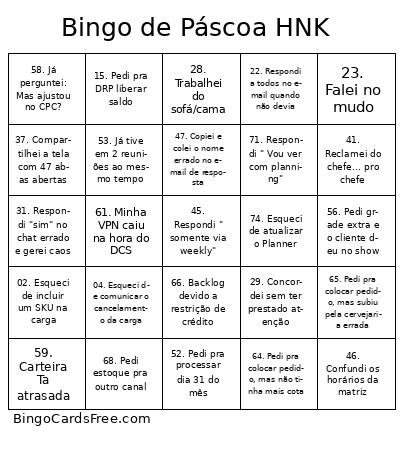
    claudio bingo CardsThis claudio bingo Cards Game contains following Words or Phrases: 01. Veículo chegou para carregar e não tinha produto, 02. Esqueci de incluir um SKU na carga, 03. Mandei e-mail e esqueci de anexar o arquivo, 04. Esqueci de comunicar o cancelamento da carga, 05. Atualizei a planilha errada, 06. Mandei a mensagem no grupo errado, 07. Dei "bom dia" às 16h, 08. Disse que ia chegar e não chegou, 09. Apareci na câmera de pijama, 10. Esqueci que era minha vez de apresentar o DCS, 11. Não mandei a ata da reunião, 12. Escrevi "peido" ao invés de pedido, 13. Confundi outras Danis com a Dani Sampaio, 14. Mandei carga sem agenda, 15. Pedi pra DRP liberar saldo, 16. Comemorei ATP positivo e negativou no mesmo dia, 17. Comemorei Backlog baixo e chorei depois, 18. Neguei saldo pro GPA, 19. Encomenda chegou na hora da apresentação, 20. Ignorei uma msg de T&O cobrando uma descarga, 21. Me arrumei pra visitar o cliente e ele desmarcou, 22. Respondi a todos no email quando não devia, 23. Falei no mudo, 24. Programei a dt fora da matriz, 25. Trabalhei da praia, 26. Fiquei horas com TI no PC, 27. Deletei arquivo que não podia, 28. Trabalhei do sofá/cama, 29. Concordei sem ter prestado atenção, 30. Derrubei café no notebook antes da reunião, 31. Respondi "sim" no chat errado e gerei caos, 32. Dei enter antes de terminar o que ia falar, 33. Falei mal do sistema com o fornecedor na call, 34. Agendei reunião em feriado, 35. Dei join na reunião errada e fiquei lá 5 minutos, 36. Fiz piada achando que era informal… e não era, 37. Compartilhei a tela com 47 abas abertas, 38. Botei a câmera achando que era outra reunião, 39. Esqueci de sair da call e fiquei "espiando" sem querer, 40. Mandei print do grupo pro grupo, 41. Reclamei do chefe… pro chefe, 42. Escrevi "beijos" em e-mail pro gerente, 43. Esqueci de salvar a planilha e perdi tudo, 44. Pedi pra alocar fora BOP, 45. Respondi " somente via weekly", 46. Confundi os horários da matriz, 47. Copiei e colei o nome errado no e-mail de resposta, 48. Não quis postergar meu pedido para ajustar o ATP, 49. Fiquei falando sozinho achando que tavam ouvindo, 50. Achei que tava de folga… e não tava, 51. Pedi matriz estendida, 52. Pedi pra processar dia 31 do mês, 53. Já tive em 2 reuniões ao mesmo tempo, 54. O BI já atualizou?, 55. Cliquei em "responder" achando que era "encaminhar", 56. Pedi grade extra e o cliente deu no show, 57. Já perguntei: reiniciou o computador?, 58. Já perguntei: Mas ajustou no CPC?, 59. Carteira Ta atrasada, 60. Quota está no nível Sku/Fabrica, 61. Minha VPN caiu na hora do DCS, 62. Ganhei sorteio de convite para um show, 63. To esperando o champion validar minha RFCA, 64. Pedi pra colocar pedido, mas não tinha mais cota, 65. Pedi pra colocar pedido, mas subiu pela cervejaria errada, 66. Backlog devido a restrição de crédito, 67. Perguntei 5x o que é reagregação, 68. Pedi estoque pra outro canal, 69. Respondi com "segue anexo" e esqueci o anexo, 70. Respondi a pesquisa da felicidade, 71. Respondi " Vou ver com planning", 72. Respondi " Vou ver com o Mario", 73. Respondi " Vou ver com a fábrica", 74. Esqueci de atualizar o Planner, 75. Pedi prioridade de alocação.

    Advertisement