
Bingo Cards - Print Free or Customize
Print free bingo cards or adjust them, limitless cards! Select from 42,200+ templates or use our bingo card generator. Add numbers, phrases, photos, or any combination. Play using PDF prints, online bingo cards, and our online bingo caller, or mix physical and digital.
About: This bingo card is perfect for fans of Phineas and Ferb looking to add some extra fun to their next watch party or marathon. Packed with quirky moments, iconic catchphrases, and classic character antics, it captures the spirit of the show and makes spotting your favorite running gags and surprises even more exciting. Great for groups or solo viewers alike!
How To: To get a PDF to print, click the Print button. You can modify the card count and other print options on the Print tab. Grid items and free space text can be changed on the Basic tab. Appearance can be exactly personalized on the relevant tabs, or you can quickly search any setting using the 🔍 tab.
How to play Bingo Cards?
- Online Players: Click on the Play button above, and then click on the 🎫 button.
- Online Caller: Click on the Play button above.
- Printed Players: Print PDF bingo cards and manually write on the cards.
- Printed Caller: Print PDF calling list & calling slips and manually choose the slips.
- Combo Mode: Choose any combination above. For instance, caller can be either Offline or Online. And players can be Offline or Online or a combo of both.
Step-By-Step:
- Start by downloading the Bingo PDF by clicking on the "Print" button above.
- Open the PDF and print a hard copy.
- For random calling, you can print another copy of the call list, cut, fold and then pick them randomly at play time.
- Cut the bingo cards at the cut marks if there are more than 1 bingo cards per page.
- Distribute one card per player. For marking, you can use crayons. Crayons are the cheapest.
- Choose one person to be the caller. If you are playing in a small group, the caller can as well play along with their own Bingo card.
- The caller starts the game by randomly pulling an item from the call list and saying it to everyone.
- The players check their cards to see if they have the called word. If they do, they cross off that word.
- The first player to complete a horizontal, vertical, or a diagonal line of crossed items announces "Bingo!" and wins the game.
- The caller validates that the items marked form a proper line as per the Bingo card and call list.
- You can play for varied patterns or a full card blackout for an extended game.
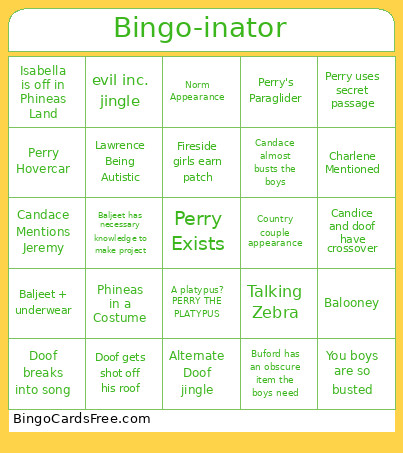 This Bingo Cards Game contains following Words or Phrases: (insert name)-inator!, A platypus? PERRY THE PLATYPUS, Agent P theme tune, Candace almost busts the boys, candace calling mom, Candace screams, Candace giggling maniacally, Candace Mentions Jeremy, Character breaks into song, Curse You Perry the Platypus, Doof and Perry fight scene, Doof breaks into song, Doof's backstory, Doof's trap, Doofinshmirtz gets hit by his own inator (unintentionally), evil inc. jingle, Get to the bottom of it, Hey Ferb, I know what we're gonna do today!, Hey, Where's Perry?, Inator self-destructs, Major Monogram speaking to Perry, You boys are so busted, Perry uses secret passage, What'cha doin?, there you are Perry, Stacy Reality Checks Candace, ___ happens behind an oblivious Candace, Agent Perry secret identity reveal near miss, Alternate Doof jingle, Aren't you a little young to be a ___, Baljeet + underwear, Baljeet has necessary knowledge to make project, Buford Gives English Nerd Vibes, Buford has an obscure item the boys need, Candace's Eye Twitches, Carl on Camera, Doof explains his whole plan to Perry, Doof gets shot off his roof, Doofenshmirtz says "and by x I mean COMPLETELY X", Ferb is Cut Off before speaking, Fireside girls are experts in whatever the boys need, Fireside girls earn patch, Fireside Girls Other Than Isabella, I'll call you back., Isabella is off in Phineas Land, Jeremy in the Hot-Dog Hat, Lawrence Being Autistic, Linda (mom) makes a snack, Linda Gets Her Hair Done, Major Monogram contacts Perry via watch, Owca mention, Perry Hit With Inator, Perry Hovercar, Perry's Paraglider, Vanessa appearance, Phineas and Ferb's invention draws a large crowd, Phineas in a Costume, A Different Animal Agent, Balooney, Candice and doof have crossover, Charlene Mentioned, Country couple appearance, Ducky momo, Ferb + Vanessa, Fourth wall break, Giant floating baby head, Gichee gichee goo, Irving is a Little Creep, Love Handel, LOVEMUFFIN, Mayor Roger Appearance, Meap, Norm Appearance, Woefully Underdressed Doof, Talking Zebra, Perry actually uses a door.