Print free BINGO item hunt cards or alter them,
unlimited cards! Select from 41,500+ templates or use our bingo card generator.
Add numbers, phrases, photos, or all of them.
Play using PDF prints, online bingo cards,
and our online bingo caller, or combine all formats.
About: This bingo card is perfect for a lively photo scavenger hunt and encourages creativity, exploration, and a bit of silliness. Whether at a team-building event, summer camp, or a party with friends, participants will have fun tracking down quirky objects and snapping memorable photos. Expect plenty of laughs and some unexpected discoveries along the way!
How To: To download a printable PDF, click the Print button.
You can alter the number of cards and other
print preferences on the Print tab.
Grid items and free space text can be changed on the Basic tab.
Appearance can be entirely customized on the
corresponding tabs, or you can easily locate any setting
using the 🔍 tab.
How to play BINGO item hunt Cards?
Printed Players: Print PDF bingo cards and manually write on the cards.
Virtual Caller: Click on the Play button above.
Printed Caller: Print PDF calling list & calling slips and manually choose the slips.
Virtual Players: Click on the Play button above, and then click on the 🎫 button.
Mixed Mode: Choose any combination above.
For example, caller can be either Offline or Virtual.
And players can be Offline or Virtual or a combo of both.
Step-By-Step:
Start by downloading the BINGO item hunt PDF by clicking on the "Print" button above.
Open the PDF and print it.
For random drawing, you can print another copy of the call list, cut, fold and then pull them randomly at play time.
Cut the bingo cards at the cut lines if there are greater than 1 bingo cards per page.
Distribute one card per player. For marking, you can use pens. Crayons cost the least.
Choose one person to be the caller. If you are playing in a small group, the caller may also play along with their own Bingo card.
The caller initiates the game by randomly picking an item from the call list and announcing it to all players.
The players look at their cards to see if they have the called word. If they do, they cross off that word.
The first player to finish a horizontal, vertical, or a diagonal line of crossed items yells "Bingo!" and wins the game.
The caller verifies that the items marked form a proper line as per the Bingo card and call list.
You can play for multiple patterns or a full card blackout for a longer game.
This BINGO item hunt Cards Game contains following Words or Phrases: Capture your image next to anything made of gold, Capture yourself next to any plant or flower pot, Find a red balloon and take a picture with it, Find a toy car and capture it in your picture, Find and snap yourself near anything that floats above ground, Find and take your picture near hanging lights or lanterns, Lean against any wall covered in drawings for your shot, Pose by any clock or watch you can find, Pose next to a giant pencil you find somewhere, Pose next to something spinning around quickly, Pose with a teddy bear you discover in the world, Pretend to sleep on any bed found in the world, Sit by any fireplace and snap your photo there, Snap a photo with an unusual hat on your head, Snap your avatar beside anything shaped like fruit, Snap yourself holding an umbrella inside the world, Snap yourself holding or near colorful balloons, Snap yourself with any kind of animal plushie toy, Stand by anything that makes music when touched, Stand under any tree inside the world for your photo, Take a group selfie near any rainbow object found, Take a photo wearing any mask found in the world, Take a picture holding a shiny blue crystal, Take a picture standing next to an ice cream cone, Take a selfie beside a hidden rubber duck, Take a selfie with an oversized book you spot, Take your photo sitting on an unusual chair or bench, Take your picture next to anything that glows bright green, Take your picture pointing at anything written on walls, Wave at the camera while standing on stairs inside.

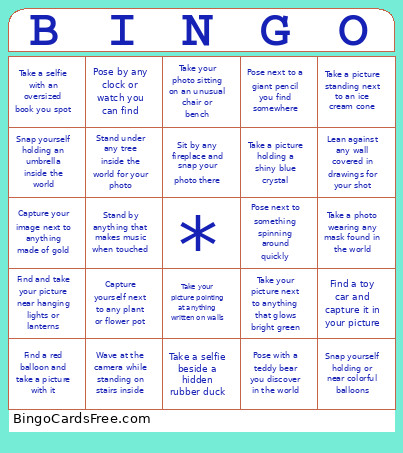 This BINGO item hunt Cards Game contains following Words or Phrases: Capture your image next to anything made of gold, Capture yourself next to any plant or flower pot, Find a red balloon and take a picture with it, Find a toy car and capture it in your picture, Find and snap yourself near anything that floats above ground, Find and take your picture near hanging lights or lanterns, Lean against any wall covered in drawings for your shot, Pose by any clock or watch you can find, Pose next to a giant pencil you find somewhere, Pose next to something spinning around quickly, Pose with a teddy bear you discover in the world, Pretend to sleep on any bed found in the world, Sit by any fireplace and snap your photo there, Snap a photo with an unusual hat on your head, Snap your avatar beside anything shaped like fruit, Snap yourself holding an umbrella inside the world, Snap yourself holding or near colorful balloons, Snap yourself with any kind of animal plushie toy, Stand by anything that makes music when touched, Stand under any tree inside the world for your photo, Take a group selfie near any rainbow object found, Take a photo wearing any mask found in the world, Take a picture holding a shiny blue crystal, Take a picture standing next to an ice cream cone, Take a selfie beside a hidden rubber duck, Take a selfie with an oversized book you spot, Take your photo sitting on an unusual chair or bench, Take your picture next to anything that glows bright green, Take your picture pointing at anything written on walls, Wave at the camera while standing on stairs inside.