Print free Testing bingo cards or personalize,
limitless prints! Select from 41,500+ templates or use our bingo card generator.
Add numbers, words, photos, or mix them all.
Play using printed PDF, online bingo cards,
and our online bingo caller, or combine all formats.
About: This bingo card is a charming celebration of Beatles songs, each square capturing the positive, whimsical spirit of their lyrics. Perfect for music lovers of all ages or themed parties, it sets a cheerful tone and encourages togetherness, friendship, and joy. Use it for family gatherings, classrooms, or fan events to spark smiles and singalongs.
How To: To download a printable PDF, click the Print button.
You can adjust the number of cards and other
print settings on the Print tab.
Grid items and free space content can be edited on the Basic tab.
Appearance can be totally customized on the
corresponding tabs, or you can quickly search any option
on the 🔍 tab.
How to play Testing Bingo Cards?
Printed Caller: Print PDF calling list & calling slips and physically pick the slips.
Digital Caller: Click on the Play button above.
Printed Players: Print PDF bingo cards and physically scratch the cards.
Digital Players: Click on the Play button above, and then click on the 🎫 button.
Hybrid Play: Choose any combination above.
For instance, caller can be either Paper or Digital.
And players can be Paper or Digital or a mix of both.
Step-By-Step:
Start by getting the Testing PDF by clicking on the "Print" button above.
Open the PDF and print a hard copy.
For random calling, you can print another copy of the call list, cut, fold and then pull them randomly at play time.
Cut the bingo cards at the cut marks if there are greater than 1 bingo cards per page.
Give one card to each player. For marking, you can use pencils. Crayons cost the least.
Choose one person to be the caller. If you are playing in a small group, the caller may as well play along with their own Bingo card.
The caller opens the play by randomly picking an item from the call list and calling out it to all players.
The players scan their cards to see if they have the called word. If they do, they dab that word.
The first player to finish a horizontal, vertical, or a diagonal line of marked items shouts "Bingo!" and wins the game.
The caller checks that the items crossed off form a correct line according to the Bingo card and call list.
You can play for multiple patterns or a full card blackout for a longer game.
This Testing Bingo Cards Game contains following Words or Phrases: A Hard Day's Night ends with happy dreams, Across the Universe stars twinkle brightly, All My Loving sends hugs, All Together Now everyone joins hands, All You Need Is Love fills hearts, Baby You're a Rich Man smiles wide, Day Tripper loves fun journeys, Drive My Car beeps along the road safely, Eight Days a Week shows lots of love, From Me to You sends good wishes, Getting Better every single day, Golden Slumbers bring sweet dreams, Good Day Sunshine makes smiles grow big, Hello Little Girl waves hello sweetly, Help is always there for friends, I Want to Hold Your Hand feels friendly, Lady Madonna cares for her children kindly, Let It Be brings peaceful feelings, Love Me Do sings about kindness, Lovely Rita helps people cross safely, Lucy in the Sky with Diamonds shines bright, Nowhere Man finds his way home, Ob-La-Di Ob-La-Da life goes on happily, Penny Lane has blue suburban skies, Rain falls gently outside, She Loves You yeah yeah yeah!, The Fool on the Hill watches quietly, The Long and Winding Road leads home, Twist and Shout makes everyone dance, While My Guitar Gently Weeps softly plays music.

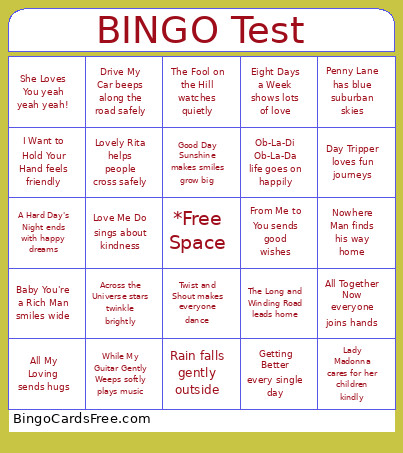 This Testing Bingo Cards Game contains following Words or Phrases: A Hard Day's Night ends with happy dreams, Across the Universe stars twinkle brightly, All My Loving sends hugs, All Together Now everyone joins hands, All You Need Is Love fills hearts, Baby You're a Rich Man smiles wide, Day Tripper loves fun journeys, Drive My Car beeps along the road safely, Eight Days a Week shows lots of love, From Me to You sends good wishes, Getting Better every single day, Golden Slumbers bring sweet dreams, Good Day Sunshine makes smiles grow big, Hello Little Girl waves hello sweetly, Help is always there for friends, I Want to Hold Your Hand feels friendly, Lady Madonna cares for her children kindly, Let It Be brings peaceful feelings, Love Me Do sings about kindness, Lovely Rita helps people cross safely, Lucy in the Sky with Diamonds shines bright, Nowhere Man finds his way home, Ob-La-Di Ob-La-Da life goes on happily, Penny Lane has blue suburban skies, Rain falls gently outside, She Loves You yeah yeah yeah!, The Fool on the Hill watches quietly, The Long and Winding Road leads home, Twist and Shout makes everyone dance, While My Guitar Gently Weeps softly plays music.