Print free Ruby2 bingo cards or customize,
unlimited cards! Pick from 42,200+ templates or use our bingo card generator.
Add numbers, phrases, pictures, or any combination.
Play using PDF printouts, digital bingo cards,
and our digital bingo caller, or mix physical and digital.
About: This bingo card is perfect for a fun, energetic party or theater-themed gathering, especially among friends who share a love for musicals and playful antics. With challenges ranging from breaking into song to quirky inside jokes and interactive dares, it’s designed to get everyone laughing, mingling, and celebrating the guest of honor in memorable ways.
How To: To get a PDF to print, click the Print button.
You can change the card quantity and other
printing preferences on the Print tab.
Grid items and free space content can be added on the Basic tab.
Appearance can be highly customized on the
relevant tabs, or you can quickly locate any option
on the 🔍 tab.
How to play Ruby2 Bingo Cards?
Paper Players: Print PDF bingo cards and manually mark the cards.
Online Players: Click on the Play button above, and then click on the 🎫 button.
Online Caller: Click on the Play button above.
Paper Caller: Print PDF calling list & calling slips and manually pick the slips.
Hybrid Mode: Pick any combination above.
For instance, caller can be either Printed or Online.
And players can be Printed or Online or a combo of both.
Step-By-Step:
Start by downloading the Ruby2 PDF by clicking on the "Print" button above.
Open the PDF and print it.
For random drawing, you can print another copy of the call list, cut, fold and then pick them randomly at play time.
Cut the bingo cards at the cut marks if there are greater than 1 bingo cards per page.
Give one card to each player. For marking, you can use pens. Crayons cost the least.
Pick one person to be the caller. If you are playing in a small group, the caller may also play along with their own Bingo card.
The caller initiates the play by randomly pulling an item from the call list and saying it to everyone.
The players look at their cards to see if they have the announced word. If they do, they cross off that word.
The first player to complete a horizontal, vertical, or a diagonal line of marked items announces "Bingo!" and wins the game.
The caller verifies that the items crossed off form a correct line as per the Bingo card and call list.
You can play for multiple patterns or a full card blackout for a longer game.
This Ruby2 Bingo Cards Game contains following Words or Phrases: Ruby says "musical reference ", Ruby mentions the play that goes wrong, Ruby mentions urinetown, Someone breaks into song, Walk in someone else's shoes, Take a selfie with someone you don't know, Someone trips and falls, You win kahoot!, Find a rubber duck, "Baka!", If you know Rubys actual birthday, Find someone who has a tattoo, Win rock paper scissors, Get a compliment from a stranger, Micheal in The Bathroom, Blind karaoke occurs, Draw yourself on the paper, If you're having fun, Meet a new person, Take some photos, Wear a boa for 15 minutes, If you can name 5 of rubys shows, Start a chant/song, Throw a drink on someone, Eat a cupcake with no hands, Kiss someone on the cheek, Successfully get Ruby to catch something, Sondheim mention, "Yk I hate Andrew Lloyd Weber", Learn something new about Ruby, Pretend to pass out, "That's a good question Mrs colleymoore", The party goes until at least midnight, If you know ruby's next show.

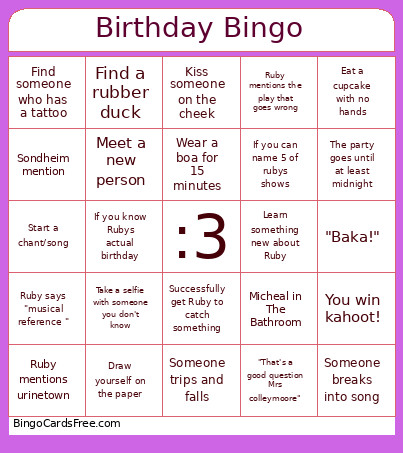 This Ruby2 Bingo Cards Game contains following Words or Phrases: Ruby says "musical reference ", Ruby mentions the play that goes wrong, Ruby mentions urinetown, Someone breaks into song, Walk in someone else's shoes, Take a selfie with someone you don't know, Someone trips and falls, You win kahoot!, Find a rubber duck, "Baka!", If you know Rubys actual birthday, Find someone who has a tattoo, Win rock paper scissors, Get a compliment from a stranger, Micheal in The Bathroom, Blind karaoke occurs, Draw yourself on the paper, If you're having fun, Meet a new person, Take some photos, Wear a boa for 15 minutes, If you can name 5 of rubys shows, Start a chant/song, Throw a drink on someone, Eat a cupcake with no hands, Kiss someone on the cheek, Successfully get Ruby to catch something, Sondheim mention, "Yk I hate Andrew Lloyd Weber", Learn something new about Ruby, Pretend to pass out, "That's a good question Mrs colleymoore", The party goes until at least midnight, If you know ruby's next show.