Print free bingo cards or personalize,
limitless cards! Choose from 42,600+ templates or use the bingo card generator.
Add numbers, phrases, images, or mix them all.
Play using PDF printouts, digital bingo cards,
and the digital bingo caller, or combine all formats.
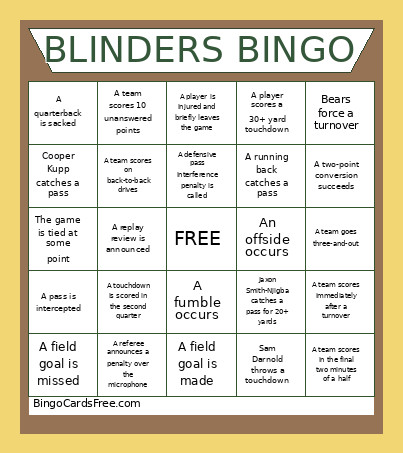
About: This bingo card is perfect for fans tuning into a Seahawks versus Bears football matchup. It captures the excitement and unpredictability of an NFL game, with boxes covering standout plays, penalties, commentary moments, and wild fan antics. Whether you’re watching with friends or at a watch party, this card turns every drive and dramatic turn into a reason to cheer.
How To: To save a printable PDF, click the Print button.
You can modify the number of cards and other
printing options on the Print tab.
Grid items and free space content can be added on the Basic tab.
Appearance can be totally customized on the
relevant tabs, or you can easily find any option
using the 🔍 tab.
How to play Bingo Cards?
Online Players: Click on the Play button above, and then click on the 🎫 button.
Paper Caller: Print PDF calling list & calling slips and physically draw the slips.
Online Caller: Click on the Play button above.
Paper Players: Print PDF bingo cards and physically write on the cards.
Hybrid Play: Choose any combination above.
For instance, caller can be either Printed or Online.
And players can be Printed or Online or a mix of both.
Step-By-Step:
Start by getting the Bingo PDF by clicking on the "Print" button above.
Open the PDF and print a hard copy.
For random calling, you can print another copy of the call list, cut, fold and then pick them randomly at play time.
Cut the bingo cards at the cut lines if there are greater than 1 bingo cards per page.
Give one card to each player. For marking, you can use markers. Crayons are the cheapest.
Choose one person to be the caller. If you are playing in a small group, the caller can as well play along with their own Bingo card.
The caller begins the play by randomly pulling an item from the call list and calling out it to all players.
The players scan their cards to see if they have the announced word. If they do, they dab that word.
The first player to finish a horizontal, vertical, or a diagonal line of crossed items shouts "Bingo!" and wins the play.
The caller validates that the items crossed off form a proper line as per the Bingo card and call list.
You can play for different patterns or a full card blackout for a longer play.
This Bingo Cards Game contains following Words or Phrases: Sam Darnold throws a touchdown, Caleb Williams throws a touchdown, Deandre Swfit rushes for 20+ yards on one play, Jaxon Smith-Njigba catches a pass for 20+ yards, Jaxon Smith-Njigba catches a touchdown, Rome Odunze catches a pass for 15+ yards, Cooper Kupp catches a pass, Colston Loveland catches a pass, Seahawks force a turnover, Bears force a turnover, Either team scores on its opening drive, A field goal is made, A field goal is missed, A touchdown is scored in the first quarter, A touchdown is scored in the second quarter, A team scores on back-to-back drives, A quarterback is sacked, A pass is intercepted, A fumble occurs, A player celebrates with a dance, A coach is shown arguing with a referee, A penalty wipes out a big play, A defensive pass interference penalty is called, A holding penalty is called, A team converts on fourth down, A team fails to convert on fourth down, A team converts a third down with 10+ yards to go, A team goes three-and-out, A punt travels 50+ yards, A punt is returned for 15+ yards, A kickoff is returned past the 30-yard line, A two-point conversion is attempted, A two-point conversion succeeds, A team scores in the final two minutes of a half, A team scores immediately after a turnover, A quarterback scrambles for 10+ yards, A running back catches a pass, A tight end catches a touchdown, A receiver drops a pass, A player is injured and briefly leaves the game, A replay review is announced, A referee announces a penalty over the microphone, The broadcast shows a celebrity or notable fan, The broadcast shows a fan wearing a funny costume, The commentators mention the playoffs, The commentators mention a previous Seahawks-Bears matchup, A player scores a 30+ yard touchdown, A team scores 10 unanswered points, The game is tied at some point, An offside occurs.

 This Bingo Cards Game contains following Words or Phrases: Sam Darnold throws a touchdown, Caleb Williams throws a touchdown, Deandre Swfit rushes for 20+ yards on one play, Jaxon Smith-Njigba catches a pass for 20+ yards, Jaxon Smith-Njigba catches a touchdown, Rome Odunze catches a pass for 15+ yards, Cooper Kupp catches a pass, Colston Loveland catches a pass, Seahawks force a turnover, Bears force a turnover, Either team scores on its opening drive, A field goal is made, A field goal is missed, A touchdown is scored in the first quarter, A touchdown is scored in the second quarter, A team scores on back-to-back drives, A quarterback is sacked, A pass is intercepted, A fumble occurs, A player celebrates with a dance, A coach is shown arguing with a referee, A penalty wipes out a big play, A defensive pass interference penalty is called, A holding penalty is called, A team converts on fourth down, A team fails to convert on fourth down, A team converts a third down with 10+ yards to go, A team goes three-and-out, A punt travels 50+ yards, A punt is returned for 15+ yards, A kickoff is returned past the 30-yard line, A two-point conversion is attempted, A two-point conversion succeeds, A team scores in the final two minutes of a half, A team scores immediately after a turnover, A quarterback scrambles for 10+ yards, A running back catches a pass, A tight end catches a touchdown, A receiver drops a pass, A player is injured and briefly leaves the game, A replay review is announced, A referee announces a penalty over the microphone, The broadcast shows a celebrity or notable fan, The broadcast shows a fan wearing a funny costume, The commentators mention the playoffs, The commentators mention a previous Seahawks-Bears matchup, A player scores a 30+ yard touchdown, A team scores 10 unanswered points, The game is tied at some point, An offside occurs.