Print free Block Party bingo cards or alter them,
unlimited cards! Pick from 42,200+ templates or use the bingo card generator.
Add numbers, words, photos, or any combination.
Play using printed PDF, online bingo cards,
and the online bingo caller, or combine all formats.
About: This bingo card is designed for a neighborhood gathering, like a block party or community mixer, and helps people break the ice while having fun. It highlights the unique backgrounds, skills, and experiences of neighbors, sparking conversations and helping everyone find common ground. It’s perfect for building connections in a welcoming, laid-back atmosphere.
How To: To save a printable PDF, click the Print button.
You can alter the number of cards and other
printing options on the Print tab.
Grid items and free space content can be changed on the Basic tab.
Appearance can be totally customized on the
corresponding tabs, or you can quickly find any setting
on the 🔍 tab.
How to play Block Party Bingo Cards?
Printed Players: Print PDF bingo cards and physically scratch the cards.
Printed Caller: Print PDF calling list & calling slips and physically select the slips.
Digital Caller: Click on the Play button above.
Digital Players: Click on the Play button above, and then click on the 🎫 button.
Hybrid Play: Choose any combination above.
For instance, caller can be either Paper or Digital.
And players can be Paper or Digital or a combo of both.
Step-By-Step:
Start by downloading the Block Party Bingo PDF by clicking on the "Print" button above.
Open the PDF and print a hard copy.
For random calling, you can print another copy of the call list, cut, fold and then pick them randomly at play time.
Cut the bingo cards at the cut lines if there are more than 1 bingo cards per page.
Distribute one card per player. For marking, you can use markers. Crayons are the cheapest.
Choose one person to be the caller. If you are playing in a small group, the caller can also play along with their own Bingo card.
The caller starts the game by randomly picking an item from the call list and saying it to all players.
The players check their cards to see if they have the called word. If they do, they cross off that word.
The first player to finish a horizontal, vertical, or a diagonal line of marked items yells "Bingo!" and wins the game.
The caller confirms that the items marked form a correct line as per the Bingo card and call list.
You can play for varied patterns or a full card blackout for a longer game.
This Block Party Bingo Cards Game contains following Words or Phrases: Single-generation household, Kids go to Chappell, Kids go to Amundsen, Kids go to school outside the neighborhood, Work from home, Has lived in the neighborhood over 10 years, Has Kids under 10, Is an empty nester, Is retired, Has a garden, Just moved within the past year, Knows more than 3 neighbors by name, Volunteers locally, Attended last year's block party, Bakes from scratch, Loves to grill, Plays a musical instrument, Runs/walks/rides a bike regularly, Has a book recommendation, Has been to more than 5 countries, Speaks more than one language, Was born in another state, Has family in another country, Knows how to Salsa dance, Has been on a cruise, Is into photography, Has a unique talent or party trick, Is a bad cook, Is a twin or has twins, Is an only child, Shares a birthday month with you, Drives a red car, Was in a marching band or sports team on school, Has the same favorite color as you, Has met a celebrity, Grew up in Chicago.

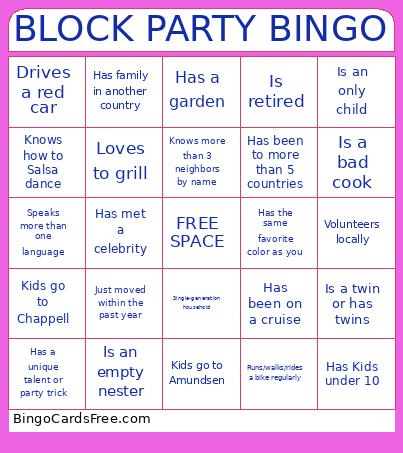 This Block Party Bingo Cards Game contains following Words or Phrases: Single-generation household, Kids go to Chappell, Kids go to Amundsen, Kids go to school outside the neighborhood, Work from home, Has lived in the neighborhood over 10 years, Has Kids under 10, Is an empty nester, Is retired, Has a garden, Just moved within the past year, Knows more than 3 neighbors by name, Volunteers locally, Attended last year's block party, Bakes from scratch, Loves to grill, Plays a musical instrument, Runs/walks/rides a bike regularly, Has a book recommendation, Has been to more than 5 countries, Speaks more than one language, Was born in another state, Has family in another country, Knows how to Salsa dance, Has been on a cruise, Is into photography, Has a unique talent or party trick, Is a bad cook, Is a twin or has twins, Is an only child, Shares a birthday month with you, Drives a red car, Was in a marching band or sports team on school, Has the same favorite color as you, Has met a celebrity, Grew up in Chicago.