Print free book bingo cards or personalize,
unlimited cards! Pick from 41,500+ templates or use the bingo card generator.
Add numbers, words, pictures, or mix them all.
Play using printable PDF, virtual bingo cards,
and the virtual bingo caller, or go hybrid.
About: This bingo card celebrates classic and beloved children's books, perfect for engaging young readers or sparking nostalgia among adults. From imaginative adventures to timeless tales, it covers a broad spectrum of stories that have shaped generations. Use this at book fairs, school events, or family game nights to inspire memories and conversations about favorite childhood reads.
How To: To download a PDF to print, click the Print button.
You can change the card quantity and other
print preferences on the Print tab.
Grid items and free space text can be changed on the Basic tab.
Appearance can be totally customized on the
relevant tabs, or you can quickly find any setting
using the 🔍 tab.
How to play book bingo Cards?
Paper Players: Print PDF bingo cards and manually mark the cards.
Virtual Caller: Click on the Play button above.
Virtual Players: Click on the Play button above, and then click on the 🎫 button.
Paper Caller: Print PDF calling list & calling slips and manually select the slips.
Hybrid Play: Pick any combination above.
For instance, caller can be either Printed or Virtual.
And players can be Printed or Virtual or a combo of both.
Step-By-Step:
Start by downloading the book bingo PDF by clicking on the "Print" button above.
Open the PDF and print a hard copy.
For random drawing, you can print another copy of the call list, cut, fold and then draw them randomly at play time.
Cut the bingo cards at the cut lines if there are more than 1 bingo cards per page.
Give one card to each player. For marking, you can use pens. Crayons are the cheapest.
Pick one person to be the caller. If you are playing in a small group, the caller can also play along with their own Bingo card.
The caller opens the game by randomly picking an item from the call list and calling out it to everyone.
The players check their cards to see if they have the announced word. If they do, they cross off that word.
The first player to complete a horizontal, vertical, or a diagonal line of crossed items announces "Bingo!" and wins the play.
The caller confirms that the items crossed off form a correct line according to the Bingo card and call list.
You can play for different patterns or a full card blackout for an extended play.
This book bingo Cards Game contains following Words or Phrases: Bridge to Terabithia, Dinotopia, Harold and the Purple Crayon, Cloudy With a Chance of Meatballs, The Golden Compass, Black Beauty, Redwall, Bud, Not Buddy, The Secret Garden, Anne of Green Gables, How to Eat Fried Worms, There Was an Old Lady Who Swallowed a Fly!, We Are Water Protectors, A Bear Called Paddington, Frog and Toad Are Friends, American Born Chinese, Meet Samantha, The Day Jimmy's Boa Ate the Wash, Little House on the Prairie, The Velveteen Rabbit, Jumanji, The Bad Seed, Where the Red Fern Grows, Dinosaurs Before Dark, Warriors: Into the Wild, The Bad Beginning, The Monster at the End of This Book, Harriet the Spy, The Rainbow Fish, The Lion, the Witch, and the Wardrobe, Strega Nona, Pete the Cat: I Love My White Shoes, The Story of Ferdinand, The Kissing Hand, Misty of Chicoteague, The Adventures of Captain Underpants, The Little Prince, The Day the Crayons Quit, Click, Clack, Moo: Cows That Type, Miss Nelson Is Missing!, Diary of a Wimpy Kid, The True Story of the 3 Little Pigs, Green Eggs and Ham, Peter Pan, Welcome to Dead House, Matilda, Amelia Bedelia, Bunnicula, Angelina Ballerina, Little Bear, Junie B. Jones and the Stupid Smelly Bus, Mary Poppins, Curious George, Where the Wild Things Are, Madeline, The Giving Tree, The Snowy Day, Artemis Fowl, The One and Only Ivan, Corduroy, If You Give a Mouse a Cookie, Goodnight Moon, Walk Two Moons, Number the Stars, Don't Let the Pigeon Drive the Bus!, Stellaluna, New Kid, The Very Hungry Caterpillar, Kristy's Great Idea, Knight Owl, Are You There God? It's Me, Margaret, Percy Jackson and the Lightning Thief, Eloise, Inkheart, The Boxcar Children, Holes, Ella Enchanted, Charlotte's Web, Big, Sadako and the Thousand Paper Cranes, Harry Potter and the Sorcerer's Stone, Frindle.

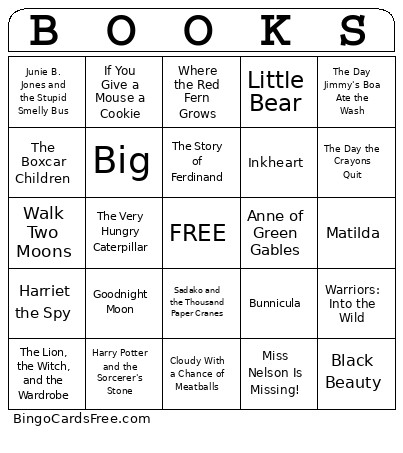 This book bingo Cards Game contains following Words or Phrases: Bridge to Terabithia, Dinotopia, Harold and the Purple Crayon, Cloudy With a Chance of Meatballs, The Golden Compass, Black Beauty, Redwall, Bud, Not Buddy, The Secret Garden, Anne of Green Gables, How to Eat Fried Worms, There Was an Old Lady Who Swallowed a Fly!, We Are Water Protectors, A Bear Called Paddington, Frog and Toad Are Friends, American Born Chinese, Meet Samantha, The Day Jimmy's Boa Ate the Wash, Little House on the Prairie, The Velveteen Rabbit, Jumanji, The Bad Seed, Where the Red Fern Grows, Dinosaurs Before Dark, Warriors: Into the Wild, The Bad Beginning, The Monster at the End of This Book, Harriet the Spy, The Rainbow Fish, The Lion, the Witch, and the Wardrobe, Strega Nona, Pete the Cat: I Love My White Shoes, The Story of Ferdinand, The Kissing Hand, Misty of Chicoteague, The Adventures of Captain Underpants, The Little Prince, The Day the Crayons Quit, Click, Clack, Moo: Cows That Type, Miss Nelson Is Missing!, Diary of a Wimpy Kid, The True Story of the 3 Little Pigs, Green Eggs and Ham, Peter Pan, Welcome to Dead House, Matilda, Amelia Bedelia, Bunnicula, Angelina Ballerina, Little Bear, Junie B. Jones and the Stupid Smelly Bus, Mary Poppins, Curious George, Where the Wild Things Are, Madeline, The Giving Tree, The Snowy Day, Artemis Fowl, The One and Only Ivan, Corduroy, If You Give a Mouse a Cookie, Goodnight Moon, Walk Two Moons, Number the Stars, Don't Let the Pigeon Drive the Bus!, Stellaluna, New Kid, The Very Hungry Caterpillar, Kristy's Great Idea, Knight Owl, Are You There God? It's Me, Margaret, Percy Jackson and the Lightning Thief, Eloise, Inkheart, The Boxcar Children, Holes, Ella Enchanted, Charlotte's Web, Big, Sadako and the Thousand Paper Cranes, Harry Potter and the Sorcerer's Stone, Frindle.