Print free Book bingo cards or modify,
unlimited cards! Choose from 41,500+ templates or use the bingo card generator.
Add numbers, phrases, pictures, or mix them all.
Play using printable PDF, virtual bingo cards,
and the virtual bingo caller, or mix physical and digital.
About: This bingo card is a perfect pick for book lovers looking to broaden their literary horizons. Featuring a vibrant mix of genres, authors, and themes—from recent bestsellers to timeless classics—it’s designed to encourage adventurous reading and spark lively discussions. Ideal for book clubs or reading challenges, it celebrates diversity in storytelling and voice.
How To: To get a printable PDF, click the Print button.
You can modify the number of cards and other
printing preferences on the Print tab.
Grid items and free space text can be added on the Basic tab.
Appearance can be fully customized on the
relevant tabs, or you can quickly search any preference
using the 🔍 tab.
How to play Book Bingo Cards?
Printed Caller: Print PDF calling list & calling slips and physically choose the slips.
Printed Players: Print PDF bingo cards and physically scratch the cards.
Online Caller: Click on the Play button above.
Online Players: Click on the Play button above, and then click on the 🎫 button.
Mixed Mode: Select any combination above.
For instance, caller can be either Paper or Online.
And players can be Paper or Online or a combination of both.
Step-By-Step:
Start by saving the Book Bingo PDF by clicking on the "Print" button above.
Open the PDF and print a hard copy.
For random drawing, you can print another copy of the call list, cut, fold and then pull them randomly at play time.
Cut the bingo cards at the cut lines if there are greater than 1 bingo cards per page.
Distribute one card per player. For marking, you can use pencils. Crayons are the cheapest.
Select one person to be the caller. If you are playing in a small group, the caller may as well play along with their own Bingo card.
The caller starts the game by randomly picking an item from the call list and saying it to everyone.
The players scan their cards to see if they have the announced word. If they do, they cross off that word.
The first player to finish a horizontal, vertical, or a diagonal line of marked items yells "Bingo!" and wins the game.
The caller validates that the items marked form a correct line according to the Bingo card and call list.
You can play for different patterns or a full card blackout for an extended game.
This Book Bingo Cards Game contains following Words or Phrases: Published in the 2020s - Witch King by Martha Wells, Read the World - Human Acts by Han Kang, Fantasy - Fairy Tale by Stephen King, Bonus Book - Three Comrades by Erich Maria Remarque, Monthly Mini - Human Resource by Adrian Tchaikovsky, Poetry Corner - Brought from Beyond by Amy Clampitt, Nonfiction - A Room of One's Own by Virginia Woolf, LGBTQ - Sister Snake by Amanda Lee Koe, Mythology - The Hobbit by J.R.R. Tolkien, Indigenous Author - The Break by Katherena Vermette, Gutenberg - Emma by Jane Austen, Mod Pick - The Magicians by Lev Grossman, Big Read - Our Share of Night by Mariana Enriquez, Science Fiction - Carl's Doomsday Scenario by Matt Dinniman, Prize Winner - Invisible Helix by Keigo Higashino, Evergreen - Horns by Joe Hill, Historical Fiction - Dead Man's Walk by Larry McMurtry, Runner-Up Read - Quicksilver by Callie Hart, POC Author - Fledgling by Octavia Butler, Horror - The Witching Hour by Anna Rice, Discovery Read - Trail of Lightning by Rebecca Roanhorse, Female Author - Network Effect by Martha Wells, Mystery/Thriller - Yellowface by R.F. Kuang, Romance - The Frog King by Garth Greenwell.

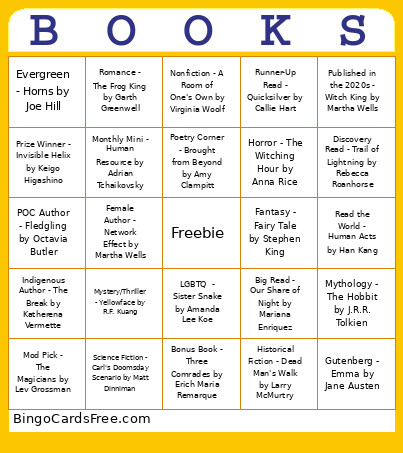 This Book Bingo Cards Game contains following Words or Phrases: Published in the 2020s - Witch King by Martha Wells, Read the World - Human Acts by Han Kang, Fantasy - Fairy Tale by Stephen King, Bonus Book - Three Comrades by Erich Maria Remarque, Monthly Mini - Human Resource by Adrian Tchaikovsky, Poetry Corner - Brought from Beyond by Amy Clampitt, Nonfiction - A Room of One's Own by Virginia Woolf, LGBTQ - Sister Snake by Amanda Lee Koe, Mythology - The Hobbit by J.R.R. Tolkien, Indigenous Author - The Break by Katherena Vermette, Gutenberg - Emma by Jane Austen, Mod Pick - The Magicians by Lev Grossman, Big Read - Our Share of Night by Mariana Enriquez, Science Fiction - Carl's Doomsday Scenario by Matt Dinniman, Prize Winner - Invisible Helix by Keigo Higashino, Evergreen - Horns by Joe Hill, Historical Fiction - Dead Man's Walk by Larry McMurtry, Runner-Up Read - Quicksilver by Callie Hart, POC Author - Fledgling by Octavia Butler, Horror - The Witching Hour by Anna Rice, Discovery Read - Trail of Lightning by Rebecca Roanhorse, Female Author - Network Effect by Martha Wells, Mystery/Thriller - Yellowface by R.F. Kuang, Romance - The Frog King by Garth Greenwell.