Boos' Book Bingo 6x6 Cards - Print Free or Customize
Print free Boos' Book bingo 6x6 cards or alter them,
unlimited prints! Select from 42,600+ designs or use our bingo card generator.
Add numbers, words, photos, or all of them.
Play using PDF printouts, digital bingo cards,
and our digital bingo caller, or go hybrid.
About: This bingo card is a playful celebration of reading adventures, perfect for book clubs, reading challenges, or a group of friends looking to spice up their TBR piles. With prompts ranging from quirky covers and magical characters to themes of revenge and community, it encourages readers to explore outside their comfort zones and share unexpected literary discoveries together.
How To: To get a PDF to print, click the Print button.
You can alter the number of cards and other
print options on the Print tab.
Grid items and free space content can be changed on the Basic tab.
Appearance can be entirely customized on the
corresponding tabs, or you can easily locate any preference
using the 🔍 tab.
How to play Boos' Book Bingo 6x6 Cards?
Digital Players: Click on the Play button above, and then click on the 🎫 button.
Paper Players: Print PDF bingo cards and physically mark the cards.
Paper Caller: Print PDF calling list & calling slips and physically select the slips.
Digital Caller: Click on the Play button above.
Combo Mode: Pick any combination above.
For example, caller can be either Printed or Digital.
And players can be Printed or Digital or a combo of both.
Step-By-Step:
Start by getting the Boos' Book Bingo 6x6 PDF by clicking on the "Print" button above.
Open the PDF and print it.
For random drawing, you can print another copy of the call list, cut, fold and then pull them randomly at play time.
Cut the bingo cards at the cut marks if there are more than 1 bingo cards per page.
Give one card to each player. For marking, you can use markers. Crayons cost the least.
Pick one person to be the caller. If you are playing in a small group, the caller may also play along with their own Bingo card.
The caller begins the play by randomly drawing an item from the call list and calling out it to everyone.
The players look at their cards to see if they have the called word. If they do, they cross off that word.
The first player to finish a horizontal, vertical, or a diagonal line of marked items yells "Bingo!" and wins the game.
The caller validates that the items crossed off form a correct line according to the Bingo card and call list.
You can play for multiple patterns or a full card blackout for an extended game.
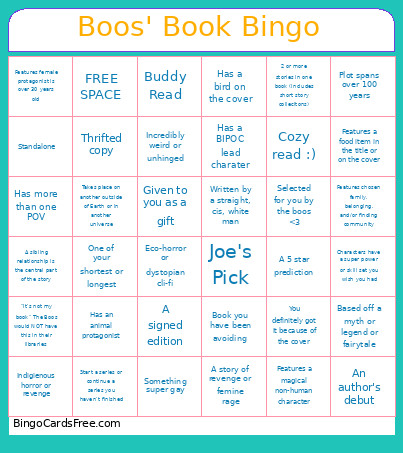
This Boos' Book Bingo 6x6 Cards Game contains following Words or Phrases: Selected for you by the boos <3, Given to you as a gift, Joe's Pick, Has an animal protagonist, A story of revenge or femine rage, Features chosen family, belonging, and/or finding community, Characters have a super power or skill set you wish you had, Eco-horror or dystopian cli-fi, Incredibly weird or unhinged, Written by a straight, cis, white man, Thrifted copy, Takes place on another outside of Earth or in another universe, You definitely got it because of the cover, Indigienous horror or revenge, Has a bird on the cover, One of your shortest or longest, An author's debut, Start a series or continue a series you haven't finished, Has a BIPOC lead charater, Cozy read :), Something super gay, 2 or more stories in one book (includes short story collecitons), Buddy Read, Has more than one POV, Features a magical non-human character, Plot spans over 100 years, Features female protagonist is over 30 years old, A sibling relationship is the central part of the story, Standalone, Book you have been avoiding, A 5 star prediction, Based off a myth or legend or fairytale, "It's not my book" The Boos would NOT have this in their libraries, Features a food item in the title or on the cover, A signed edition.

 This Boos' Book Bingo 6x6 Cards Game contains following Words or Phrases: Selected for you by the boos <3, Given to you as a gift, Joe's Pick, Has an animal protagonist, A story of revenge or femine rage, Features chosen family, belonging, and/or finding community, Characters have a super power or skill set you wish you had, Eco-horror or dystopian cli-fi, Incredibly weird or unhinged, Written by a straight, cis, white man, Thrifted copy, Takes place on another outside of Earth or in another universe, You definitely got it because of the cover, Indigienous horror or revenge, Has a bird on the cover, One of your shortest or longest, An author's debut, Start a series or continue a series you haven't finished, Has a BIPOC lead charater, Cozy read :), Something super gay, 2 or more stories in one book (includes short story collecitons), Buddy Read, Has more than one POV, Features a magical non-human character, Plot spans over 100 years, Features female protagonist is over 30 years old, A sibling relationship is the central part of the story, Standalone, Book you have been avoiding, A 5 star prediction, Based off a myth or legend or fairytale, "It's not my book" The Boos would NOT have this in their libraries, Features a food item in the title or on the cover, A signed edition.