Print free BREACH bingo cards or modify,
unlimited prints! Pick from 41,500+ designs or use the bingo card generator.
Add numbers, phrases, photos, or mix them all.
Play using printed PDF, online bingo cards,
and the online bingo caller, or go hybrid.
About: This bingo card is perfect for fans eagerly following the intricate lore and musical evolution of Twenty One Pilots. Packed with references to storylines, potential music video concepts, and genre shifts, it's ideal for album release parties or fan streaming events where everyone’s on the lookout for hidden clues and callbacks. Get ready—this card guarantees an engaging experience for the most dedicated listeners.
How To: To get a PDF to print, click the Print button.
You can change the card quantity and other
printing options on the Print tab.
Grid items and free space content can be added on the Basic tab.
Appearance can be fully personalized on the
corresponding tabs, or you can quickly find any preference
on the 🔍 tab.
How to play BREACH Bingo Cards?
Paper Caller: Print PDF calling list & calling slips and manually select the slips.
Paper Players: Print PDF bingo cards and manually scratch the cards.
Online Caller: Click on the Play button above.
Online Players: Click on the Play button above, and then click on the 🎫 button.
Hybrid Play: Pick any combination above.
For instance, caller can be either Printed or Online.
And players can be Printed or Online or a combination of both.
Step-By-Step:
Start by saving the BREACH PDF by clicking on the "Print" button above.
Open the PDF and print it.
For random calling, you can print another copy of the call list, cut, fold and then draw them randomly at play time.
Cut the bingo cards at the cut marks if there are more than 1 bingo cards per page.
Give one card to each player. For marking, you can use markers. Crayons are the cheapest.
Pick one person to be the caller. If you are playing in a small group, the caller can as well play along with their own Bingo card.
The caller opens the game by randomly picking an item from the call list and calling out it to all players.
The players check their cards to see if they have the announced word. If they do, they mark that word.
The first player to finish a horizontal, vertical, or a diagonal line of marked items yells "Bingo!" and wins the game.
The caller confirms that the items crossed off form a correct line according to the Bingo card and call list.
You can play for multiple patterns or a full card blackout for an extended game.
This BREACH Bingo Cards Game contains following Words or Phrases: Get a music video mirroring the jacket incident., Torchbearer theme., Callbacks/reference to older songs., Clancy becomes a Bishop but in a symbolic Way., Drum solos!, The Contract MV will be 4mins+, The Contract will have Nico in it., Very diverse album, with Contract setting the vibes. (Diverse genre wise), Atleast 3 Lore/Lore Adjecent Songs/MVs., Breach Location from letters revealed., Light-hearted Song like Lavish., All 3 TBs. (Drummer, Bandito, Guide), New Animal imagery/mascot., Clancy gets seized., Red eyes., TB and Clancy make up at end., The Contract will be lore based., New FPE acronym, The contract is a "flashback" (happening ín Clancy's head while he's getting seized/smeared by Nico) (planting false memories?) (It happens in Clancys head), Josh vocals, The cycle ALMOST repeats but it gets broken. (Either in a flashback way where they go back and do things differently/shows all the times the cycle repeated/or directly in Nicos tower), Excipilation for Smearing, It was all in his head........Fuck you., Tyler and Josh show up., Trench gets destroyed., Nico/Blurryface will make an appearance., Some sort of case against Clancy/Banditos., New DMA.ORG post., Clancy becomes a bishop, Torchbearer dies (Representation of God and Jesus. Jesus died for your sin type stuff), We get a new colour., They reclaim red., Clancy smears someone., Dema doesn't burn., RAWFEAR will be more alt/metal., City Walls MV will be 10+ mins.

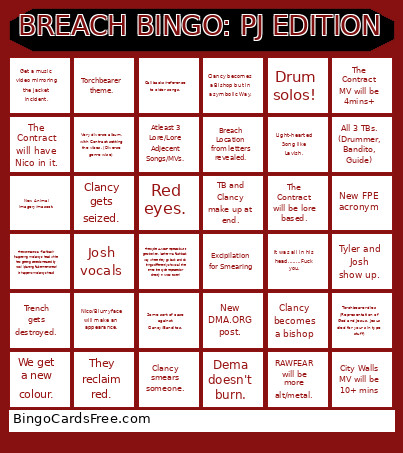 This BREACH Bingo Cards Game contains following Words or Phrases: Get a music video mirroring the jacket incident., Torchbearer theme., Callbacks/reference to older songs., Clancy becomes a Bishop but in a symbolic Way., Drum solos!, The Contract MV will be 4mins+, The Contract will have Nico in it., Very diverse album, with Contract setting the vibes. (Diverse genre wise), Atleast 3 Lore/Lore Adjecent Songs/MVs., Breach Location from letters revealed., Light-hearted Song like Lavish., All 3 TBs. (Drummer, Bandito, Guide), New Animal imagery/mascot., Clancy gets seized., Red eyes., TB and Clancy make up at end., The Contract will be lore based., New FPE acronym, The contract is a "flashback" (happening ín Clancy's head while he's getting seized/smeared by Nico) (planting false memories?) (It happens in Clancys head), Josh vocals, The cycle ALMOST repeats but it gets broken. (Either in a flashback way where they go back and do things differently/shows all the times the cycle repeated/or directly in Nicos tower), Excipilation for Smearing, It was all in his head........Fuck you., Tyler and Josh show up., Trench gets destroyed., Nico/Blurryface will make an appearance., Some sort of case against Clancy/Banditos., New DMA.ORG post., Clancy becomes a bishop, Torchbearer dies (Representation of God and Jesus. Jesus died for your sin type stuff), We get a new colour., They reclaim red., Clancy smears someone., Dema doesn't burn., RAWFEAR will be more alt/metal., City Walls MV will be 10+ mins.