bua_commencement_bingo_2026 Cards - Print Free or Customize
Print free bua_commencement_bingo_2026 cards or modify,
limitless cards! Pick from 41,500+ templates or use the bingo card generator.
Add numbers, words, images, or any combination.
Play using PDF printouts, digital bingo cards,
and the digital bingo caller, or combine all formats.
About: This bingo card captures all the quirky, heartfelt, and unforgettable moments that can pop up during a Boston University Academy graduation or awards ceremony. With nods to inside jokes, classic teacher references, and inevitable tech hiccups, it’s perfect for students, faculty, and families ready to celebrate (and gently roast) their unique school traditions together.
How To: To get a printable PDF, click the Print button.
You can modify the number of cards and other
printing settings on the Print tab.
Grid items and free space content can be edited on the Basic tab.
Appearance can be highly customized on the
relevant tabs, or you can easily locate any preference
on the 🔍 tab.
How to play bua_commencement_bingo_2026 Cards?
Virtual Players: Click on the Play button above, and then click on the 🎫 button.
Paper Players: Print PDF bingo cards and physically write on the cards.
Paper Caller: Print PDF calling list & calling slips and physically pick the slips.
Virtual Caller: Click on the Play button above.
Mixed Play: Choose any combination above.
For instance, caller can be either Printed or Virtual.
And players can be Printed or Virtual or a combination of both.
Step-By-Step:
Start by downloading the bua_commencement_bingo_2026 PDF by clicking on the "Print" button above.
Open the PDF and print it.
For random calling, you can print another copy of the call list, cut, fold and then draw them randomly at play time.
Cut the bingo cards at the cut marks if there are more than 1 bingo cards per page.
Distribute one card per player. For marking, you can use crayons. Crayons cost the least.
Choose one person to be the caller. If you are playing in a small group, the caller can as well play along with their own Bingo card.
The caller begins the play by randomly drawing an item from the call list and calling out it to all players.
The players check their cards to see if they have the announced word. If they do, they dab that word.
The first player to complete a horizontal, vertical, or a diagonal line of marked items shouts "Bingo!" and wins the play.
The caller confirms that the items crossed off form a proper line according to the Bingo card and call list.
You can play for varied patterns or a full card blackout for a longer play.
This bua_commencement_bingo_2026 Cards Game contains following Words or Phrases: "Kind and Curious", Kolovos mentions Charlie, Someone shouts bingo when they win, Someone mentions prom or other BUA dance, Student speaker calls out specific people (for good or bad things), Oration from Iliad, Oration from Odyssey, Someone mentions the pandemic, Oration from the Aeneid, Phone ringing in audience, "independent school", Someone makes political statement (not necessarily verbal), Someone fumbles diploma, Someone cries during ceremony, Someone references a pop singer, A senior is visibly playing bingo onstage, People clap at the wrong time, Teacher no longer at school mentioned, Someone talks about senior thesis, Technical difficulties, "next generation of leaders", A senior is realized to not be present when called to receive their diploma, Someone mentions a restaurant on-campus or the convenience store, Someone incorrectly sits in a reserved seat, Someone's hat or tassel falls off, Someone gets hit or drops a heavy object, Dr. White mispronounces someone's name, Someone trips onstage, Kolovos calls this class or our school "special", Kolovos talks about being Greek, Someone in audience yells a senior's name loudly, Someone gives listed points of advice, Baby crying in audience, A former teacher or student is present for non-family reasons, Dr. Harrington shows up, "Now more than ever", Kolovos talks about being Greek, "floor of the gym", Someone incorrectly sits in a reserved seat, Kolovos does not mention other family except Charlie (wife included), Paper airplane is thrown, 67 67 67 67 67 67 67 67.

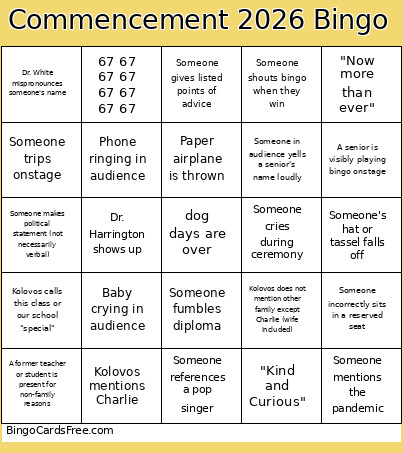 This bua_commencement_bingo_2026 Cards Game contains following Words or Phrases: "Kind and Curious", Kolovos mentions Charlie, Someone shouts bingo when they win, Someone mentions prom or other BUA dance, Student speaker calls out specific people (for good or bad things), Oration from Iliad, Oration from Odyssey, Someone mentions the pandemic, Oration from the Aeneid, Phone ringing in audience, "independent school", Someone makes political statement (not necessarily verbal), Someone fumbles diploma, Someone cries during ceremony, Someone references a pop singer, A senior is visibly playing bingo onstage, People clap at the wrong time, Teacher no longer at school mentioned, Someone talks about senior thesis, Technical difficulties, "next generation of leaders", A senior is realized to not be present when called to receive their diploma, Someone mentions a restaurant on-campus or the convenience store, Someone incorrectly sits in a reserved seat, Someone's hat or tassel falls off, Someone gets hit or drops a heavy object, Dr. White mispronounces someone's name, Someone trips onstage, Kolovos calls this class or our school "special", Kolovos talks about being Greek, Someone in audience yells a senior's name loudly, Someone gives listed points of advice, Baby crying in audience, A former teacher or student is present for non-family reasons, Dr. Harrington shows up, "Now more than ever", Kolovos talks about being Greek, "floor of the gym", Someone incorrectly sits in a reserved seat, Kolovos does not mention other family except Charlie (wife included), Paper airplane is thrown, 67 67 67 67 67 67 67 67.