Print free Bumble bingo cards or adjust them,
limitless cards! Choose from 42,200+ templates or use the bingo card generator.
Add numbers, words, images, or any combination.
Play using PDF prints, online bingo cards,
and the online bingo caller, or go hybrid.
How To: To download a PDF to print, click the Print button.
You can alter the card count and other
printing settings on the Print tab.
Grid items and free space text can be edited on the Basic tab.
Appearance can be fully personalized on the
relevant tabs, or you can easily find any preference
using the 🔍 tab.
How to play Bumble Bingo Cards?
Printed Caller: Print PDF calling list & calling slips and physically draw the slips.
Digital Caller: Click on the Play button above.
Digital Players: Click on the Play button above, and then click on the 🎫 button.
Printed Players: Print PDF bingo cards and physically mark the cards.
Mixed Mode: Select any combination above.
For example, caller can be either Printed or Digital.
And players can be Printed or Digital or a combo of both.
Step-By-Step:
Start by getting the Bumble Bingo PDF by clicking on the "Print" button above.
Open the PDF and print a hard copy.
For random drawing, you can print another copy of the call list, cut, fold and then pick them randomly at play time.
Cut the bingo cards at the cut lines if there are greater than 1 bingo cards per page.
Distribute one card per player. For marking, you can use pencils. Crayons are the cheapest.
Select one person to be the caller. If you are playing in a small group, the caller may as well play along with their own Bingo card.
The caller initiates the game by randomly drawing an item from the call list and calling out it to all players.
The players scan their cards to see if they have the called word. If they do, they dab that word.
The first player to finish a horizontal, vertical, or a diagonal line of marked items yells "Bingo!" and wins the game.
The caller confirms that the items crossed off form a proper line according to the Bingo card and call list.
You can play for multiple patterns or a full card blackout for an extended game.
This Bumble Bingo Cards Game contains following Words or Phrases: eerste foto is een groepsfoto, meeste fotos met zonnebril, reference naar wijn - aperol spritz, hobby is naar de gym gaan, klim foto, gym foto, meer dan 1 mirror selfie, eiffel toren of ander heel bekend monument, iets met astrologie, Matcha of avocado toast, fluent in sarcasm, Hoeveel landen ze al bezocht hebben, 2 bijna identieke fotos, Foto in de natuur met armen open, Koffie = persoonlijkheid, Haat op de datingapps, Loop foto, Foto waar je niet kan zien wie het is, Bio bestaande uit alleen emojis, Personality type (myers briggs), Iets over minimum lengte lengte, Heel cliché bio, Bio in het engels maar duidelijk flamand, Nationaliteit in de bio, Festival foto, Doggo foto, Foto duidelijk alleen om het lichaam te laten zien, Clearly een hookup focused profiel, Geblurred gezicht, "foodie", Kinderfoto, Foto filters, Palestina, Iets met pineapple on pizza, Spreekt 5 talen of meer, Twee fotos, different looking people, Olifant foto of ander exotisch dier, "I'm into tattoos", Foto met ouders of grootouders, Foto met een kind dat niet van hen is, Ik heb het gevoel dat ze gemeen tegen me zouden zijn, Give me travel tips for "anywhere", Geen enkele glimlach, Zou goed passen bij Vasco, Looking for friends, Gekleurd haar, Zou nog iets kunnen zijn voor maxime, Plant girlie, Oeps die kennen we, Profiel met maar 1 foto, Een goede pun, Plantbased.

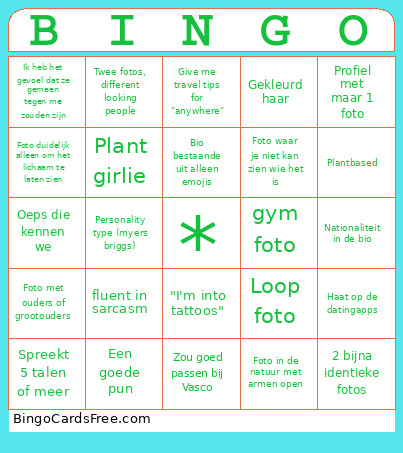 This Bumble Bingo Cards Game contains following Words or Phrases: eerste foto is een groepsfoto, meeste fotos met zonnebril, reference naar wijn - aperol spritz, hobby is naar de gym gaan, klim foto, gym foto, meer dan 1 mirror selfie, eiffel toren of ander heel bekend monument, iets met astrologie, Matcha of avocado toast, fluent in sarcasm, Hoeveel landen ze al bezocht hebben, 2 bijna identieke fotos, Foto in de natuur met armen open, Koffie = persoonlijkheid, Haat op de datingapps, Loop foto, Foto waar je niet kan zien wie het is, Bio bestaande uit alleen emojis, Personality type (myers briggs), Iets over minimum lengte lengte, Heel cliché bio, Bio in het engels maar duidelijk flamand, Nationaliteit in de bio, Festival foto, Doggo foto, Foto duidelijk alleen om het lichaam te laten zien, Clearly een hookup focused profiel, Geblurred gezicht, "foodie", Kinderfoto, Foto filters, Palestina, Iets met pineapple on pizza, Spreekt 5 talen of meer, Twee fotos, different looking people, Olifant foto of ander exotisch dier, "I'm into tattoos", Foto met ouders of grootouders, Foto met een kind dat niet van hen is, Ik heb het gevoel dat ze gemeen tegen me zouden zijn, Give me travel tips for "anywhere", Geen enkele glimlach, Zou goed passen bij Vasco, Looking for friends, Gekleurd haar, Zou nog iets kunnen zijn voor maxime, Plant girlie, Oeps die kennen we, Profiel met maar 1 foto, Een goede pun, Plantbased.