
Bus Simulator Bingo Cards - Print Free or Customize
Print free Bus Simulator bingo cards or adjust them, limitless prints! Pick from 41,500+ designs or use our bingo card generator. Add numbers, phrases, pictures, or mix them all. Play using printed PDF, online bingo cards, and our online bingo caller, or mix physical and digital.
About: This bingo card captures the wild, unpredictable spirit of a social Roblox server, where chaos and comedy collide. It’s perfect for group hangouts or livestreams among friends who love spotting quirky moments and inside jokes during gameplay. From player antics to oddball events, it sets a lighthearted tone that rewards observation and shared laughter.
How To: To get a PDF to print, click the Print button. You can modify the card count and other print preferences on the Print tab. Grid items and free space text can be edited on the Basic tab. Appearance can be exactly personalized on the relevant tabs, or you can quickly search any option using the 🔍 tab.
How to play Bus Simulator Bingo Cards?
- Paper Caller: Print PDF calling list & calling slips and manually choose the slips.
- Virtual Players: Click on the Play button above, and then click on the 🎫 button.
- Paper Players: Print PDF bingo cards and manually scratch the cards.
- Virtual Caller: Click on the Play button above.
- Mixed Play: Select any combination above. For example, caller can be either Offline or Virtual. And players can be Offline or Virtual or a combo of both.
Step-By-Step:
- Start by downloading the Bus Simulator PDF by clicking on the "Print" button above.
- Open the PDF and print it.
- For random drawing, you can print another copy of the call list, cut, fold and then pull them randomly at play time.
- Cut the bingo cards at the cut marks if there are greater than 1 bingo cards per page.
- Give one card to each player. For marking, you can use crayons. Crayons cost the least.
- Select one person to be the caller. If you are playing in a small group, the caller can as well play along with their own Bingo card.
- The caller initiates the game by randomly pulling an item from the call list and saying it to all players.
- The players check their cards to see if they have the called word. If they do, they mark that word.
- The first player to finish a horizontal, vertical, or a diagonal line of crossed items announces "Bingo!" and wins the play.
- The caller verifies that the items marked form a proper line as per the Bingo card and call list.
- You can play for multiple patterns or a full card blackout for an extended play.
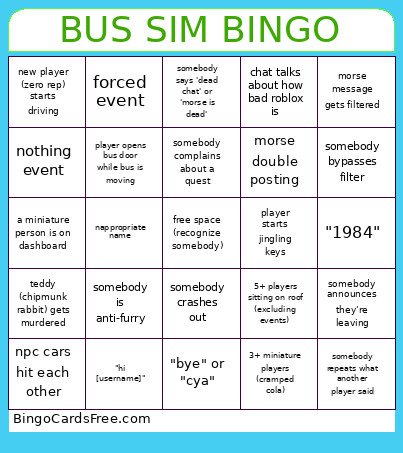 This Bus Simulator Bingo Cards Game contains following Words or Phrases: somebody says 'retroslop', somebody is anti-furry, harassment over driver seat, somebody crashes out, player gets banned, radio abuse, tazer taking too long to give ram quest (10+ chats), Improper proportions (thighs, bust size, etc), someone types !anim, 3+ bacons on bus, someone getting mad at cafe, honk/airhorn spam, teddy (the rabbit that sings chipmunk) event, 3+ backwalls events within same session, forced event, 'user' being in game, one or less people doing cafe, begging for tie in paint recolor event, hear someone else do memory game, somebody asks to play gba for quest, eccta question sparks debate, chat talks about how bad roblox is, morse message gets filtered, morse is dead (30+ minutes since last message), player gets kicked to prevent server crash, player jumps off bus, player gets hit by car, somebody says 'dead chat' or 'morse is dead', somebody announces they're leaving, dead server (10 or less people), a miniature person is on dashboard, player starts emoting, player complains about backwalls, player ragdolls and dies, mini-bus inside of bus, player dies during event, nothing event, player with '[contributor] tag in game, event spawns in tunnel and is unusable, player uses /me, somebody bypasses filter, vr player joins, somebody in chat uses an emoji, long message gets filtered (more than one line), player starts jingling keys, player drinks bloxy cola, somebody complains about a quest, 3+ people thank same driver, player starts insulting people, only 1-3 people talking for 5+ minutes, 2+ players with the same sit animation, 3+ miniature players (cramped cola), player opens bus door while bus is moving, driver is silent the entire time they drive, player has animal as region indicator, teddy (chipmunk rabbit) gets murdered, same event happens 2 times in a row, new player (zero rep) starts driving, "hi [username]", inappropriate avatar, nappropriate name, multiple players crowd same npc, "what?", somebody repeats what another player said, npc cars hit each other, 5+ players sitting on roof (excluding events), variation of "game is dead/dying", "bye" or "cya", "</3" or "<3", purple wins bus recolor event, morse double posting, driver turns off/on indoor lights, player in chat explains game mechanic, "1984", recognize a player's cosplay..