California Forever, goodbye Bingo Cards - Print Free or Customize
Print free California Forever, goodbye bingo cards or modify,
unlimited prints! Choose from 41,500+ designs or use our bingo card generator.
Add numbers, words, pictures, or mix them all.
Play using printed PDF, virtual bingo cards,
and our virtual bingo caller, or combine all formats.
About: This bingo card is a celebration of iconic songs inspired by California and its vibrant culture. Packed with tracks from legendary bands and artists across multiple decades, it’s perfect for music lovers at themed parties, West Coast gatherings, or any event where you want to spark nostalgia and fun conversations about California’s unforgettable soundtrack.
How To: To save a printable PDF, click the Print button.
You can adjust the card count and other
print options on the Print tab.
Grid items and free space content can be changed on the Basic tab.
Appearance can be completely customized on the
relevant tabs, or you can quickly find any preference
using the 🔍 tab.
How to play California Forever, goodbye Bingo Cards?
Printed Players: Print PDF bingo cards and manually scratch the cards.
Online Players: Click on the Play button above, and then click on the 🎫 button.
Printed Caller: Print PDF calling list & calling slips and manually draw the slips.
Online Caller: Click on the Play button above.
Hybrid Play: Choose any combination above.
For example, caller can be either Printed or Online.
And players can be Printed or Online or a combo of both.
Step-By-Step:
Start by saving the California Forever, goodbye PDF by clicking on the "Print" button above.
Open the PDF and print a hard copy.
For random calling, you can print another copy of the call list, cut, fold and then draw them randomly at play time.
Cut the bingo cards at the cut lines if there are more than 1 bingo cards per page.
Distribute one card per player. For marking, you can use crayons. Crayons cost the least.
Choose one person to be the caller. If you are playing in a small group, the caller may as well play along with their own Bingo card.
The caller initiates the play by randomly pulling an item from the call list and announcing it to all players.
The players look at their cards to see if they have the announced word. If they do, they cross off that word.
The first player to finish a horizontal, vertical, or a diagonal line of marked items announces "Bingo!" and wins the game.
The caller validates that the items marked form a correct line according to the Bingo card and call list.
You can play for different patterns or a full card blackout for an extended game.
This California Forever, goodbye Bingo Cards Game contains following Words or Phrases: California Gurls - Katy Perry, California Love - 2Pac, California Dreamin' - The Mamas & The Papas, Californication - Red Hot Chili Peppers, Going to California - Led Zeppelin, California Girls - The Beach Boys, Fuck it I love you - Lana Del Rey, Save Me, San Francisco - Train, Hotel California - Eagles, California Sun - Ramones, Beverly Hills - Weezer, Malibu - Miley Cyrus, Straight Outta Compton - N.W.A., Ventura Highway - America, Dani California - Red Hot Chili Peppers, California - Joni Mitchell, California - Lorde, Queen of California - John Mayer, California English - Vampire Weekend, Going Back to Cali - The Notorious B.I.G., I Left My Heart in San Francisco - Tony Bennett, Lights - Journey, Fake Tales of San Francisco - Arctic Monkeys, Mission In The Rain - Jerry Garcia, Tell Me When to Go - E-40, L.A. Devotee - Panic! At The Disco, Touch of Grey - Grateful Dead, Dreams - Fleetwood Mac, Enter Sandman - Metalllica, Good Riddance (Time of Your Life) - Green Day, Riders on the Storm - The Doors, Not Like Us - Kendrick Lamar, Home Sweet Home - Motley Crue, So Far So Fake - Pierce the Veil, Santeria - Sublime, Drop It Like It's Hot - Snoop Dog, Hot for Teacher - Van Halen, Jump - Van Halen, Wouldn't It Be Nice - The Beach Boys, For Whom The Bell Tolls - Metallica, squabble up - Kendrick Lamar, Welcome to Paradise - Green Day, Don't Speak - No Doubt, Hella Good - No Doubt, Landslide - Fleetwood Mac, Rhiannon - Fleetwood Mac, California - Chappel Roan, Drops of Jupiter (Tell Me) - Train, Hey, Soul Sister - Train.

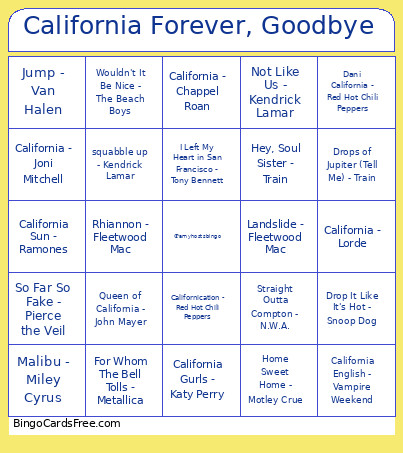 This California Forever, goodbye Bingo Cards Game contains following Words or Phrases: California Gurls - Katy Perry, California Love - 2Pac, California Dreamin' - The Mamas & The Papas, Californication - Red Hot Chili Peppers, Going to California - Led Zeppelin, California Girls - The Beach Boys, Fuck it I love you - Lana Del Rey, Save Me, San Francisco - Train, Hotel California - Eagles, California Sun - Ramones, Beverly Hills - Weezer, Malibu - Miley Cyrus, Straight Outta Compton - N.W.A., Ventura Highway - America, Dani California - Red Hot Chili Peppers, California - Joni Mitchell, California - Lorde, Queen of California - John Mayer, California English - Vampire Weekend, Going Back to Cali - The Notorious B.I.G., I Left My Heart in San Francisco - Tony Bennett, Lights - Journey, Fake Tales of San Francisco - Arctic Monkeys, Mission In The Rain - Jerry Garcia, Tell Me When to Go - E-40, L.A. Devotee - Panic! At The Disco, Touch of Grey - Grateful Dead, Dreams - Fleetwood Mac, Enter Sandman - Metalllica, Good Riddance (Time of Your Life) - Green Day, Riders on the Storm - The Doors, Not Like Us - Kendrick Lamar, Home Sweet Home - Motley Crue, So Far So Fake - Pierce the Veil, Santeria - Sublime, Drop It Like It's Hot - Snoop Dog, Hot for Teacher - Van Halen, Jump - Van Halen, Wouldn't It Be Nice - The Beach Boys, For Whom The Bell Tolls - Metallica, squabble up - Kendrick Lamar, Welcome to Paradise - Green Day, Don't Speak - No Doubt, Hella Good - No Doubt, Landslide - Fleetwood Mac, Rhiannon - Fleetwood Mac, California - Chappel Roan, Drops of Jupiter (Tell Me) - Train, Hey, Soul Sister - Train.