Print free calizzygo bingo cards or alter them,
limitless prints! Select from 41,900+ designs or use the bingo card generator.
Add numbers, words, images, or any combination.
Play using PDF prints, digital bingo cards,
and the digital bingo caller, or mix physical and digital.
About: This bingo card captures all the must-do moments and key tasks for setting up a rustic, heartfelt wedding. It’s perfect for anyone helping organize a DIY-style ceremony, especially when friends and family are pitching in to make the day special. Expect a mix of hands-on prep, thoughtful details, and a celebratory tone throughout!
How To: To save a printable PDF, click the Print button.
You can change the card quantity and other
printing preferences on the Print tab.
Grid items and free space content can be changed on the Basic tab.
Appearance can be completely personalized on the
corresponding tabs, or you can quickly search any preference
on the 🔍 tab.
How to play calizzygo Bingo Cards?
Paper Caller: Print PDF calling list & calling slips and manually draw the slips.
Online Caller: Click on the Play button above.
Online Players: Click on the Play button above, and then click on the 🎫 button.
Paper Players: Print PDF bingo cards and manually write on the cards.
Mixed Mode: Choose any combination above.
For example, caller can be either Offline or Online.
And players can be Offline or Online or a mix of both.
Step-By-Step:
Start by getting the calizzygo PDF by clicking on the "Print" button above.
Open the PDF and print it.
For random drawing, you can print another copy of the call list, cut, fold and then pull them randomly at play time.
Cut the bingo cards at the cut lines if there are more than 1 bingo cards per page.
Distribute one card per player. For marking, you can use crayons. Crayons are the cheapest.
Choose one person to be the caller. If you are playing in a small group, the caller may also play along with their own Bingo card.
The caller opens the game by randomly picking an item from the call list and announcing it to all players.
The players check their cards to see if they have the called word. If they do, they cross off that word.
The first player to finish a horizontal, vertical, or a diagonal line of crossed items announces "Bingo!" and wins the play.
The caller verifies that the items crossed off form a proper line as per the Bingo card and call list.
You can play for different patterns or a full card blackout for a longer play.
This calizzygo Bingo Cards Game contains following Words or Phrases: Get haybales, setup hay at ceremony spot, Truck with tables comes 9am: set up furniture, Setup arbor at ceremony spot, Put all the ingredients/things for cheese platters over at the sheds kitchen, Izzy to harvest flowers from gardens and set up all the vases, Set up any decorations ready for placement on Sat: fairy lights, bunting, table cloths, vases and flowers, Buy cheeses, meats, fruits for wedding cheese platters (Izzy and Cal) and any food for Sunday lunch., Someone to pick up flowers from Doblo's at 10:30 am, Caterer to come around lunchtime for setup (need to discuss leaving gate open/someone to meet caterer to show them where to setup), Set up Gazebo at ceremony spot, Set up champagne and water at ceremony spot, Set up 2 chairs and table at ceremony for signing the marriage certificate, Someone in charge of meeting Susie the celebrant to show her the way. Susie arrive at 1:45pm, Photographer will arrive for ceremony time: Jordie, After the ceremony, some people to prepare cheese/nibbly platters to be set out for guests, Everyone meet at sheds at 2pm - ready to direct people for a 2:30pm ceremony start., Organize easter hunt clues/settle in, Angus, Nell and Ellis arrive: pickup from airport at 2:25pm, Tony, Judy, Duncan, Caitlan, Maeve and Murray arriv, Caterer to come around lunchtime for setup (need to discuss leaving gate open/someone to meet caterer to show them where to setup), Set up Gazebo at ceremony spot, Set up champagne and water at ceremony spot, Set up 2 chairs and table at ceremony for signing the marriage certificate, Someone in charge of meeting Susie the celebrant to show her the way. Susie arrive at 1:45pm, Photographer will arrive for ceremony time: Jordie, After the ceremony, some people to prepare cheese/nibbly platters to be set out for guests.

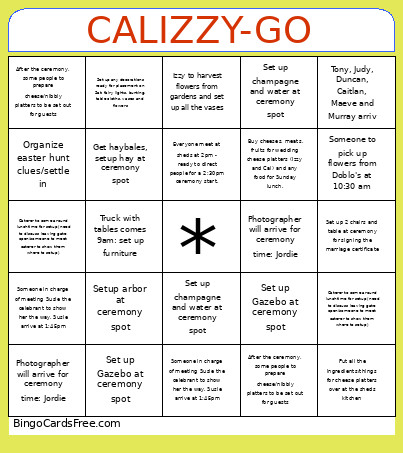 This calizzygo Bingo Cards Game contains following Words or Phrases: Get haybales, setup hay at ceremony spot, Truck with tables comes 9am: set up furniture, Setup arbor at ceremony spot, Put all the ingredients/things for cheese platters over at the sheds kitchen, Izzy to harvest flowers from gardens and set up all the vases, Set up any decorations ready for placement on Sat: fairy lights, bunting, table cloths, vases and flowers, Buy cheeses, meats, fruits for wedding cheese platters (Izzy and Cal) and any food for Sunday lunch., Someone to pick up flowers from Doblo's at 10:30 am, Caterer to come around lunchtime for setup (need to discuss leaving gate open/someone to meet caterer to show them where to setup), Set up Gazebo at ceremony spot, Set up champagne and water at ceremony spot, Set up 2 chairs and table at ceremony for signing the marriage certificate, Someone in charge of meeting Susie the celebrant to show her the way. Susie arrive at 1:45pm, Photographer will arrive for ceremony time: Jordie, After the ceremony, some people to prepare cheese/nibbly platters to be set out for guests, Everyone meet at sheds at 2pm - ready to direct people for a 2:30pm ceremony start., Organize easter hunt clues/settle in, Angus, Nell and Ellis arrive: pickup from airport at 2:25pm, Tony, Judy, Duncan, Caitlan, Maeve and Murray arriv, Caterer to come around lunchtime for setup (need to discuss leaving gate open/someone to meet caterer to show them where to setup), Set up Gazebo at ceremony spot, Set up champagne and water at ceremony spot, Set up 2 chairs and table at ceremony for signing the marriage certificate, Someone in charge of meeting Susie the celebrant to show her the way. Susie arrive at 1:45pm, Photographer will arrive for ceremony time: Jordie, After the ceremony, some people to prepare cheese/nibbly platters to be set out for guests.