Print free cfsge bingo cards or alter them,
limitless cards! Select from 42,200+ templates or use our bingo card generator.
Add numbers, words, images, or all of them.
Play using PDF prints, virtual bingo cards,
and our virtual bingo caller, or combine all formats.
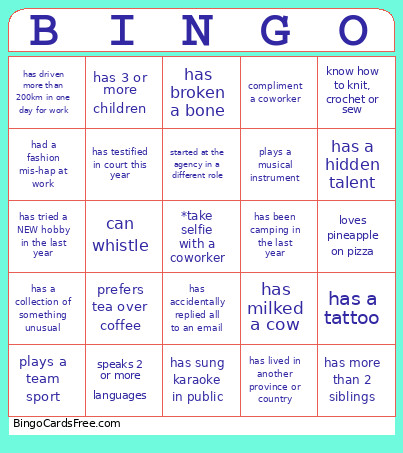
About: This bingo card is perfect for work events or team-building sessions, designed to spark fun conversations and celebrate the unique quirks and talents within your group. With a mix of personal trivia, work experiences, and hidden skills, it encourages colleagues to connect over shared stories and surprising facts in a relaxed, lighthearted way.
How To: To download a PDF to print, click the Print button.
You can change the number of cards and other
printing preferences on the Print tab.
Grid items and free space content can be added on the Basic tab.
Appearance can be entirely customized on the
relevant tabs, or you can easily find any preference
on the 🔍 tab.
How to play cfsge bingo Cards?
Virtual Players: Click on the Play button above, and then click on the 🎫 button.
Virtual Caller: Click on the Play button above.
Printed Caller: Print PDF calling list & calling slips and physically choose the slips.
Printed Players: Print PDF bingo cards and physically write on the cards.
Mixed Play: Choose any combination above.
For instance, caller can be either Printed or Virtual.
And players can be Printed or Virtual or a mix of both.
Step-By-Step:
Start by getting the cfsge bingo PDF by clicking on the "Print" button above.
Open the PDF and print it.
For random drawing, you can print another copy of the call list, cut, fold and then pull them randomly at play time.
Cut the bingo cards at the cut lines if there are more than 1 bingo cards per page.
Give one card to each player. For marking, you can use pencils. Crayons cost the least.
Choose one person to be the caller. If you are playing in a small group, the caller can also play along with their own Bingo card.
The caller opens the game by randomly drawing an item from the call list and announcing it to everyone.
The players check their cards to see if they have the called word. If they do, they dab that word.
The first player to complete a horizontal, vertical, or a diagonal line of marked items announces "Bingo!" and wins the play.
The caller confirms that the items crossed off form a correct line as per the Bingo card and call list.
You can play for varied patterns or a full card blackout for an extended play.
This cfsge bingo Cards Game contains following Words or Phrases: speaks 2 or more languages, is left handed, prefers coffee over tea, prefers tea over coffee, has more than 50 unread emails, still uses handwritten planner, has a pet that isn't a dog or cat, has run a marathon, has a hidden talent, has met a celebrity, has locked self out of house or car, has milked a cow, has been to 5 or more countries, plays a musical instrument, loves pineapple on pizza, has been camping in the last year, know how to knit, crochet or sew, has lived in another province or country, has broken a bone, has a vegetable garden, has worked here 10+ years, started at the agency in a different role, has completed additional education while working here, loves to cook or bake, is a sports fan, enjoys puzzles or escape rooms, has a creative hobby, enjoys board games, has tried a NEW hobby in the last year, can name all 7 continents, has accidentally replied all to an email, has sung karaoke in public, has a collection of something unusual, has a birthday in the same month as you, has a tattoo, plays a team sport, has more than 2 siblings, has 3 or more children, has testified in court this year, had a fashion mis-hap at work, had to use the washroom while working somewhere you wish you hadn't, drives a white car, knows a magic trick, can whistle, has worked an after hours shift, has driven more than 200km in one day for work, compliment a coworker, needed to call IT for an issue but turns out you were the issue.

 This cfsge bingo Cards Game contains following Words or Phrases: speaks 2 or more languages, is left handed, prefers coffee over tea, prefers tea over coffee, has more than 50 unread emails, still uses handwritten planner, has a pet that isn't a dog or cat, has run a marathon, has a hidden talent, has met a celebrity, has locked self out of house or car, has milked a cow, has been to 5 or more countries, plays a musical instrument, loves pineapple on pizza, has been camping in the last year, know how to knit, crochet or sew, has lived in another province or country, has broken a bone, has a vegetable garden, has worked here 10+ years, started at the agency in a different role, has completed additional education while working here, loves to cook or bake, is a sports fan, enjoys puzzles or escape rooms, has a creative hobby, enjoys board games, has tried a NEW hobby in the last year, can name all 7 continents, has accidentally replied all to an email, has sung karaoke in public, has a collection of something unusual, has a birthday in the same month as you, has a tattoo, plays a team sport, has more than 2 siblings, has 3 or more children, has testified in court this year, had a fashion mis-hap at work, had to use the washroom while working somewhere you wish you hadn't, drives a white car, knows a magic trick, can whistle, has worked an after hours shift, has driven more than 200km in one day for work, compliment a coworker, needed to call IT for an issue but turns out you were the issue.