Print free CH FIVE bingo cards or customize,
unlimited prints! Select from 42,200+ designs or use the bingo card generator.
Add numbers, phrases, photos, or mix them all.
Play using PDF prints, virtual bingo cards,
and the virtual bingo caller, or go hybrid.
About: This bingo card captures the excitement and speculation swirling around future Deltarune chapters, perfect for fans eager to catch every hidden reference, character twist, or wild theory as they unfold. It’s packed with predictions and wishful thinking that will get any community watch party or friend group hyped while discussing game updates or streaming new content together.
How To: To save a printable PDF, click the Print button.
You can modify the card count and other
printing preferences on the Print tab.
Grid items and free space content can be changed on the Basic tab.
Appearance can be completely personalized on the
corresponding tabs, or you can easily search any option
on the 🔍 tab.
How to play CH FIVE Bingo Cards?
Digital Caller: Click on the Play button above.
Digital Players: Click on the Play button above, and then click on the 🎫 button.
Printed Players: Print PDF bingo cards and physically scratch the cards.
Printed Caller: Print PDF calling list & calling slips and physically draw the slips.
Hybrid Play: Pick any combination above.
For example, caller can be either Paper or Digital.
And players can be Paper or Digital or a mix of both.
Step-By-Step:
Start by getting the CH FIVE PDF by clicking on the "Print" button above.
Open the PDF and print a hard copy.
For random calling, you can print another copy of the call list, cut, fold and then pick them randomly at play time.
Cut the bingo cards at the cut marks if there are more than 1 bingo cards per page.
Give one card to each player. For marking, you can use pens. Crayons cost the least.
Pick one person to be the caller. If you are playing in a small group, the caller can also play along with their own Bingo card.
The caller starts the play by randomly picking an item from the call list and saying it to everyone.
The players check their cards to see if they have the called word. If they do, they dab that word.
The first player to finish a horizontal, vertical, or a diagonal line of marked items yells "Bingo!" and wins the play.
The caller confirms that the items marked form a correct line according to the Bingo card and call list.
You can play for varied patterns or a full card blackout for an extended play.
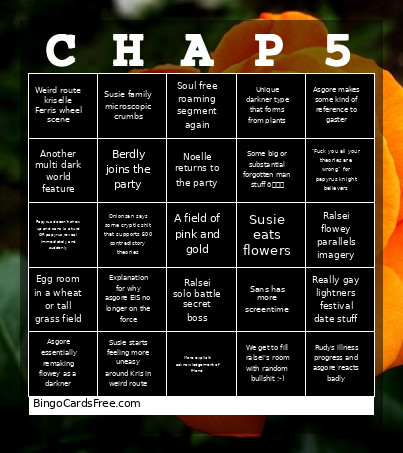
This CH FIVE Bingo Cards Game contains following Words or Phrases: Asgore makes some kind of reference to gaster, Ralsei flowey parallels imagery, Susie eats flowers, More explicit acknowledgement of friend, Berdly joins the party, Noelle returns to the party, Soul free roaming segment again, Ralsei solo battle secret boss, Really gay lightners festival date stuff, Egg room in a wheat or tall grass field, Rudys illness progress and asgore reacts badly, Asgore essentially remaking flowey as a darkner, Sans has more screentime, Susie starts feeling more uneasy around Kris in weird route, Another multi dark world feature, Weird route kriselle Ferris wheel scene, We get to fill ralsei's room with random bullshit :-), Unique darkner type that forms from plants, Papyrus doesn't show up and sans is a turd OR papyrus reveal immediately and suddenly, Some big or substantial forgotten man stuff 👀, "Fuck you all your theories are wrong" for papyrus knight believers, Onionsan says some cryptic shit that supports 500 contradictory theories, Explanation for why asgore EIS no longer on the force, Susie family microscopic crumbs.

 This CH FIVE Bingo Cards Game contains following Words or Phrases: Asgore makes some kind of reference to gaster, Ralsei flowey parallels imagery, Susie eats flowers, More explicit acknowledgement of friend, Berdly joins the party, Noelle returns to the party, Soul free roaming segment again, Ralsei solo battle secret boss, Really gay lightners festival date stuff, Egg room in a wheat or tall grass field, Rudys illness progress and asgore reacts badly, Asgore essentially remaking flowey as a darkner, Sans has more screentime, Susie starts feeling more uneasy around Kris in weird route, Another multi dark world feature, Weird route kriselle Ferris wheel scene, We get to fill ralsei's room with random bullshit :-), Unique darkner type that forms from plants, Papyrus doesn't show up and sans is a turd OR papyrus reveal immediately and suddenly, Some big or substantial forgotten man stuff 👀, "Fuck you all your theories are wrong" for papyrus knight believers, Onionsan says some cryptic shit that supports 500 contradictory theories, Explanation for why asgore EIS no longer on the force, Susie family microscopic crumbs.