cheesy old lady bingo Cards - Print Free or Customize
Print free cheesy old lady bingo cards or alter them,
limitless prints! Select from 41,900+ templates or use the bingo card generator.
Add numbers, words, pictures, or mix them all.
Play using PDF prints, online bingo cards,
and the online bingo caller, or combine all formats.
About: This bingo card is perfect for a quirky, tight-knit group gathering or reunion where inside jokes, niche interests, and strong personalities abound. With its offbeat and eclectic mix of prompts, it encourages laughter and storytelling as everyone searches for friends who fit these unique traits. Ideal for sparking conversations at creative parties, retreats, or unconventional family get-togethers.
How To: To save a PDF to print, click the Print button.
You can change the number of cards and other
print options on the Print tab.
Grid items and free space text can be added on the Basic tab.
Appearance can be entirely customized on the
corresponding tabs, or you can easily search any preference
on the 🔍 tab.
How to play cheesy old lady bingo Cards?
Paper Players: Print PDF bingo cards and manually scratch the cards.
Paper Caller: Print PDF calling list & calling slips and manually pick the slips.
Virtual Players: Click on the Play button above, and then click on the 🎫 button.
Virtual Caller: Click on the Play button above.
Hybrid Play: Choose any combination above.
For example, caller can be either Offline or Virtual.
And players can be Offline or Virtual or a mix of both.
Step-By-Step:
Start by getting the cheesy old lady bingo PDF by clicking on the "Print" button above.
Open the PDF and print a hard copy.
For random calling, you can print another copy of the call list, cut, fold and then draw them randomly at play time.
Cut the bingo cards at the cut lines if there are more than 1 bingo cards per page.
Give one card to each player. For marking, you can use pencils. Crayons cost the least.
Choose one person to be the caller. If you are playing in a small group, the caller can also play along with their own Bingo card.
The caller starts the game by randomly picking an item from the call list and saying it to all players.
The players scan their cards to see if they have the announced word. If they do, they cross off that word.
The first player to finish a horizontal, vertical, or a diagonal line of marked items shouts "Bingo!" and wins the play.
The caller confirms that the items crossed off form a correct line as per the Bingo card and call list.
You can play for varied patterns or a full card blackout for a longer play.
This cheesy old lady bingo Cards Game contains following Words or Phrases: Is having back issues, Has smuggled cheese nationally or internationally, Sees ranch as more than a condiment, Can name all 4 members of Gorillaz, Blue cheese person, Can spot a fake Labubu, Thinks Christopher Walken is hot, Can touch toes without straining, Loves a Werther's Original, Bird nerd, Considers yogurt a food group, Has done a Mexican takedown, Almost got rabies, Shares your astrological sign, Lives like already retired, Writer, Strong opinion on dishwasher loading, Ex-vermiculturist (aka worm rancher), Begrudgingly completed a home reno project, "Hell yeah brother", Drove 100+ miles without stopping, 'Knows their onions' on something, Performer, Has fed 20+ people in a single sitting, "Kookiebeans", Spotted a GPO in the wild, Belongs on Great British Bake Off, Loves Rebecca Black's new album, Makes a mean casserole, Thinks Shrek is more iconic than The Godfather, Can really cut a rug (demo required), Fixer, "I have a system", Costco Executive Member, Burner, Window seat, Pickleball pro, Screen printer, Stinky cheese person, Certified yapper, Ex or current horse girl, Bad texter, "It's a texture thing", Thinks a hot dog is a sandwich, Has milked an animal, Believes mayo belongs on fries, Kira's birthday twin, Has designed and built an instrument, Can get Ember to play dead (laying down doesn't count!), Has a regrettable tattoo, More than 1 like on a Letterboxd review, Indigo dyer, Hasn't seen The Odyssey and doesn't plan to, Known to dress up as a hot dog, Wouldn't say boo to a goose, Swam in the ocean this summer, Might be in a cult, Backpacker, "Go DJ go DJ goooo", A desk is the only piece of furniture she needed for an entire year, Maker, Is a regular somewhere, [Insert fun fact about another guest].

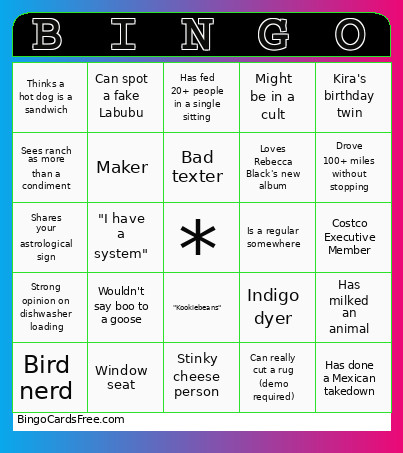 This cheesy old lady bingo Cards Game contains following Words or Phrases: Is having back issues, Has smuggled cheese nationally or internationally, Sees ranch as more than a condiment, Can name all 4 members of Gorillaz, Blue cheese person, Can spot a fake Labubu, Thinks Christopher Walken is hot, Can touch toes without straining, Loves a Werther's Original, Bird nerd, Considers yogurt a food group, Has done a Mexican takedown, Almost got rabies, Shares your astrological sign, Lives like already retired, Writer, Strong opinion on dishwasher loading, Ex-vermiculturist (aka worm rancher), Begrudgingly completed a home reno project, "Hell yeah brother", Drove 100+ miles without stopping, 'Knows their onions' on something, Performer, Has fed 20+ people in a single sitting, "Kookiebeans", Spotted a GPO in the wild, Belongs on Great British Bake Off, Loves Rebecca Black's new album, Makes a mean casserole, Thinks Shrek is more iconic than The Godfather, Can really cut a rug (demo required), Fixer, "I have a system", Costco Executive Member, Burner, Window seat, Pickleball pro, Screen printer, Stinky cheese person, Certified yapper, Ex or current horse girl, Bad texter, "It's a texture thing", Thinks a hot dog is a sandwich, Has milked an animal, Believes mayo belongs on fries, Kira's birthday twin, Has designed and built an instrument, Can get Ember to play dead (laying down doesn't count!), Has a regrettable tattoo, More than 1 like on a Letterboxd review, Indigo dyer, Hasn't seen The Odyssey and doesn't plan to, Known to dress up as a hot dog, Wouldn't say boo to a goose, Swam in the ocean this summer, Might be in a cult, Backpacker, "Go DJ go DJ goooo", A desk is the only piece of furniture she needed for an entire year, Maker, Is a regular somewhere, [Insert fun fact about another guest].