
Christmas bingo Cards - Print Free or Customize
Print free Christmas bingo cards or personalize, unlimited prints! Choose from 41,500+ templates or use our bingo card generator. Add numbers, phrases, photos, or all of them. Play using printed PDF, digital bingo cards, and our digital bingo caller, or combine all formats.
About: This bingo card perfectly captures the unpredictable, hilarious chaos of a family holiday gathering. With nods to quirky relatives, playful traditions, and subtle moments only your clan would understand, it’s ideal for livening up Christmas festivities. Designed for families who love to laugh at themselves, this card turns real-life moments into friendly competition.
How To: To get a printable PDF, click the Print button. You can change the card quantity and other print settings on the Print tab. Grid items and free space text can be edited on the Basic tab. Appearance can be completely customized on the corresponding tabs, or you can quickly find any option using the 🔍 tab.
How to play Christmas bingo Cards?
- Online Players: Click on the Play button above, and then click on the 🎫 button.
- Paper Players: Print PDF bingo cards and manually scratch the cards.
- Online Caller: Click on the Play button above.
- Paper Caller: Print PDF calling list & calling slips and manually pick the slips.
- Mixed Play: Pick any combination above. For instance, caller can be either Paper or Online. And players can be Paper or Online or a mix of both.
Step-By-Step:
- Start by saving the Christmas bingo PDF by clicking on the "Print" button above.
- Open the PDF and print it.
- For random calling, you can print another copy of the call list, cut, fold and then pick them randomly at play time.
- Cut the bingo cards at the cut lines if there are greater than 1 bingo cards per page.
- Distribute one card per player. For marking, you can use markers. Crayons are the cheapest.
- Pick one person to be the caller. If you are playing in a small group, the caller may as well play along with their own Bingo card.
- The caller initiates the game by randomly picking an item from the call list and saying it to all players.
- The players look at their cards to see if they have the announced word. If they do, they mark that word.
- The first player to finish a horizontal, vertical, or a diagonal line of marked items announces "Bingo!" and wins the play.
- The caller validates that the items crossed off form a correct line as per the Bingo card and call list.
- You can play for varied patterns or a full card blackout for a longer play.
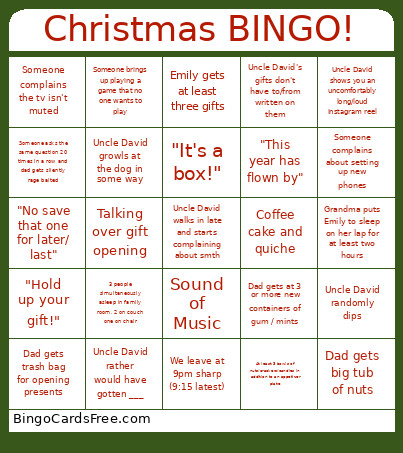 This Christmas bingo Cards Game contains following Words or Phrases: Uncle David randomly dips, Mom comments on recyclable wrapping paper, Dad gets trash bag for opening presents, "It's a box!", Someone thinks they lost a gift after everything has been opened, Someone makes the prayer circle wait to start, Someone gets gifted something that makes us side eye, AI generated gift, Emily gets at least three gifts, Yearly performance review, Sound of Music, Coffee cake and quiche, Anyone mentions the family photo books, Uncle David walks in late and starts complaining about smth, Talking over gift opening, Uncle David's gifts don't have to/from written on them, Uncle David rather would have gotten ___, 3 people simultaneously asleep in family room, 2 on couch one on chair, Uncle David use text to speech, Uncle David shows you an uncomfortably long/loud Instagram reel, Uncle David gets white newbalance sneakers, Mom gets uncle David something new he won't like, Dad gets big tub of nuts, Dad gets at 3 or more new containers of gum / mints, Elsie gets at least 5 new pieces of clothing, Grandpa photos come out, Dinner starts in the hour of 4-5:00pm, "I can't believe how old we're getting", "It was about this time that [detail of Owen's birth]", Emily pisses in the house, Someone complains about setting up new phones, Someone asks the same question 20 times in a row and dad gets silently rage baited, Someone brings up playing a game that no one wants to play, Uncle David asks dirty questions about my love life, Uncle David in the kitchen all of dinner, We leave at 9pm sharp (9:15 latest), Someone complains the tv isn't muted, "This year has flown by", Grandma puts Emily to sleep on her lap for at least two hours, Family photos before opening gifts, "Hold up your gift!", Elsie Owen picture at top of the stairs, "Open this one first", At least 3 bowls of nuts/crackers/candies in addition to an appetizer plate, "No save that one for later/ last", Uncle David growls at the dog in some way, Uncle David joke while opening gifts/ at dinner table.