
Cities States Country Bingo Cards - Print Free or Customize
Print free Cities States Country bingo cards or adjust them, unlimited cards! Pick from 42,200+ designs or use the bingo card generator. Add numbers, phrases, images, or any combination. Play using printed PDF, digital bingo cards, and the digital bingo caller, or go hybrid.
About: This bingo card is a lively celebration of classic songs that highlight iconic places, American road trips, and hometown pride. It's perfect for music lovers at a party, trivia night, or themed get-together. The vibe is nostalgic and fun, bringing everyone together with hits that span genres and generations.
How To: To get a printable PDF, click the Print button. You can alter the number of cards and other print options on the Print tab. Grid items and free space content can be added on the Basic tab. Appearance can be entirely customized on the corresponding tabs, or you can easily find any setting using the 🔍 tab.
How to play Cities States Country Bingo Cards?
- Virtual Players: Click on the Play button above, and then click on the 🎫 button.
- Paper Players: Print PDF bingo cards and physically cross off the cards.
- Virtual Caller: Click on the Play button above.
- Paper Caller: Print PDF calling list & calling slips and physically pick the slips.
- Hybrid Mode: Choose any combination above. For instance, caller can be either Paper or Virtual. And players can be Paper or Virtual or a combo of both.
Step-By-Step:
- Start by saving the Cities States Country PDF by clicking on the "Print" button above.
- Open the PDF and print it.
- For random calling, you can print another copy of the call list, cut, fold and then pull them randomly at play time.
- Cut the bingo cards at the cut marks if there are more than 1 bingo cards per page.
- Distribute one card per player. For marking, you can use markers. Crayons cost the least.
- Choose one person to be the caller. If you are playing in a small group, the caller may as well play along with their own Bingo card.
- The caller starts the play by randomly pulling an item from the call list and announcing it to all players.
- The players scan their cards to see if they have the announced word. If they do, they cross off that word.
- The first player to complete a horizontal, vertical, or a diagonal line of crossed items announces "Bingo!" and wins the play.
- The caller confirms that the items crossed off form a proper line according to the Bingo card and call list.
- You can play for different patterns or a full card blackout for an extended play.
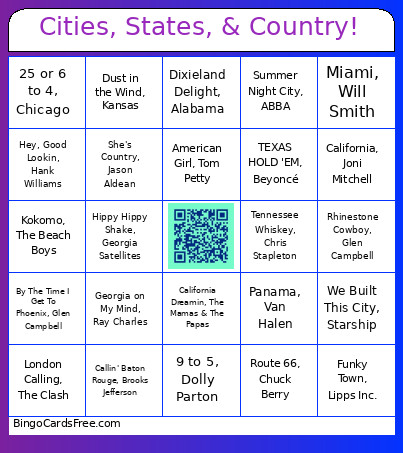 This Cities States Country Bingo Cards Game contains following Words or Phrases: New York State of Mind, Billy Joel, New York, New York, Frank Sinatra, 25 or 6 to 4, Chicago, Detroit Rock City, Kiss, Sweet Home Alabama, Lynyrd Skynyrd, Miami, Will Smith, Viva Las Vegas, Elvis Presley, Hotel California, Eagles, California Girls, The Beach Boys, Heads Carolina, Tails California, Jo Dee Messina, 9 to 5, Dolly Parton, Man! I Feel Like A Woman! Shania Twain, Hey, Good Lookin, Hank Williams, I've Been Everywhere, Johnny Cash, Rhinestone Cowboy, Glen Campbell, Neon Moon, Brooks & Dunn, Take Me Home, Country Roads, John Denver, Tennessee Whiskey, Chris Stapleton, California Dreamin, The Mamas & The Papas, Midnight Train to Georgia, Gladys Knight & The Pips, Fire, Ohio Players, Georgia on My Mind, Ray Charles, Mississippi Queen, Mountain, Dixieland Delight, Alabama, Summer in the City, The Lovin' Spoonful, London Calling, The Clash, L.A. Woman, The Doors, More Than a Feeling, Boston, Carry on Wayward Son, Kansas, Chicken Fried, Zac Brown Band, The Devil Went Down to Georgia, Charlie Daniels, We Built This City, Starship, Summer Night City, ABBA, Paradise City, Guns N' Roses, Hippy Hippy Shake, Georgia Satellites, Ventura Highway, America, Horse With No Name, America, Route 66, Chuck Berry, Going to California, Led Zeppelin, American Pie, Don McLean, Africa, TOTO, Born in the U.S.A. Bruce Springsteen, Living in America, James Brown, American Girl, Tom Petty, Wagon Wheel, Darius Rucker, She's Country, Jason Aldean, Family Tradition, Hank Williams Jr., TEXAS HOLD 'EM, Beyoncé, Funky Town, Lipps Inc., All My Ex's Live In Texas, George Strait, Chattahoochee, Alan Jackson, By The Time I Get To Phoenix, Glen Campbell, Back In The U.S.S.R. The Beatles, Folsom Prison Blues, Johnny Cash, Dust in the Wind, Kansas, Love Rollercoaster, Ohio Players, Carolina in My Mind, James Taylor, California, Joni Mitchell, Panama, Van Halen, Song of the South, Alabama, The Girl From Ipanema, Frank Sinatra, American Woman, Lenny Kravitz, Kokomo, The Beach Boys, Callin' Baton Rouge, Brooks Jefferson, Courtesy Of The Red, White And Blue, Toby Keith.