Print free Clam River bingo cards or customize,
limitless cards! Choose from 41,500+ templates or use our bingo card generator.
Add numbers, phrases, images, or any combination.
Play using PDF printouts, virtual bingo cards,
and our virtual bingo caller, or combine all formats.
About: This bingo card captures the lively and unpredictable spirit of an Amtgard camping event, perfect for a weekend full of laughter, creativity, and community. With a playful mix of quirky traditions, inside jokes, and spontaneous moments, it's ideal for both seasoned participants and newcomers looking to soak in the camaraderie of a fantasy-themed gathering.
How To: To save a PDF to print, click the Print button.
You can alter the number of cards and other
printing preferences on the Print tab.
Grid items and free space content can be added on the Basic tab.
Appearance can be highly personalized on the
relevant tabs, or you can quickly locate any option
on the 🔍 tab.
How to play Clam River Bingo Cards?
Paper Players: Print PDF bingo cards and physically mark the cards.
Virtual Caller: Click on the Play button above.
Virtual Players: Click on the Play button above, and then click on the 🎫 button.
Paper Caller: Print PDF calling list & calling slips and physically select the slips.
Combo Play: Select any combination above.
For instance, caller can be either Paper or Virtual.
And players can be Paper or Virtual or a combo of both.
Step-By-Step:
Start by saving the Clam River Bingo PDF by clicking on the "Print" button above.
Open the PDF and print it.
For random drawing, you can print another copy of the call list, cut, fold and then pull them randomly at play time.
Cut the bingo cards at the cut lines if there are more than 1 bingo cards per page.
Give one card to each player. For marking, you can use markers. Crayons are the cheapest.
Select one person to be the caller. If you are playing in a small group, the caller may also play along with their own Bingo card.
The caller begins the game by randomly drawing an item from the call list and saying it to all players.
The players scan their cards to see if they have the announced word. If they do, they dab that word.
The first player to complete a horizontal, vertical, or a diagonal line of crossed items announces "Bingo!" and wins the play.
The caller checks that the items marked form a proper line as per the Bingo card and call list.
You can play for different patterns or a full card blackout for an extended play.
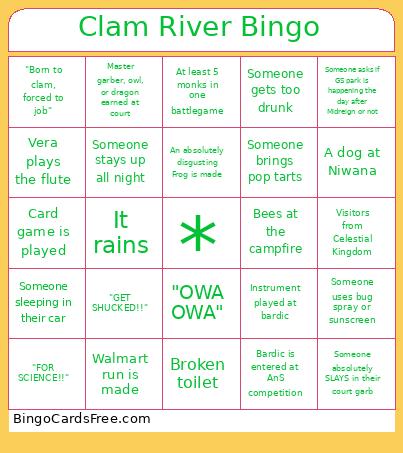
This Clam River Bingo Cards Game contains following Words or Phrases: Bees at the campfire, Someone gets too drunk, Instrument played at bardic, Broken toilet, Poison ivy found, "FOR SCIENCE!!", "OWA OWA", It rains, A dog at Niwana, At least 5 monks in one battlegame, Someone sleeping in their car, Someone makes s'mores, Late night fast food run, Someone stays up all night, A weapon gets broken and is no longer legal, Card game is played, The Rogues dogpile someone when they get an award, An absolutely disgusting Frog is made, Someone's Frog gets stolen and refilled, Someone asks if GS park is happening the day after Midreign or not, Visitors from Celestial Kingdom, Someone brings pop tarts, Someone is crocheting, sewing, or knitting, "GET SHUCKED!!", "Born to clam, forced to job", Vera plays the flute, Someone absolutely SLAYS in their court garb, Master garber, owl, or dragon earned at court, Leaf sings a song, Walmart run is made, Someone uses bug spray or sunscreen, Bardic is entered at AnS competition.

 This Clam River Bingo Cards Game contains following Words or Phrases: Bees at the campfire, Someone gets too drunk, Instrument played at bardic, Broken toilet, Poison ivy found, "FOR SCIENCE!!", "OWA OWA", It rains, A dog at Niwana, At least 5 monks in one battlegame, Someone sleeping in their car, Someone makes s'mores, Late night fast food run, Someone stays up all night, A weapon gets broken and is no longer legal, Card game is played, The Rogues dogpile someone when they get an award, An absolutely disgusting Frog is made, Someone's Frog gets stolen and refilled, Someone asks if GS park is happening the day after Midreign or not, Visitors from Celestial Kingdom, Someone brings pop tarts, Someone is crocheting, sewing, or knitting, "GET SHUCKED!!", "Born to clam, forced to job", Vera plays the flute, Someone absolutely SLAYS in their court garb, Master garber, owl, or dragon earned at court, Leaf sings a song, Walmart run is made, Someone uses bug spray or sunscreen, Bardic is entered at AnS competition.