
JumpStart9 Bingo Cards - Print Free or Customize
Print free JumpStart9 bingo cards or customize, unlimited cards! Pick from 41,500+ templates or use our bingo card generator. Add numbers, words, pictures, or all of them. Play using printed PDF, digital bingo cards, and our digital bingo caller, or combine all formats.
About: This bingo card captures the pulse of teen and pre-teen life, brimming with pop culture, summer adventures, and personal quirks. It's perfect for a back-to-school mixer or freshman orientation, helping new students connect over shared hobbies, experiences, and school spirit in a fun and stress-free way. Expect lots of laughter and instant icebreakers!
How To: To download a printable PDF, click the Print button. You can modify the card quantity and other print settings on the Print tab. Grid items and free space content can be edited on the Basic tab. Appearance can be entirely customized on the corresponding tabs, or you can easily find any preference on the 🔍 tab.
How to play JumpStart9 Bingo Cards?
- Virtual Caller: Click on the Play button above.
- Virtual Players: Click on the Play button above, and then click on the 🎫 button.
- Printed Players: Print PDF bingo cards and physically write on the cards.
- Printed Caller: Print PDF calling list & calling slips and physically select the slips.
- Mixed Play: Select any combination above. For example, caller can be either Printed or Virtual. And players can be Printed or Virtual or a combo of both.
Step-By-Step:
- Start by saving the JumpStart9 PDF by clicking on the "Print" button above.
- Open the PDF and print a hard copy.
- For random calling, you can print another copy of the call list, cut, fold and then pick them randomly at play time.
- Cut the bingo cards at the cut marks if there are greater than 1 bingo cards per page.
- Distribute one card per player. For marking, you can use markers. Crayons cost the least.
- Select one person to be the caller. If you are playing in a small group, the caller can also play along with their own Bingo card.
- The caller begins the game by randomly picking an item from the call list and announcing it to everyone.
- The players look at their cards to see if they have the announced word. If they do, they cross off that word.
- The first player to complete a horizontal, vertical, or a diagonal line of marked items shouts "Bingo!" and wins the play.
- The caller confirms that the items crossed off form a correct line according to the Bingo card and call list.
- You can play for multiple patterns or a full card blackout for an extended play.
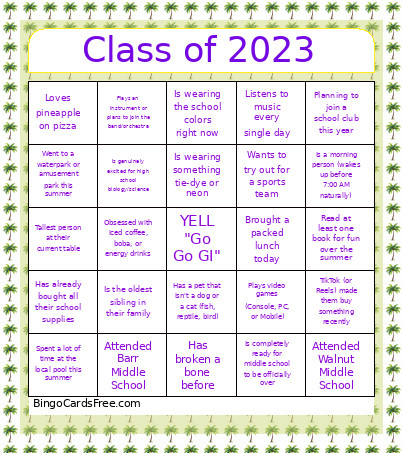 This JumpStart9 Bingo Cards Game contains following Words or Phrases: Plays video games (Console, PC, or Mobile), Can recite a viral meme sound perfectly, TikTok (or Reels) made them buy something recently, Binge-watched a whole show over the summer, Listens to music every single day, Plays a sport outside of school, Loves to draw, paint, or do photography, Speaks more than one language fluently, Knows how to skateboard or rollerblade, Can name 3 Marvel or DC superheroes in 3 seconds\Traveled out of state over the summer, Went to a waterpark or amusement park this summer, Stayed up past 2:00 AM at least once this week, Is a morning person (wakes up before 7:00 AM naturally), Obsessed with iced coffee, boba, or energy drinks, Read at least one book for fun over the summer, Spent a lot of time at the local pool this summer, Went camping or hiking recently, Learned a new skill over the break (cooking, coding, etc.)Has a summer birthday (June, July, August), Is left-handed, Has the exact same number of siblings as you, Is wearing sneakers right now, Has a pet that isn't a dog or a cat (fish, reptile, bird), Is wearing a watch (smartwatch counts!), Can do a neat party trick (double-jointed, whistle loud, etc.), Is the oldest sibling in their family, Is the youngest sibling in their family, Has broken a bone before, Has never been on an airplane, Is wearing something tie-dye or neon, Tallest person at their current table, Loves pineapple on pizza, Born in the exact same month as you, Has already bought all their school supplies, Planning to join a school club this year, Wants to try out for a sports team, Plays an instrument or plans to join the band/orchestra, Is genuinely excited for high school biology/science, Is wearing the school colors right now, Is completely ready for middle school to be officially over, Brought a packed lunch today, Is carrying a backpack right now, Attended Westridge Middle School, Attended Barr Middle School, Attended Walnut Middle School, Has a sibling already attending this high school.