
class reunion bingo Cards - Print Free or Customize
Print free class reunion bingo cards or modify, limitless cards! Choose from 41,500+ designs or use the bingo card generator. Add numbers, phrases, images, or all of them. Play using PDF printouts, digital bingo cards, and the digital bingo caller, or combine all formats.
About: This bingo card is perfect for a Notre Dame alumni reunion, filled with prompts that celebrate dorm life, campus memories, and post-graduation adventures. It’s designed to spark conversations and laughs as classmates reconnect and discover shared experiences, from favorite hangouts to career paths. Ideal for breaking the ice and building nostalgia among ND grads.
How To: To save a PDF to print, click the Print button. You can change the number of cards and other print options on the Print tab. Grid items and free space content can be edited on the Basic tab. Appearance can be entirely personalized on the relevant tabs, or you can easily search any setting on the 🔍 tab.
How to play class reunion bingo Cards?
- Printed Caller: Print PDF calling list & calling slips and physically pick the slips.
- Online Players: Click on the Play button above, and then click on the 🎫 button.
- Printed Players: Print PDF bingo cards and physically mark the cards.
- Online Caller: Click on the Play button above.
- Mixed Mode: Pick any combination above. For instance, caller can be either Offline or Online. And players can be Offline or Online or a mix of both.
Step-By-Step:
- Start by downloading the class reunion bingo PDF by clicking on the "Print" button above.
- Open the PDF and print it.
- For random calling, you can print another copy of the call list, cut, fold and then pull them randomly at play time.
- Cut the bingo cards at the cut lines if there are more than 1 bingo cards per page.
- Distribute one card per player. For marking, you can use pencils. Crayons cost the least.
- Pick one person to be the caller. If you are playing in a small group, the caller can as well play along with their own Bingo card.
- The caller starts the play by randomly drawing an item from the call list and saying it to everyone.
- The players look at their cards to see if they have the announced word. If they do, they mark that word.
- The first player to finish a horizontal, vertical, or a diagonal line of marked items yells "Bingo!" and wins the game.
- The caller checks that the items marked form a correct line according to the Bingo card and call list.
- You can play for varied patterns or a full card blackout for an extended game.
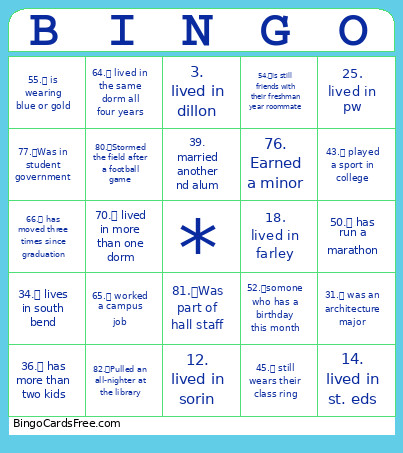 This class reunion bingo Cards Game contains following Words or Phrases: 1. lived in alumni, 10. lived in Fisher, 11. lived in siegfried, 12. lived in sorin, 13. lived in stanford, 14. lived in st. eds, 15. lived in badin, 16. lived in bp, 17. lived in cavanaugh, 18. lived in farley, 19. lived in zahm, 2. lived in carroll, 20. lived in lewis, 21. lived in howard, 22. lived in mcglinn, 23. lived in lyons, 24. lived in pe, 25. lived in pw, 26. lived in ryan, 27. lived in walsh, 28. lived in welsh fam, 29. lived in pangborn, 3. lived in dillon, 30. changed majors, 31. was an architecture major, 32. moved to chicago after graduation, 33. works on campus, 34. lives in south bend, 35. has published a book, 36. has more than two kids, 37. started their own business, 38. married their college sweetheart, 39. married another nd alum, 4. lived in duncan, 40. has lived abroad, 41. studied abroad, 42. was in nd band, 43. played a sport in college, 44. received another degree after graduation, 45. still wears their class ring, 46. has more than two pets, 47. has been to more than five football games since graduation, 48. traveled more than 5 hours to get here, 49. works in the medical field, 5. lived in keenan, 50. has run a marathon, 51. has met a celebrity, 52. somone who has a birthday this month, 53. is a teacher or educator, 54. is still friends with their freshman year roommate, 55. is wearing blue or gold, 56. is not on social media, 57. works in tech, 58. volunteers, 59. still speaks the language they learned in college, 6. lived in keough, 60. preferred ndh to sdh, 61. preferred sdh to ndh, 62. someone you haven't seen since graduation, 63. went to a wedding at the basilica, 64. lived in the same dorm all four years, 65. worked a campus job, 66. has moved three times since graduation, 67. still has their student id, 68. is active in the nd alumni club, 69. lived off campus junior or senior year, 7. lived in knott, 70. lived in more than one dorm, 71. has a picture with fr john, 72. has a pet with a notre dame-inspired name, 73. attended the 5-year (6-year) reunion, 74. still owns at least one the shirt, 75. Participated in an SSLP, 76. Earned a minor, 77. Was in student government, 78. Played an interhall sport, 79. Graduated from ACE, 8. lived in morrissey, 80. Stormed the field after a football game, 81. Was part of hall staff, 82. Pulled an all-nighter at the library, 9. lived in o'neill.