Client Services 1 Bingo Cards - Print Free or Customize
Print free Client Services 1 bingo cards or modify,
unlimited prints! Pick from 42,200+ designs or use the bingo card generator.
Add numbers, words, photos, or mix them all.
Play using PDF printouts, virtual bingo cards,
and the virtual bingo caller, or go hybrid.
About: This bingo card captures the life of a K-12 school IT support team during end-of-year chaos. It's full of relatable moments, from technical hiccups and quirky requests to the all-too-familiar "it works when you arrive" phenomenon. Perfect for tech staff meetings or staff appreciation events, it’s sure to spark laughs and knowing nods.
How To: To download a printable PDF, click the Print button.
You can change the number of cards and other
print options on the Print tab.
Grid items and free space content can be edited on the Basic tab.
Appearance can be highly customized on the
corresponding tabs, or you can easily locate any option
on the 🔍 tab.
How to play Client Services 1 Bingo Cards?
Printed Players: Print PDF bingo cards and manually mark the cards.
Digital Players: Click on the Play button above, and then click on the 🎫 button.
Digital Caller: Click on the Play button above.
Printed Caller: Print PDF calling list & calling slips and manually choose the slips.
Mixed Mode: Pick any combination above.
For example, caller can be either Offline or Digital.
And players can be Offline or Digital or a combo of both.
Step-By-Step:
Start by getting the Client Services 1 PDF by clicking on the "Print" button above.
Open the PDF and print a hard copy.
For random calling, you can print another copy of the call list, cut, fold and then draw them randomly at play time.
Cut the bingo cards at the cut marks if there are greater than 1 bingo cards per page.
Give one card to each player. For marking, you can use crayons. Crayons cost the least.
Pick one person to be the caller. If you are playing in a small group, the caller can also play along with their own Bingo card.
The caller starts the play by randomly pulling an item from the call list and announcing it to everyone.
The players look at their cards to see if they have the called word. If they do, they cross off that word.
The first player to finish a horizontal, vertical, or a diagonal line of marked items yells "Bingo!" and wins the play.
The caller checks that the items marked form a proper line as per the Bingo card and call list.
You can play for different patterns or a full card blackout for a longer play.
This Client Services 1 Bingo Cards Game contains following Words or Phrases: Got asked when Canvas would be back online., Helped clear a paper jam., Told somebody who was reluctant to reboot to reboot and it fixed their problem., Had to crawl under a desk to plug something in or move cables., Had somebody get upset at you because it always works once IT shows up., Got forwarded a phishing email from a user so that you could tell them if it was real or not., Helped somebody navigate our new website., Got asked to help somebody troubleshoot a personal technology issue., Had a user leave you their password even though you didnt ask for it., Swapped out a computer because of a drink spill., Helped a teacher configure Jamf Teacher., Had a teacher ask you to stay in a classroom with students while they stepped out., Had a teacher trying to use Swank with a browser that wasn't Safari., Re-enrolled a Mac because of a user level certificate problem., Came across a computer or iPad that should have been retired years ago., Had somebody tell you how good their spouse or significant other is at solving technology problems., Received 2 requests for the same issue. (2 tickets, ticket plus email or teams, etc.), Showed a user where to safely save files., Helped a user who was on the verge of tears., Swapped out a Powerlite 108 projector bulb., Received an email regarding iPad charging station needs for next year., Got excited about Maple Bars, Had a student ask if they can keep their iPad for a few days after roll in, and not enrolled in online school, Asked to set up additional Raptor machine for end-of-year festivities.

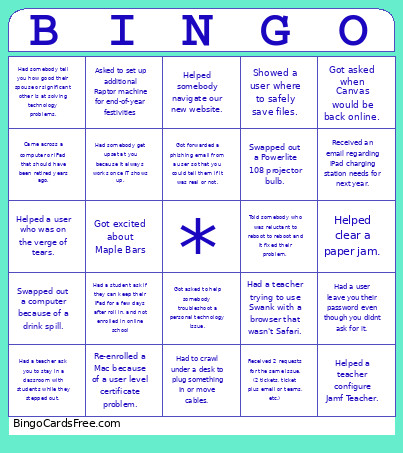 This Client Services 1 Bingo Cards Game contains following Words or Phrases: Got asked when Canvas would be back online., Helped clear a paper jam., Told somebody who was reluctant to reboot to reboot and it fixed their problem., Had to crawl under a desk to plug something in or move cables., Had somebody get upset at you because it always works once IT shows up., Got forwarded a phishing email from a user so that you could tell them if it was real or not., Helped somebody navigate our new website., Got asked to help somebody troubleshoot a personal technology issue., Had a user leave you their password even though you didnt ask for it., Swapped out a computer because of a drink spill., Helped a teacher configure Jamf Teacher., Had a teacher ask you to stay in a classroom with students while they stepped out., Had a teacher trying to use Swank with a browser that wasn't Safari., Re-enrolled a Mac because of a user level certificate problem., Came across a computer or iPad that should have been retired years ago., Had somebody tell you how good their spouse or significant other is at solving technology problems., Received 2 requests for the same issue. (2 tickets, ticket plus email or teams, etc.), Showed a user where to safely save files., Helped a user who was on the verge of tears., Swapped out a Powerlite 108 projector bulb., Received an email regarding iPad charging station needs for next year., Got excited about Maple Bars, Had a student ask if they can keep their iPad for a few days after roll in, and not enrolled in online school, Asked to set up additional Raptor machine for end-of-year festivities.